-6-
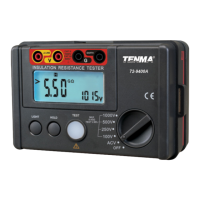
• Battery Replacement :
When the
as follows :
(1) Disconnect the test leads from the instrument
and turn off the power.
(2) Remove the two screws, located at the bottom of the rear panel.
(3) Slide the battery door straight down.
symbol " " appears on the display, replace with new
batteries.
+
-
5. Maintenance
• Cleaning and storage :
WARNING
To avoid electrical shock or damage to the meter, do not allow
water or excessive moisture inside the case.
Periodically wipe the case with a damp cloth and detergent : do not
use abrasives or solvents.
If the meter is not to be used for periods of longer than 60 days,
remove the batteries and store them separately.
TENMA TEST EQUIPMENT
900 SOUTH POINEER BLVD.
SPRINGBORO, OHIO 45066
(4) Replace with six "AA" type alkaline batteries. Do not mix with
other battery types or mix old and new batteries.
(5) Replace battery door and screws.
www.tenma.com
Downloaded from Arrow.com.Downloaded from Arrow.com.Downloaded from Arrow.com.Downloaded from Arrow.com.Downloaded from Arrow.com.Downloaded from Arrow.com.Downloaded from Arrow.com.Downloaded from Arrow.com.


 To Previous Page