26
3.1. On / Off
Maintaining a normal connection between display and controller
Long press power button (2 seconds) when the display is off; the display will turn on and
show the main interface. Long press power button (2 seconds) when the display is on
to turn off. The display will automatically turn off if no display operations are made for 5
minutes while the speed is 0.
3.2. Switching assist levels
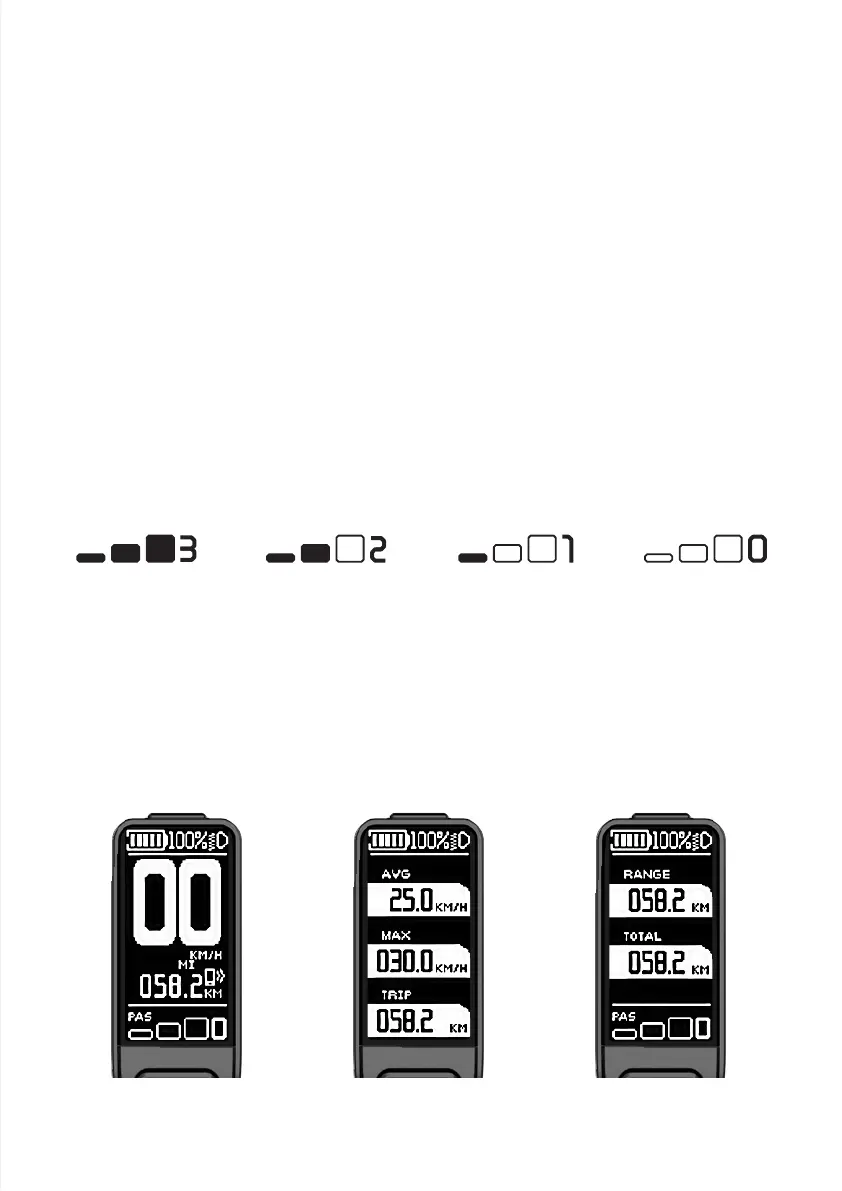
Press Up button or Down button to switch levels and change the assist mode; the e-bike
comes with 5 modes (0, 1, 2, 3, and a WALK mode). By default, the display is at level 1
assist level when it's turned on. A 0 means that no assist gear is used at all. The assist
level selection interface is as shown below.
3. Function operations
3.3. Switching display Information
Short press Function button to switch between TRIP, TRIP TIME, AVG, MAX, and TOTAL
when the display is on.
The mode switching interface is shown below.
NeutralLevel 3 Level 2 Level 1



 To Next Page