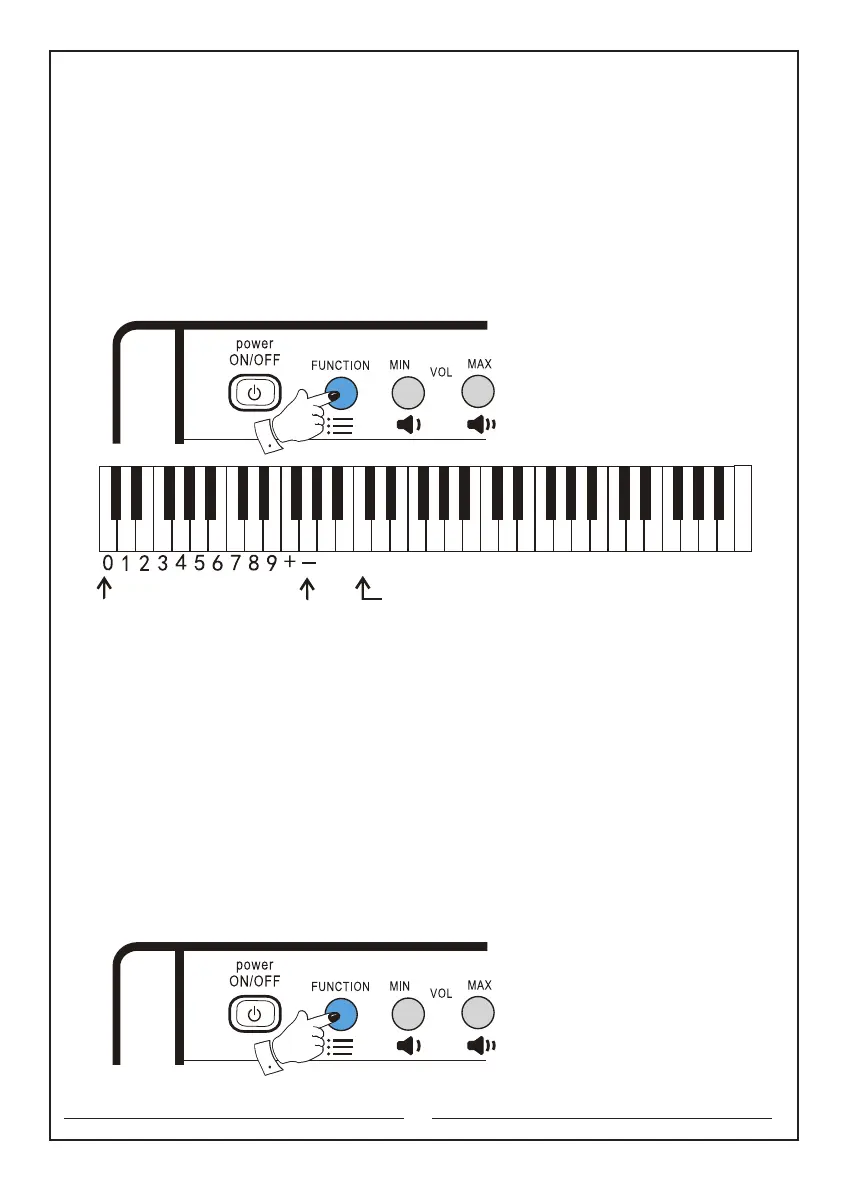
Note: you can release the ‘Function’ button after selecting the tone. (To select any
function other than the master volume, please first press and hold the ‘Function’
selector without releasing, and then press the corresponding function button to
choose the required function. After selecting function, the ‘Function’ selector can
be released.)
The keyboards that will be used are as follows:
Function key: the second button in the upper left corner
Tone: the c1 key
"+" or "-": the f and g keys
4. Use of keyboard percussions:
Keyboard percussion: first press and hold the ‘Function’ selector, then press the
‘Keyboard percussion’ button, and then release the ‘Function’ selector. At this time
61 keys become a percussion keyboard, and each key corresponds to a percussion
instrument.
Turn off keyboard percussion: first press and hold the ‘Function’ selector,
and then press the ‘Keyboard percussion’ button again. Release the ‘Function’
selector to cancel the keyboard percussion. The keyboard will be back to the playing
mode. (see Appendix 4 for the comparison table of keyboard percussions).
The keyboards that will be used are as follows:
Function key: the second button in the upper left corner
Keyboard percussion: the e3 key
8
The numeric keyboard Tone selection key
C D E F G A B c d e f g a b c1 d1 e1 f1 g1 a1 b1 c2 d2 e2 f2 g2 a2 b2 c3 d3 e3 f3 g3 a3 b3 c4



 To Next Page