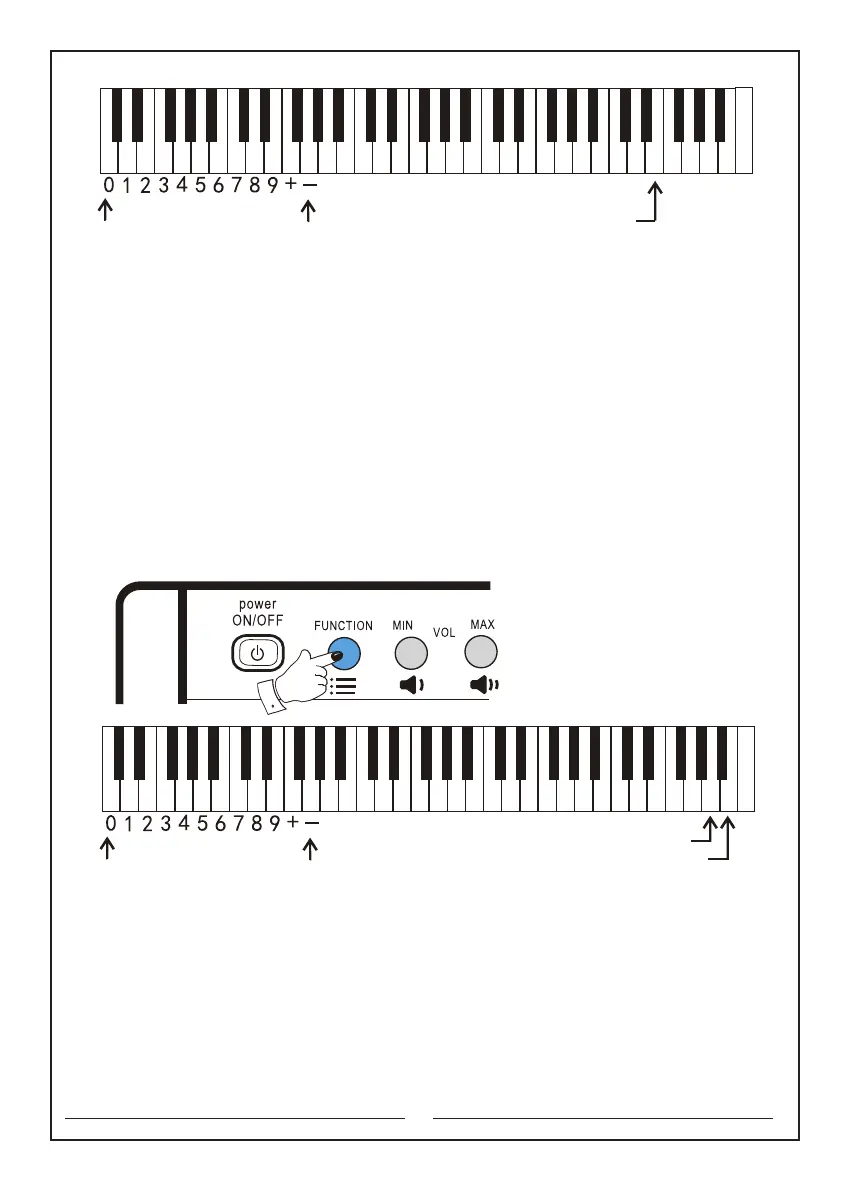
The numeric keyboard The keyboard percussion key
C D E F G A B c d e f g a b c1 d1 e1 f1 g1 a1 b1 c2 d2 e2 f2 g2 a2 b2 c3 d3 e3 f3 g3 a3 b3 c4
9
5. Use of sound effects:
5.1 Vibrato: first press and hold the ‘Function’ selector, press the ‘Vibrato’ button, and
then release the ‘Function’ selector. At this time, the sound will produce a jitter effect.
Repeat the process one more time to cancel the vibrato effect.
5.2 Sustain: first press and hold the ‘Function’ selector, press the ‘Sustain’ button,
and then release the ‘Function’ selector. At this time, the sound effect of syllables
during the performance can be lengthened. Repeat the process one more time to
cancel the sustain effect.
The keyboards that will be used are as follows:
Function key: the second button in the upper left corner
Vibrato: the b3 key
Sustain: the a3 key
6. Learning functions:
6.1 Learning function 1 (single key mode): first press the ‘Function’ selector, and then
press the ‘Single key’ button to enter the single key teaching mode. Press any key to
play the main melody as well as the accompaniment. If you do not perform after
selecting the song, the instrument will repeat a certain section of the accompaniment
until you play any key of the piano (this function is suitable for electronic piano
beginners). You can use ‘+’or‘-’ button to select the demo during the learning process.
The numeric keyboard Vibrato key
Sustain key
C D E F G A B c d e f g a b c1 d1 e1 f1 g1 a1 b1 c2 d2 e2 f2 g2 a2 b2 c3 d3 e3 f3 g3 a3 b3 c4



 To Next Page