10
To select the demo: first press and hold the ‘Function’ selector, and then press ‘+’or‘-’
button to select the preferred demo.
Cancel the ‘Single key’ learning function: first press and hold the ‘Function’
selector, and then press the ‘Single key’ button. Release the ‘Function’ selector to exit
this function.
6.2 Learning function 2 (follow mode): ): first press and hold the ‘Function’ selector,
press the ‘Follow’ button,and then release the ‘Function’ selector to enter the follow
teaching mode. The instrument will play the accompaniment of the song you selected.
The user must press the key corresponding to the note of the demo to continue
playing the next one. If you press the wrong key or do not press, it will keep
repeating the current section of background music. After performing correctly, it will
play the next note. While learning, you can use ‘+’ or ‘-’button to choose the demo.
Select demo: first press and hold the ‘Function’ selector, press ‘+’ or ‘-’button to
choose the demo.
Cancel learning function (follow mode): first press and hold the ‘Function’ selector,
press the ‘Follow’ button or ‘Start/stop’ button,and then release the ‘Function’
selector to exit the follow mode.
6.3 Learning function 3 (ensemble mode):first press and hold the ‘Function’
selector, and then press the ‘Ensemble’ button to enter ensemble teaching mode.
At this time, the instrument is playing the accompaniment of the song you selected
and you can play the main melody by yourself. If you do not play within 3 seconds,
the main melody will be played automatically to remind the performer. While
learning, you can use ‘+’ or ‘-’button to choose the demo.
Cancel learning function (ensemble mode): first press and hold the ‘Function’
selector, press the ‘Ensemble’ button or ‘Start/stop’ button,and then release the
‘Function’ selector to exit the ensemble mode.
6.4 Please see the name and the order of the demos in Appendix 3.
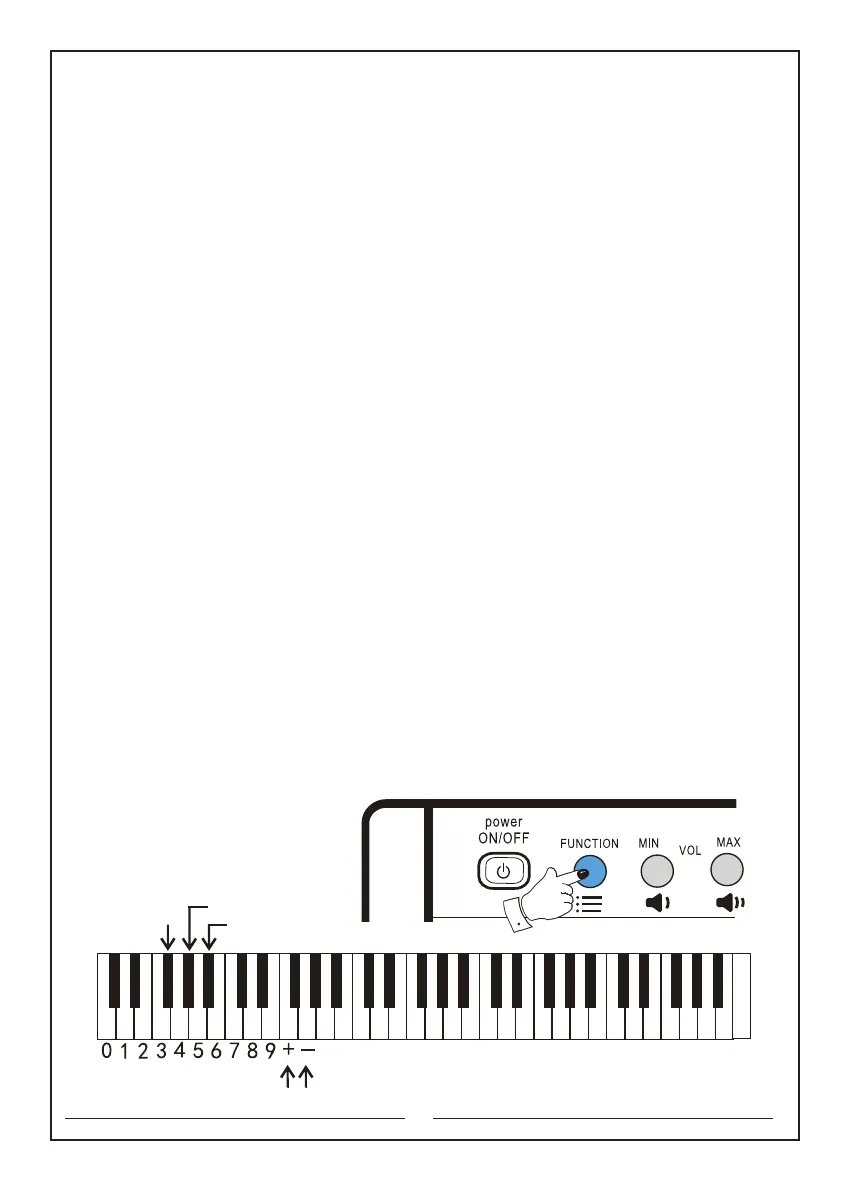
The keyboards that will be used are as follows:
Function key: the second button in the upper left corner
Single key: the third black key "+" or "-": the f and g keys
Follow: the 4th black key Ensemble: the 5th black key
"+" or "-" key
Ensemble key
Follow key
Single key
C D E F G A B c d e f g a b c1 d1 e1 f1 g1 a1 b1 c2 d2 e2 f2 g2 a2 b2 c3 d3 e3 f3 g3 a3 b3 c4



 To Next Page