12
9. Rhythm, chord and programming:
9.1 Start a rhtythm:First press and hold the ‘Function’ selector, and then press the
‘Rhythms button once to start playing the rhythm. To stop the rhythm, please first
press and hold the ‘Function’ selector, press the ‘Rhythms’ button, and then release
the ‘Function’ selector.
9.2 Select rhythms:
a. This instrument has 128 kinds of rhythms, numbering from ‘000’ to ‘127’ for you to
select. First press and hold the ‘Function’ selector, and press the ‘Rhythms’ selector.
Then press the number to select a preferred rhythm. E.g. If you would like to choose
the rhythm with number 108, first press and hold the ‘Function’ selector, and press
the ‘Rhythms’ selector→press ‘1’→press ‘0’→press ‘8’ and then release the ‘Function’
selector.
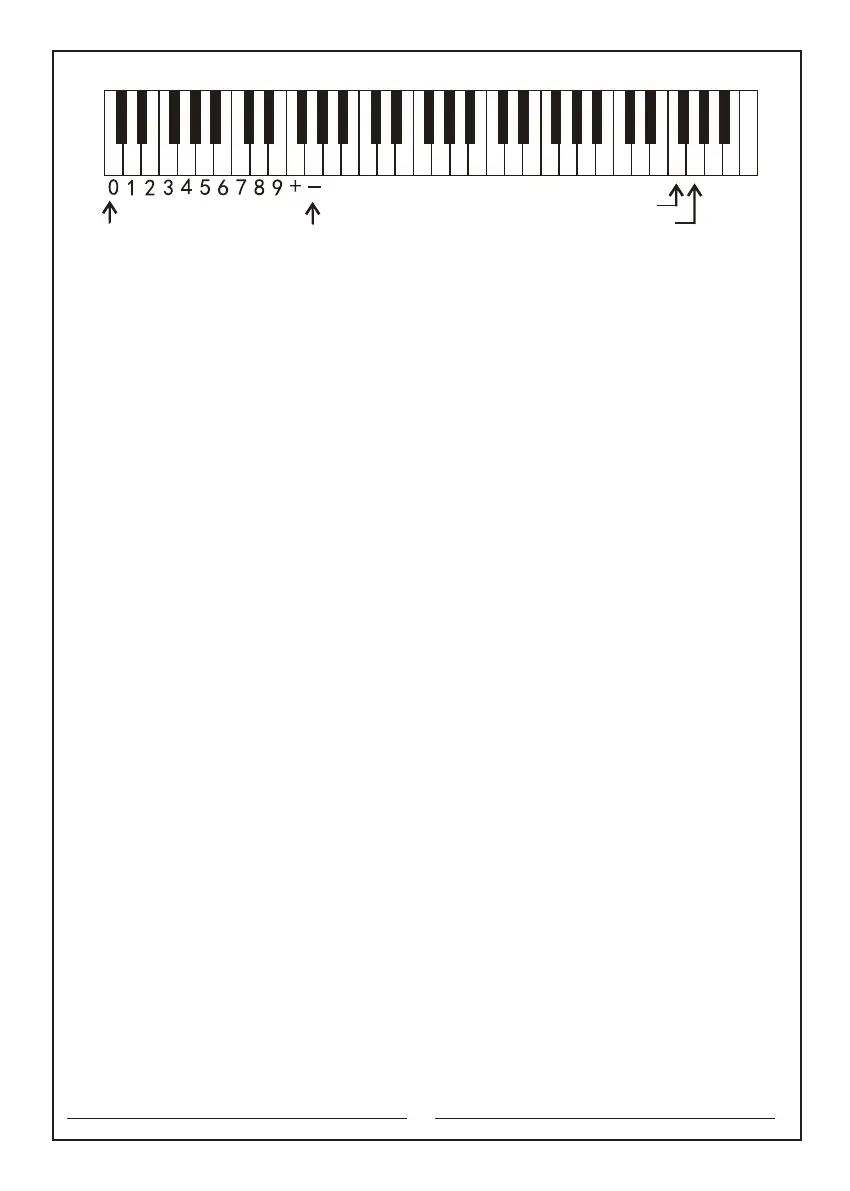
b. Use of ‘+’and ‘-’ to select rhythms. First press and hold the ‘Function’ selector, and
press ‘+’ button to increase the number or press ‘-’ button to decrease the number
until the desired number. Then release the ‘Function’ button to use. (See the picture
below).
9.3 Select synchro or chord accompaniment mode:
a. Sync the rhythm and the main note. First press and hold the ‘Function’ selector,
press ‘Synchro’ button, and then release the ‘Function’ button. Press keys in the
chord section (1-19 keys on the left). At this time, the rhythm and the played notes
are synced.
b. Automatic single finger chord: first press and hold the ‘Function’ selector and press
‘Synchro’ button. Then press the ‘Fingered chord’ chord button and release the
‘Function’ button. Press the key in the chord section (1-19 keys on the left) according
to the table of single finger chords. At this time, the rhythm and the single finger
chord are synced.
c. Automatic fingered chord: first press and hold the ‘Function’ selector and press
‘Synchro’ button. Then press the ‘Fingered’ chord button and release the ‘Function’
button. Press keys in the chord section (1-19 keys on the left) according to the table
of fingered chords. At this time, the rhythm and the fingered chord are synced.
Note: To cancel ‘Single finger chord’ or ‘Fingered chord’ function, first press and hold
the ‘Function’ selector, and then press the ‘Single finger chord’ or ‘Fingered chord’
chord button once. To cancel ‘chord’ and ‘rhythm’ functions together, first press and
hold the ‘Function’ selector, and then press ‘Start/stop’ button once.
The numeric keyboard Pitch down key
Pitch up key
C D E F G A B c d e f g a b c1 d1 e1 f1 g1 a1 b1 c2 d2 e2 f2 g2 a2 b2 c3 d3 e3 f3 g3 a3 b3 c4



 To Next Page