15
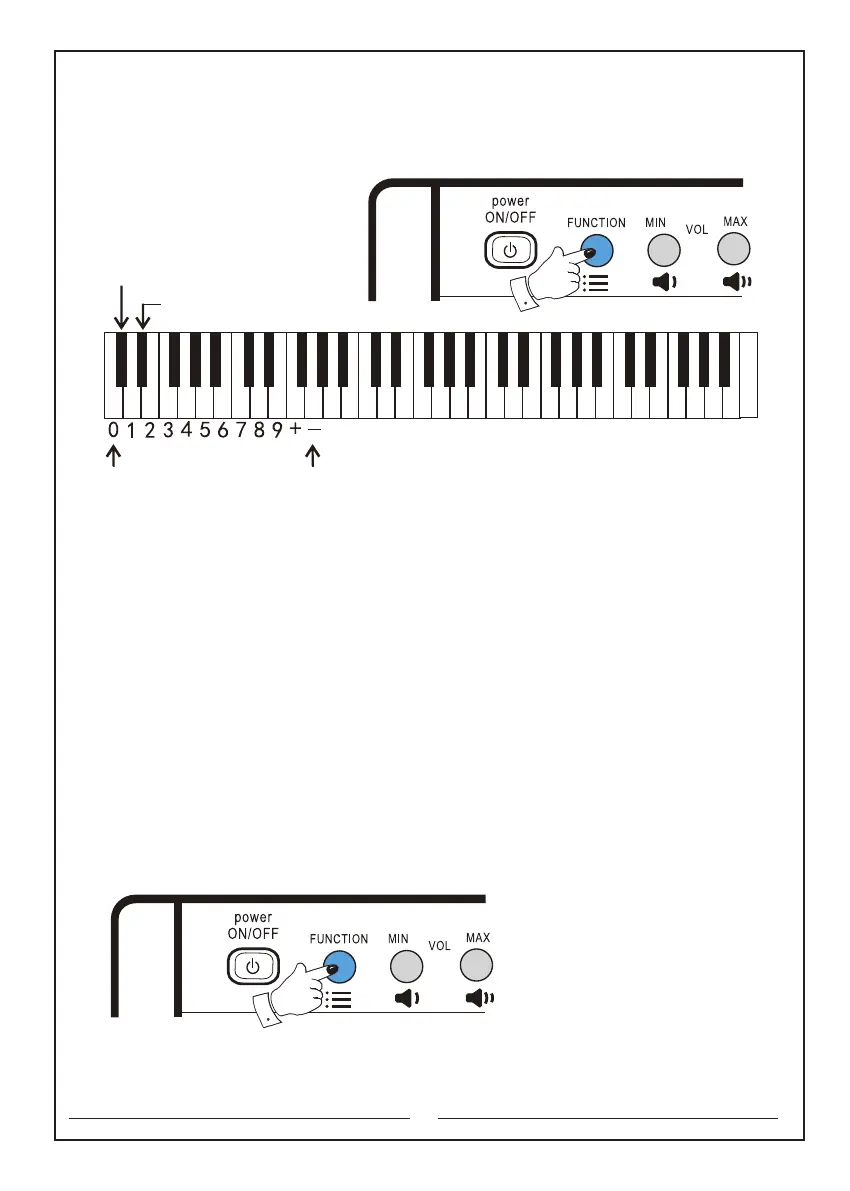
The keyboards that will be used are as follows:
Function key: the second button in the upper left corner
Demand singing: the first black key
Continuous singing: the second black key
11. Other functions:
11.1 Main volume: to adjust the volume of the entire keyboard,press ‘Increase’ or
‘Decrease’ button while the instrument is on.
The keyboards that will be used are as follows:
"Increase" / "Decrease" button: the third button and fourth button in the upper left
corner.
11.2 Accompaniment volume: first press and hold the ‘Function’ selector, press the
‘Increase’ button of the accompaniment volume to turn it on. ‘10’ will be maximum.
Press the ‘Decrease’ button of the accompaniment volume to turn it down. ‘1’ will be
minimum.
The keyboards that will be used are as follows:
Function key: the second button in the upper left corner
Increase button of the accompaniment volume: the c2 key
Decrease button of the accompaniment volume: the d2 key
The number keyboard
Continuous singing
Demand singing
C D E F G A B c d e f g a b c1 d1 e1 f1 g1 a1 b1 c2 d2 e2 f2 g2 a2 b2 c3 d3 e3 f3 g3 a3 b3 c4



 To Next Page