7
1. Power switch:
Turn the power switch to the ‘On’ position, and the LED light will be on. It is now in
playing mode with ‘Piano’ tone. Each time you restart, the instrument will
automatically reset to ‘000’ (Piano tone) and ‘000’ (Club pop rhythm).
The keyboards that will be used are as follows:
power switch: the first button in the upper left corner
2. Select tones:
There are 140 kinds of realistic tones, which can be chose freely from ‘000’ to ‘139’.
Before selecting, please hold the ‘Function’ selector and press the ‘Tone’ selector,
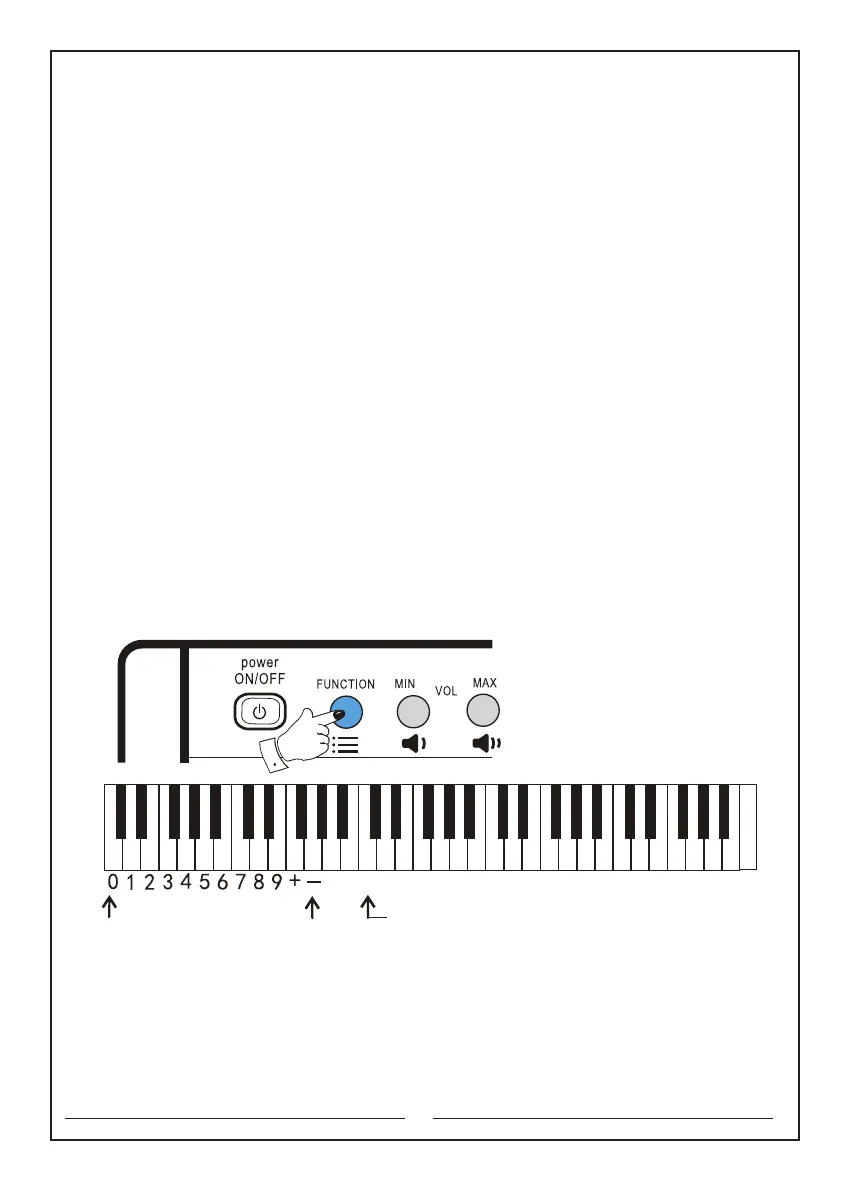
then choose the number. E.g. Select ‘018’ tone. Hold ‘Function’ selector and please
do not release, then press ‘Tone’ selector→press number ‘0’→press number ‘1’→
press number ‘8’and release the ‘function’ selector. The instrument is with‘018’ tone.
E.g. Select ‘113’ tone. Hold ‘Function’ selector and please do not release, then press
‘Tone’ selector→press number ‘1’→press number ‘1’→press number ‘3’and release
the ‘Function’ selector. The instrument is with ‘113’ tone. (See the figure below)
The keyboards that will be used are as follows:
power switch: the first button in the upper left corner
Function key: the second button in the upper left corner
Tone: the c1 key
Number: the C key to the e key
3. Use of‘+’ and‘-’ buttons:
While holding the ‘Function’ selector, press the ‘Tone’ selector: in the tone selection
mode, press‘+’ button or ‘- ’button to increase or decrease the number of the tone
in order until you select the desired tone.
2. Performing and operating
The numeric keyboard Tone selection key
C D E F G A B c d e f g a b c1 d1 e1 f1 g1 a1 b1 c2 d2 e2 f2 g2 a2 b2 c3 d3 e3 f3 g3 a3 b3 c4



 To Next Page