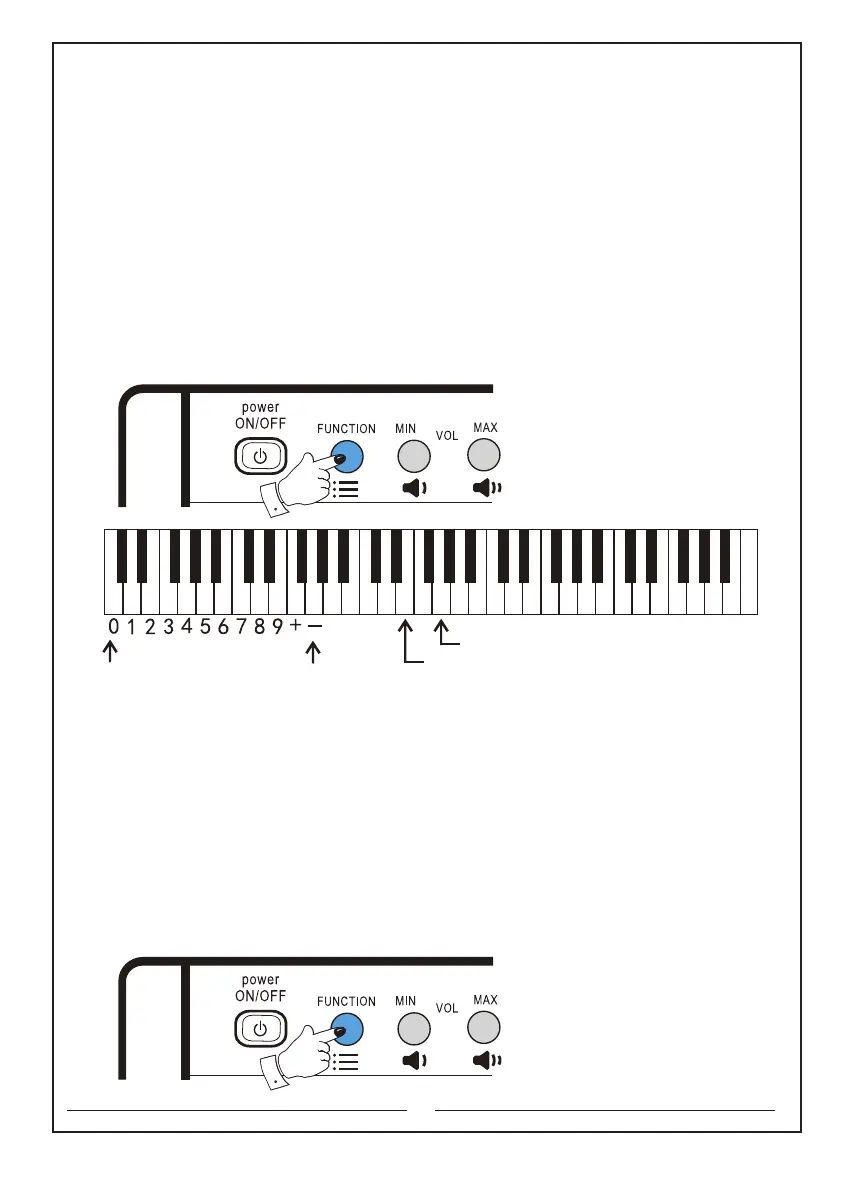
7. Recording and play functions:
First press and hold the ‘Function’ selector, press the ‘Recording’ button,and then
release the ‘Function’ selector to record your performance. After recording, first press
and hold the ‘Function’ selector, press the ‘Play’ button,and then release the
‘Function’ selector to play your recorded performance. After playing, you can replay
it by first pressing and holding the ‘Function’ selector, and then press the ‘Play’
button. To cancel the ‘Recording’ and ‘Play’ functions, first press and hold the ‘Function’
selector, press the ‘Recording’ button,and then release the ‘Function’ selector.
Note: after recording maximum ‘695’ notes, no note will recorded anymore.
The keyboards that will be used are as follows:
Function key: the second button in the upper left corner
Recording: the e1 key
Play: the g1 key
8. Transpose the pitch:
Transpose function can shift the pitch of the keyboard.
First press and hold the ‘Function’ selector, and then press the ‘Pitch up’ or
‘Pitch down’ button to set the value of the shift. Each press on the ‘Pitch up’ or
‘Pitch down’ button can ‘increase’ or ‘decrease’ 1 semitone, ranging from ‘+6’to ‘-6’.
and then release the ‘Function’ selector to record your performance. Press and hold
the ‘Function’ selector, and then press the ‘Pitch up’ and ‘Pitch down’ button
together to go back to the default value (00).
The keyboards that will be used are as follows:
Function key: the second button in the upper left corner
Pitch up: the f3 key Pitch down: the g3 key
11
The numeric keyboard Recording key
Play key
C D E F G A B c d e f g a b c1 d1 e1 f1 g1 a1 b1 c2 d2 e2 f2 g2 a2 b2 c3 d3 e3 f3 g3 a3 b3 c4



 To Next Page