m
m
%
SET POINT 1 (ONE)
Press and release the red pushbutton to access to the following menu:
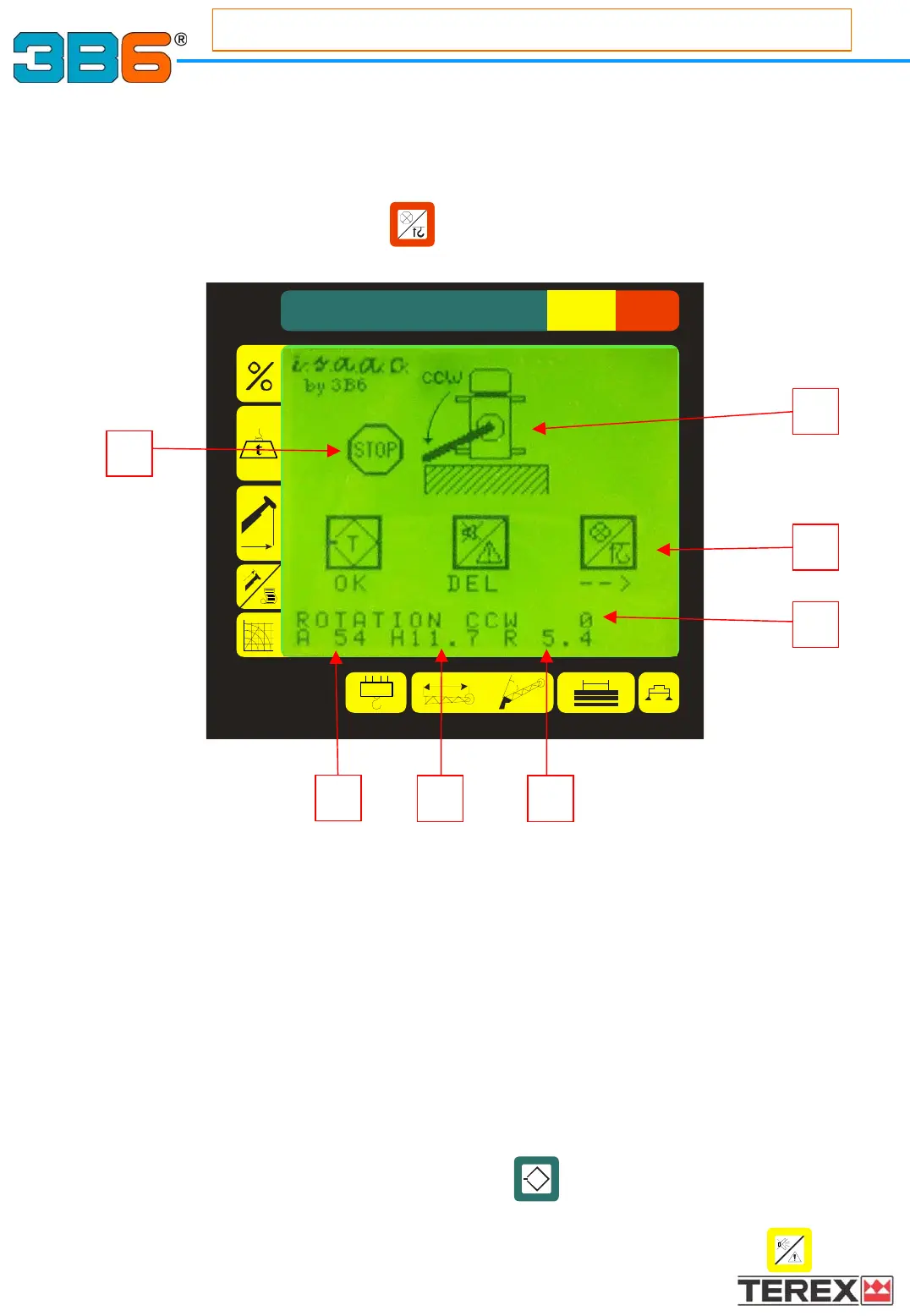
This menu sets the max CCW point (point one) of the WALL.
1) Graphic zone: the black area indicates the restricted working area (non-working area for
the boom). Blinking arrow indicates the limited movement
2) Push button functions
3) Text line: indicates the first angle of the area, normally “0”.
4) Actual angle (degrees)
5) Boom height (meters, 1 decimal) (feet/tenths)
6) Radius (meters, 1 decimal) (feet/tenths)
7) Warning: it is activated when the boom reaches the maximum allowed radius. When
the maximum radius is reached, the movement is automatically stopped and the red
light is illuminated at the same time with the “STOP” symbol
How to store point 1 (one):
• Rotate the turret in the counterclockwise direction and position the hook
to the 1st point (radius set).
• Press and release the green pushbutton .
• In the text line (3) you will see 0, as departure point. This value is expressed in
degrees.
• To cancel the stored value, press and release the yellow pushbutton .
Working Area Limiting Link: (option)
Working Area Limiting Link: (option)
i.s.a.a.c. (interactive space advanced automatic control)
1
3
2
7
65
4
26
Appendix
T



 To Next Page