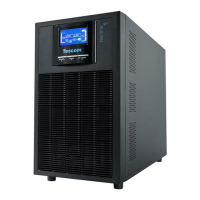
USER MANUAL
NEOLINE PLUS � 1/1 � 1-3 kVA � ONLINE UPS
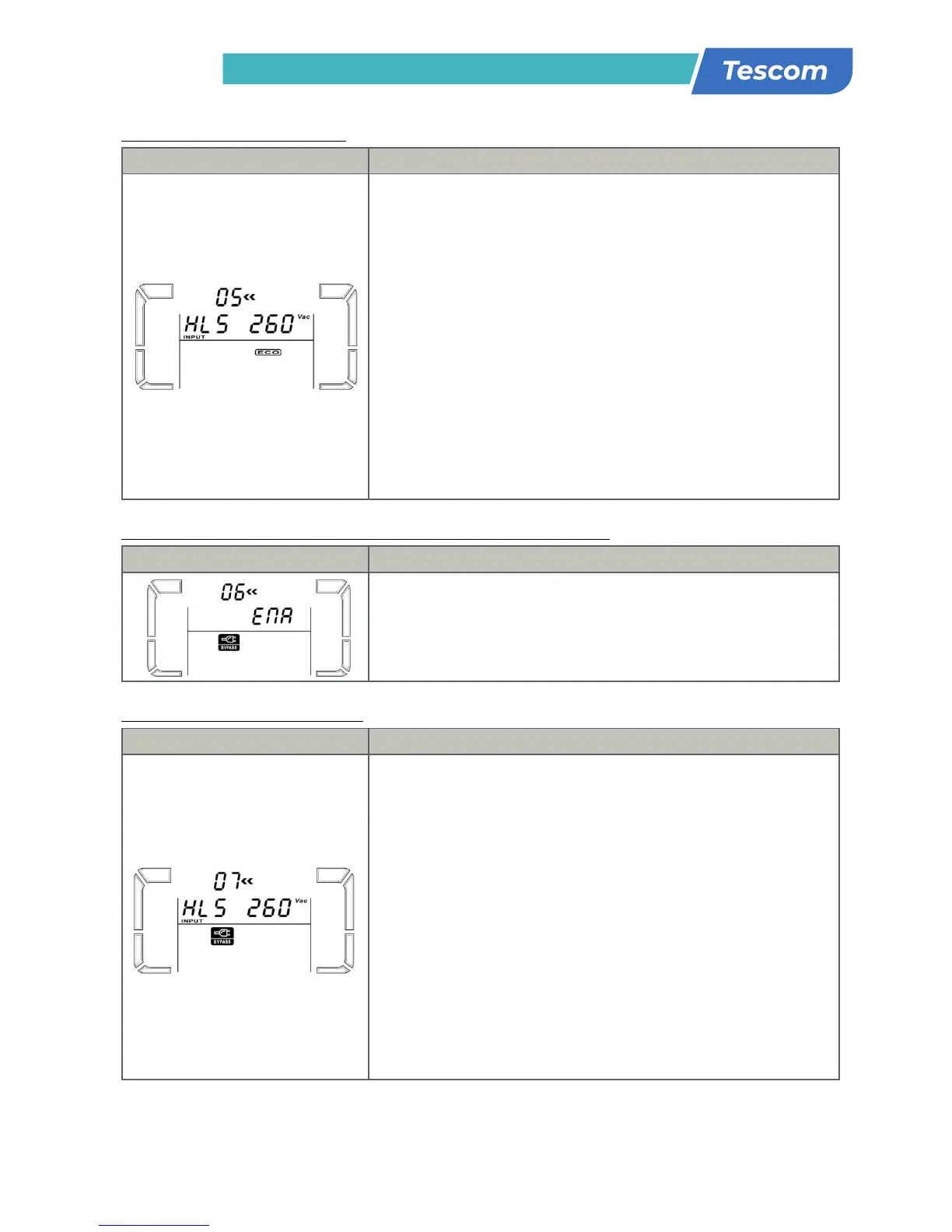
05: Ρύθμιση εύρους τάσης ECΟ
Διεπαφή Ρύθμιση
Παράμετρος 2 και 3: Ρυθμίστε το επιτρεπτό σημείο υψηλής τάσης και
σημείο χαμηλής τάσης για τη λειτουργία ECO πιέζοντας το κουμπί Down
ή Up.
ΗLS: Υψηλή απώλεια τάσης σε λειτουργία ECO στην παράμετρο 2.
Για μοντέλα 200/208/220/230/240 VAC, το ρυθμιζόμενο εύρος στην
παράμετρο 3 είναι από +7V έως +24V της ονομαστικής τάσης.
(Default: +12V)
Για μοντέλα 100/110/115/120/127 VAC, το ρυθμιζόμενο εύρος στην
παράμετρο 3 είναι από +3V to +12V της ονομαστικής τάσης.
(Default: +6V)
LLS: Xαμηλή απώλεια τάσης σε λειτουργία ECO στην παράμετρο 2.
Για μοντέλα 200/208/220/230/240 VAC, το ρυθμιζόμενο εύρος στην
παράμετρο 3 είναι από -7V έως -24V της ονομαστικής τάσης.
(Default: -12V)
Για μοντέλα 100/110/115/120/127 VAC, το ρυθμιζόμενο εύρος στην
παράμετρο 3 είναι από -3V έως -12V της ονομαστικής τάσης.
(Default: -6V)
06: Bypass ενεργοποίηση/απενεργοποίηση όταν το UPS είναι σβηστό
Διεπαφή Ρύθμιση
Παραμετρος 3: Ενεργοποίηση ή απενεργοποίηση λειτουργίας Bypass.
Μπορείτε να διαλέξετε τις ακόλουθες δύο επλογές:
ENA: Ενεργοποίηση Bypass
DIS: Απενεργοποίηση Bypass (Default)
07: Ρύθμιση εύρους τάσης Bypass
Διεπαφή Ρύθμιση
Παράμετρος 2 και 3: Ρυθμίστε το επιτρεπόμενο σημείο υψηλής τάσης και
το αντίστοιχο χαμηλής τάσης για λειτουργία Bypass πιέζοντας το κουμπί
Down ή Up.
ΗLS: Σημείο υψηλής τάσης Bypass
Για μοντέλα 200/208/220/230/240 VAC:
230-264: ρύθμιση του σημείου υψηλής τάσης στην παράμετρο 3 από
230Vac έως 264Vac. (Default: 264Vac)
Για μοντέλα 100/110/115/120/127 VAC:
120-140: ρύθμιση του σημείου υψηλής τάσης στην παράμετρο 3 από
120Vac έως 140Vac. (Default: 132Vac)
LLS: Σημείο χαμηλής τάσης Bypass
Για μοντέλα 200/208/220/230/240 VAC:
170-220: ρύθμιση του σημείου χαμηλής τάσης στην παράμετρο 3 από
170Vac έως 220Vac. (Default: 170Vac)
Για μοντέλα 100/110/115/120/127 VAC:
85-115: ρύθμιση του σημείου χαμηλής τάσης στην παράμετρο 3 από
85Vac έως 115Vac. (Default: 85Vac)
230: presents output voltage is 230Vac (Default)
240: presents output voltage is 240Vac
For 110/150/120/127 VAC models, you may choose the
following output voltage:
110: presents output voltage is 110Vac
115: presents output voltage is 115Vac
120: presents output voltage is 120Vac (Default)
127: presents output voltage is 127Vac
02: Frequency Converter enable/disable
Parameter 2 & 3: Enable or disable converter mode. You
may choose the following two options:
CF ENA: converter mode enable
CF DIS: converter mode disable(Default)
03: Output frequency setting
Parameter 2 & 3: Output frequency setting.
You may set the initial frequency on battery mode:
BAT 50: presents output frequency is 50Hz
BAT 60: presents output frequency is 60Hz
If converter mode is enabled, you may choose the
following output frequency:
CF 50: presents output frequency is 50Hz
CF 60: presents output frequency is 60Hz
Parameter 3: Enable or disable ECO function. You may
choose the following two options:
ENA: ECO mode enable
DIS: ECO mode disable (Default)
05: ECO voltage range setting
Parameter 2 & 3: Set the acceptable high voltage point
and low voltage point for ECO mode by pressing Down key
or Up key.
HLS: High loss voltage in ECO mode in parameter 2.
For 208/220/230/240 VAC models, the setting range in
parameter 3 is from +7V to +24V of the nominal voltage.
(Default: +12V)
For 110/115/120/127 VAC models, the setting range in
parameter 3 is from +3V to +12V of the nominal voltage.
(Default: +6V)
LLS: Low loss voltage in ECO mode in parameter 2.
For 208/220/230/240 VAC models, the setting range in
parameter 3 is from -7V to -24V of the nominal voltage.
(Default: -12V)
For 110/115/120/127 VAC models, the setting voltage in
parameter 3 is from -3V to -12V of the nominal voltage.
(Default: -6V)
06: Bypass enable/disable when UPS is off
Parameter 3: Enable or disable Bypass function. You may
choose the following two options:
ENA: Bypass enable
DIS: Bypass disable (Default)
07: Bypass voltage range setting
Parameter 2 & 3: Set the acceptable high voltage point
and acceptable low voltage point for Bypass mode by
pressing the Down key or Up key.
HLS: Bypass high voltage point
For 208/220/230/240 VAC models:
235-264: setting the high voltage point in parameter 3
from 235Vac to 264Vac. (Default: 264Vac)
For 110/115/120/127 VAC models:
125-132: setting the high voltage point in parameter 3
from 115Vac to 132Vac(Default: 132Vac)
LLS: Bypass low voltage point
For 208/220/230/240 VAC models:
184-225: setting the low voltage point in parameter 3
from 184Vac to 225Vac. (Default: 195Vac)
For 110/115/120/127 VAC models:
98-115: setting the low voltage point in parameter 3 from
98Vac to 115Vac. (Default: 98Vac)
8: Autonomy limitation setting
Parameter 3: Set up backup time on battery mode for
general outlets.
0-999: setting the backup time in minutes from 0-999 for
general outlets on battery mode.
0: When setting as “0”, the backup time will be only 10
seconds.
999: When setting as “999”, the backup time setting will
be disabled. (Default)
Parameter 3: Set up total battery AH value of the UPS.
(unit: AH)
7-999: setting the total battery capacity from 7 to 999.
Please set up this figure if external battery pack is
connected.
If the UPS is standard model, the default setting is 9AH.
If the UPS is long-run model, the default setting is 65AH.
parameter 3 is from -3V to -12V of the nominal voltage.
(Default: -6V)
06: Bypass enable/disable when UPS is off
Parameter 3: Enable or disable Bypass function. You may
choose the following two options:
ENA: Bypass enable
DIS: Bypass disable (Default)
07: Bypass voltage range setting
Parameter 2 & 3: Set the acceptable high voltage point
and acceptable low voltage point for Bypass mode by
pressing the Down key or Up key.
HLS: Bypass high voltage point
For 208/220/230/240 VAC models:
235-264: setting the high voltage point in parameter 3
from 235Vac to 264Vac. (Default: 264Vac)
For 110/115/120/127 VAC models:
125-132: setting the high voltage point in parameter 3
from 115Vac to 132Vac(Default: 132Vac)
LLS: Bypass low voltage point
For 208/220/230/240 VAC models:
184-225: setting the low voltage point in parameter 3
from 184Vac to 225Vac. (Default: 195Vac)
For 110/115/120/127 VAC models:
98-115: setting the low voltage point in parameter 3 from
98Vac to 115Vac. (Default: 98Vac)
8: Autonomy limitation setting
Parameter 3: Set up backup time on battery mode for
general outlets.
0-999: setting the backup time in minutes from 0-999 for
general outlets on battery mode.
0: When setting as “0”, the backup time will be only 10
seconds.
999: When setting as “999”, the backup time setting will
be disabled. (Default)
Parameter 3: Set up total battery AH value of the UPS.
(unit: AH)
7-999: setting the total battery capacity from 7 to 999.
Please set up this figure if external battery pack is
connected.
If the UPS is standard model, the default setting is 9AH.
If the UPS is long-run model, the default setting is 65AH.


 To Next Page
 Loading...