EasyManua.ls Logo

Tescom NEOLINE 1000 - User Manual

Default Icon
32 pages
Print Icon
To Next Page IconTo Next Page
Loading...
1
NEOLINE
SERIES
1000 – 2000 – 3000
1000XL – 2000XL – 3000XL
1
Phase In
-
1
Phase Out
USER MANUAL
Question and Answer IconNeed help?

Do you have a question about the Tescom NEOLINE 1000 and is the answer not in the manual?

Summary

Introduction

1.1 Description of Commonly Used Symbols

Explains symbols used in the manual for user understanding.

1.2 Safety Instructions

Provides essential safety guidelines for operating the UPS.

Product Description

2.1 System Type and Configuration

Details the different types and configurations of UPS units available.

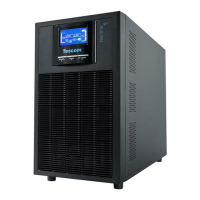
2.2 The Appearance of the UPS

Illustrates and labels the physical components of the UPS units.

2.3 Operating Principle

Describes the internal working mechanism and power flow of the UPS.

Installation

3.1 Unpacking Inspection

Guides users on how to unpack and inspect the UPS for damage or missing parts.

3.2 Installation Notes

Provides crucial notes and guidelines for proper UPS installation and placement.

3.3 Cable Connections

Details the procedures for connecting input and output power cables to the UPS.

Operation

4.1 Introduction of Display Panel

Explains the components and indicators on the UPS display panel.

4.2 Operation Mode

Describes the different operating modes of the UPS (Line, Bypass, Battery).

4.3 Operating Instructions

Provides step-by-step instructions for turning the UPS on/off and self-diagnosis.

Maintenance

5.1 Battery Maintenance

Provides guidance on maintaining the UPS battery for optimal performance and lifespan.

5.2 Checking UPS function

Outlines procedures for regularly checking the UPS's functional status.

Troubleshooting

6. Troubleshooting

Offers solutions for common UPS problems and fault indications.

Specifications

7.1 Electrical

Details the electrical characteristics and ratings of the UPS.

7.2 Mechanical

Provides physical dimensions and weight specifications for the UPS models.

7.3 Environmental

Lists the recommended environmental conditions for UPS operation and storage.

7.4 EMC

Specifies the electromagnetic compatibility standards and levels the UPS complies with.

7.5 Safety

Confirms compliance with relevant safety standards for UPS usage.

Warranty

8. Warranty

Outlines the terms and conditions for product warranty and service.

Summary

Introduction

1.1 Description of Commonly Used Symbols

Explains symbols used in the manual for user understanding.

1.2 Safety Instructions

Provides essential safety guidelines for operating the UPS.

Product Description

2.1 System Type and Configuration

Details the different types and configurations of UPS units available.

2.2 The Appearance of the UPS

Illustrates and labels the physical components of the UPS units.

2.3 Operating Principle

Describes the internal working mechanism and power flow of the UPS.

Installation

3.1 Unpacking Inspection

Guides users on how to unpack and inspect the UPS for damage or missing parts.

3.2 Installation Notes

Provides crucial notes and guidelines for proper UPS installation and placement.

3.3 Cable Connections

Details the procedures for connecting input and output power cables to the UPS.

Operation

4.1 Introduction of Display Panel

Explains the components and indicators on the UPS display panel.

4.2 Operation Mode

Describes the different operating modes of the UPS (Line, Bypass, Battery).

4.3 Operating Instructions

Provides step-by-step instructions for turning the UPS on/off and self-diagnosis.

Maintenance

5.1 Battery Maintenance

Provides guidance on maintaining the UPS battery for optimal performance and lifespan.

5.2 Checking UPS function

Outlines procedures for regularly checking the UPS's functional status.

Troubleshooting

6. Troubleshooting

Offers solutions for common UPS problems and fault indications.

Specifications

7.1 Electrical

Details the electrical characteristics and ratings of the UPS.

7.2 Mechanical

Provides physical dimensions and weight specifications for the UPS models.

7.3 Environmental

Lists the recommended environmental conditions for UPS operation and storage.

7.4 EMC

Specifies the electromagnetic compatibility standards and levels the UPS complies with.

7.5 Safety

Confirms compliance with relevant safety standards for UPS usage.

Warranty

8. Warranty

Outlines the terms and conditions for product warranty and service.

Tescom NEOLINE 1000 Specifications

General IconGeneral
Capacity1000 VA / 600 W
Communication InterfaceUSB
Output Voltage230 V
Input Voltage220/230/240VAC
Frequency50/60 Hz
Transfer Time4-8 ms
Battery TypeSealed Lead Acid
Battery Recharge Time4-6 hours to 90% after complete discharge

Related product manuals