USER MANUAL
NEOLINE PLUS � 1/1 � 1-3 kVA � ONLINE UPS
08: Ρύθμιση χρόνου αυτονομίας
Διεπαφή Ρύθμιση
Παράμετρος 3: Ρύθμιση χρόνου υποστήριξης σε λειτουργία μπαταρίας για
γενικές εξόδους.
0-999: Ρύθμιση του χρόνου υποστήριξης σε λεπτά 0-999 για γενικές
εξόδους σε λειτουργία μπαταρίας.
0: Όταν ρυθμίζεται ως “0”, ο χρόνος υποστήριξης θα είναι μόνο 10
δευτερόλεπτα.
00: Έξοδος από τη ρύθμιση
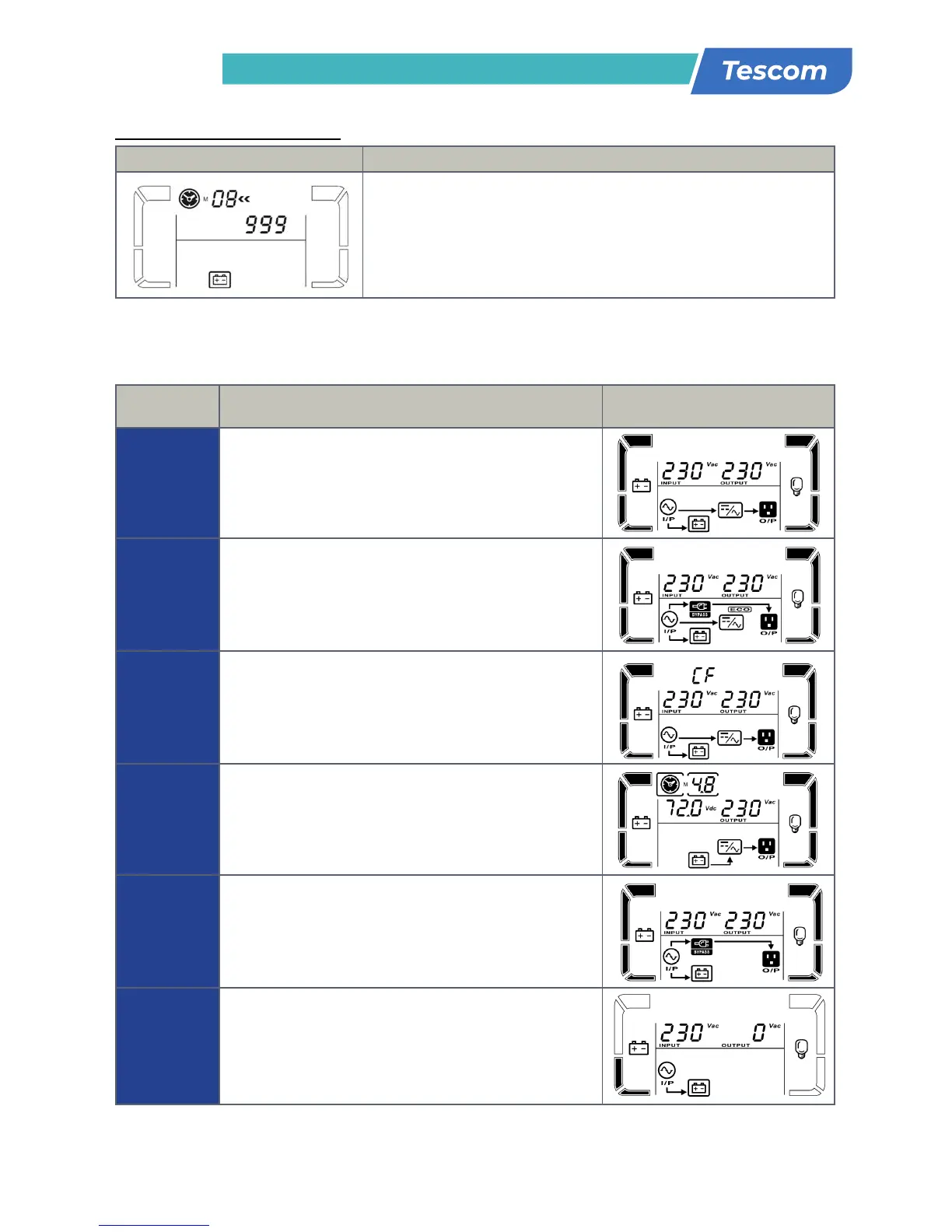
3-6. Περιγραφή τρόπου λειτουργίας
Τρόπος
λειτουργίας
Περιγραφή Οθόνη LCD
Λειτουργία
Online
Όταν η τάση εισόδου είναι εντός του επιτρεπόμενου
εύρους, το UPS θα παρέχει καθαρή και σταθερή AC τάση
στην έξοδο. Το UPS θα φορτίσει επίσης τη μπαταρία σε
λειτουργία online.
Λειτουργία
ECO
Λειτουργία εξοικονόμησης ενέργειας: Όταν η τάση εισόδου
είναι εντός του επιτρεπόμενου εύρους τάσης, το UPS θα
παρακάμψει την τάση δικτύου στην έξοδο για εξοικονόμηση
ενέργειας.
Λειτουργία
συχνότητας
μετατροπέα
Όταν η συχνότητα εισόδου είναι ανάμεσα μεταξύ 40 Hz
και 70 Hz, το UPS μπορεί να ρυθμιστεί σε μια σταθερή
συχνότητα εξόδου, 50 Hz ή 60 Hz. Το UPS σε αυτή την
κατάσταση θα εξακολουθεί να φορτίζει τη μπαταρία.
Λειτουργία
μπαταρίας
Όταν η τάση εισόδου είναι πέραν του επιτρεπόμενου
εύρους ή υπάρξει διακοπή ρεύματος συναγερμός ηχεί
κάθε 4 δευτερόλεπτα, το UPS θα αντλήσει ενέργεια από τη
μπαταρία.
Λειτουργία
Bypass
Όταν η τάση εισόδου είναι εντός του επιτρεπόμενου εύρους
αλλά το UPS είναι υπερφορτωμένο, το UPS θα εισέλθει
σε λειτουργία bypass ή η λειτουργία bypass μπορεί να
ρυθμιστεί από τον μπροστινό πίνακα. Ο συναγερμός
χτυπάει κάθε 10 δευτερόλεπτα.
Λειτουργία
αναμονής
Το UPS είναι κλειστό και δεν υπάρχει παροχή εξόδου, αλλά
μπορεί ακόμη να φορτίσει τις μπαταρίες.
parameter 3 is from -3V to -12V of the nominal voltage.
(Default: -6V)
06: Bypass enable/disable when UPS is off
Parameter 3: Enable or disable Bypass function. You may
choose the following two options:
ENA: Bypass enable
DIS: Bypass disable (Default)
07: Bypass voltage range setting
Parameter 2 & 3: Set the acceptable high voltage point
and acceptable low voltage point for Bypass mode by
pressing the Down key or Up key.
HLS: Bypass high voltage point
For 208/220/230/240 VAC models:
235-264: setting the high voltage point in parameter 3
from 235Vac to 264Vac. (Default: 264Vac)
For 110/115/120/127 VAC models:
125-132: setting the high voltage point in parameter 3
from 115Vac to 132Vac(Default: 132Vac)
LLS: Bypass low voltage point
For 208/220/230/240 VAC models:
184-225: setting the low voltage point in parameter 3
from 184Vac to 225Vac. (Default: 195Vac)
For 110/115/120/127 VAC models:
98-115: setting the low voltage point in parameter 3 from
98Vac to 115Vac. (Default: 98Vac)
8: Autonomy limitation setting
Parameter 3: Set up backup time on battery mode for
general outlets.
0-999: setting the backup time in minutes from 0-999 for
general outlets on battery mode.
0: When setting as “0”, the backup time will be only 10
seconds.
999: When setting as “999”, the backup time setting will
be disabled. (Default)
Parameter 3: Set up total battery AH value of the UPS.
(unit: AH)
7-999: setting the total battery capacity from 7 to 999.
Please set up this figure if external battery pack is
connected.
If the UPS is standard model, the default setting is 9AH.
If the UPS is long-run model, the default setting is 65AH.
17
3-6. Operating Mode Description
When the input voltage is within
acceptable range, UPS will provide pure
and stable AC power to output. The UPS
will also charge the battery at online
mode.
Energy saving mode:
When the input voltage is within voltage
regulation range, UPS will bypass
voltage to output for energy saving.
When input frequency is within 40 Hz to
70 Hz, the UPS can be set at a constant
output frequency, 50 Hz or 60 Hz. The
UPS will still charge battery under this
mode.
When the input voltage is beyond the
acceptable range or power failure and
alarm is sounding every 4 second, UPS
will backup power from battery.
When input voltage is within acceptable
range but UPS is overload, UPS will enter
bypass mode or bypass mode can be set
by front panel. Alarm is sounding every
10 second.
UPS is powered off and no output supply
power, but still can charge batteries.
17
3-6. Operating Mode Description
When the input voltage is within
acceptable range, UPS will provide pure
and stable AC power to output. The UPS
will also charge the battery at online
mode.
Energy saving mode:
When the input voltage is within voltage
regulation range, UPS will bypass
voltage to output for energy saving.
When input frequency is within 40 Hz to
70 Hz, the UPS can be set at a constant
output frequency, 50 Hz or 60 Hz. The
UPS will still charge battery under this
mode.
When the input voltage is beyond the
acceptable range or power failure and
alarm is sounding every 4 second, UPS
will backup power from battery.
When input voltage is within acceptable
range but UPS is overload, UPS will enter
bypass mode or bypass mode can be set
by front panel. Alarm is sounding every
10 second.
UPS is powered off and no output supply
power, but still can charge batteries.


 To Next Page
 Loading...