te
s
to
te
r
m
mS/cm mS/cm
¡C / ¡F
te
sto
®
24
0
S
E
L
E
C
T
H
O
L
D
I
0
B
a
t
H
o
ld
¡
k
¡
W
Auto
mm
S/cm
p
m
V
2
pH
M
an
/
x
N
a
C
l
X
%/
D
I
N
/
N
B
S
m
g
/l
C
a
l
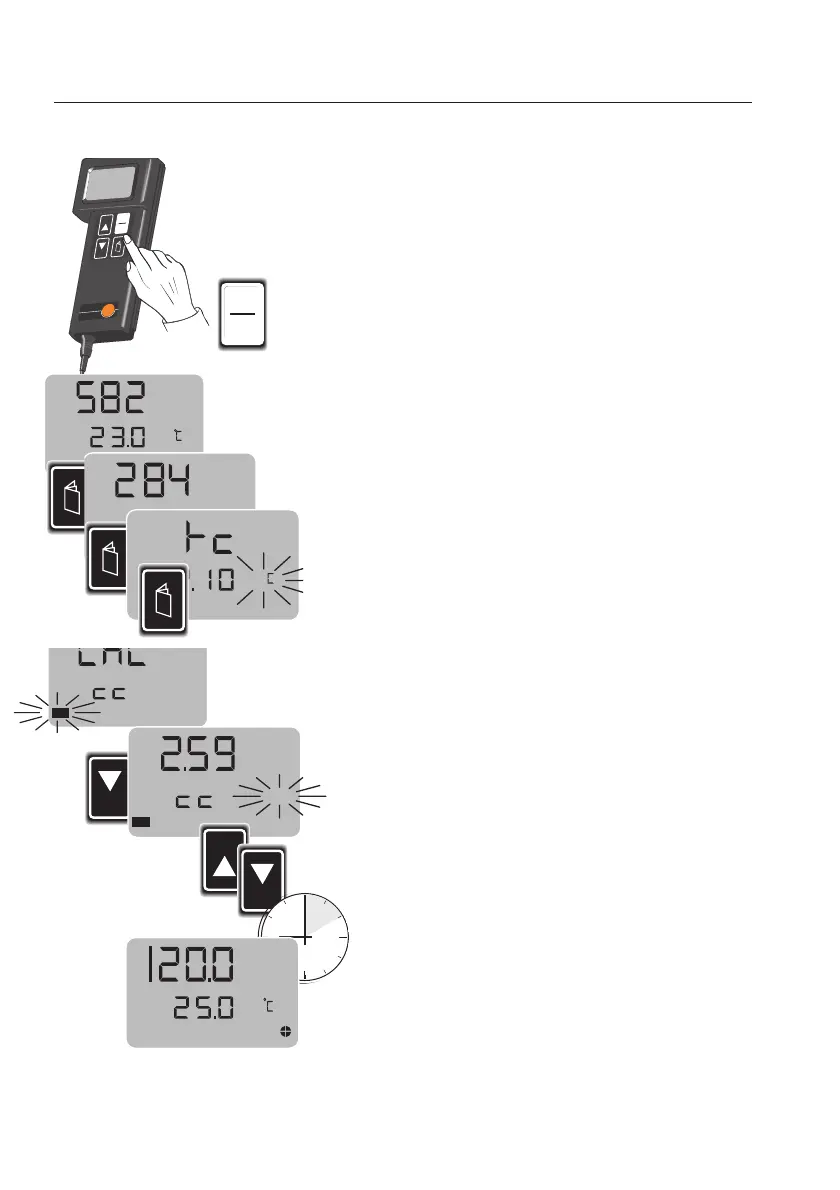
Storing tthe ccell cconstant
8
Due to reasons of product engineering, the cell
coefficient of the conductivity measuring cell varies.
The cell coefficent indicated on the cable of the
measuring cell to be used, must be stored in the
instrument
before tthe ffirst mmeasurement.
Connected the measuring cell to the instrument
Switch on the instrument.
After the display and segment test, use the page
key to enter the
"CAL"
menu.
Confirm with the select key, a value is then display-
ed and
"k"
(coefficient) flashes in the display.
Use the arrow keys (▲▼) to set the cell coefficient
of the measuring cell.
Wait 5 seconds for the instrument to store this
value and enter the measurement menu.
This new value remains stored even after the
instrument has been switched off and can be used
for the next measurement. If the measuring cell is
replaced, the cell constant for this measuring cell
must be entered and stored.
I
0
m S/cm
W
Auto
pH
Man
x
NaCl mg/l
Cal
Cal
SELECT
k
Cal
HOLD
SELECT
W
n
mS/cm
%/



 To Next Page