HOLD
12
Configuration
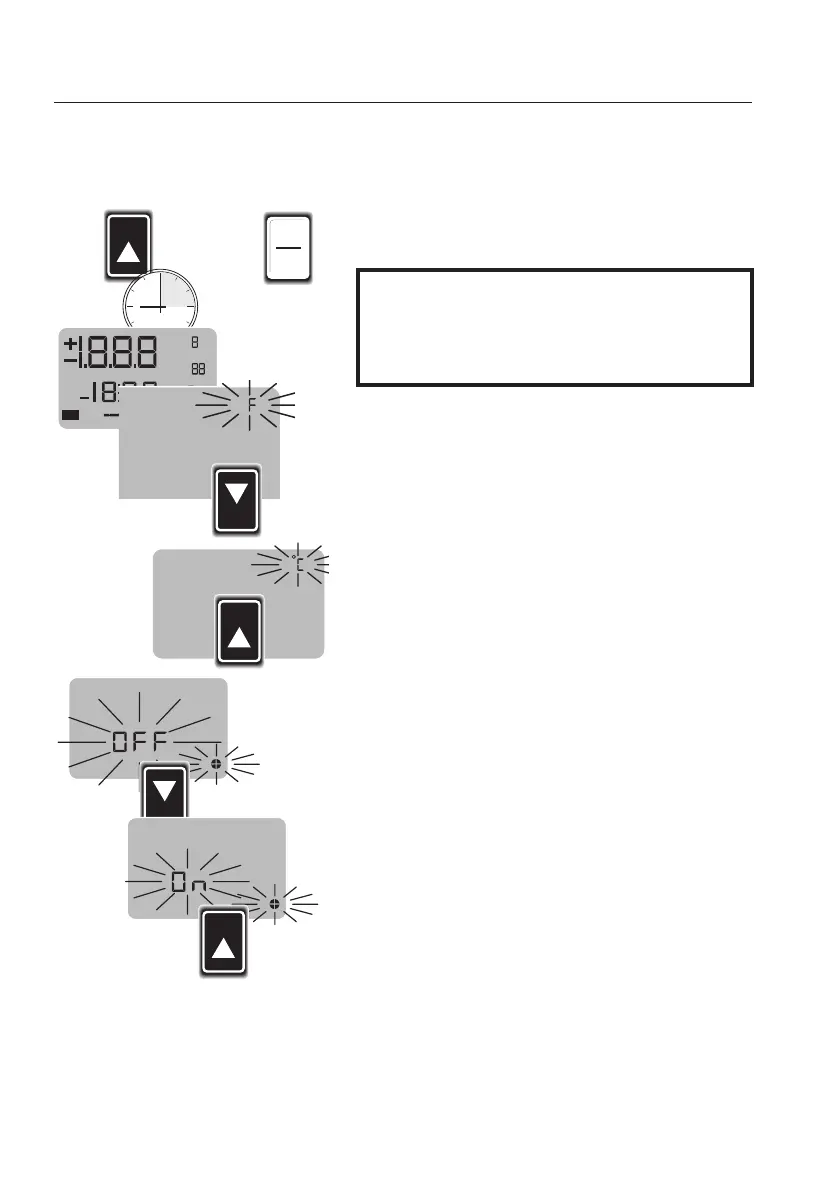
°C // °°F cconversion
Switching aauto ooff ffunction oon oor ooff
testo
240
enables the conversion of the unit of
measurement from °C to °F and vice-versa. The
auto off function can also be switched off.
Keep the
HOLD
key pressed when switching on
the instrument and press the
I/O
key once.
Keep the
HOLD
key pressed until the segment
test has been completed.
"°C"
or
°F"
flashes in the display.
Set the required unit of measurement with the
SELECT
key and confirm with
HOLD
.
The "
Auto-Off"
symbol flashes in the display.
SELECT
can be used to switch this function on or
off.
Confirm the function with
HOLD
.
The instrument now switches to the measuring
mode.
+
Bat
Hold
¡
k
¡
W
Auto
mmS/cm
p
mV
2
pH
Man
/
x
NaCl
X
%/
DIN/NBS
mg/l
Cal
HOLD
SELECT
HOLD
The auto off function increases the battery life and
thus protects the environment. Should the auto off
function be deactivated, do not forget to switch
the instrument off!



 To Next Page