Determining tthe ccell cconstant
Should you have old sensors or sensors with an
unknown constant, this value must be measured
with a test solution with a know conductivity.
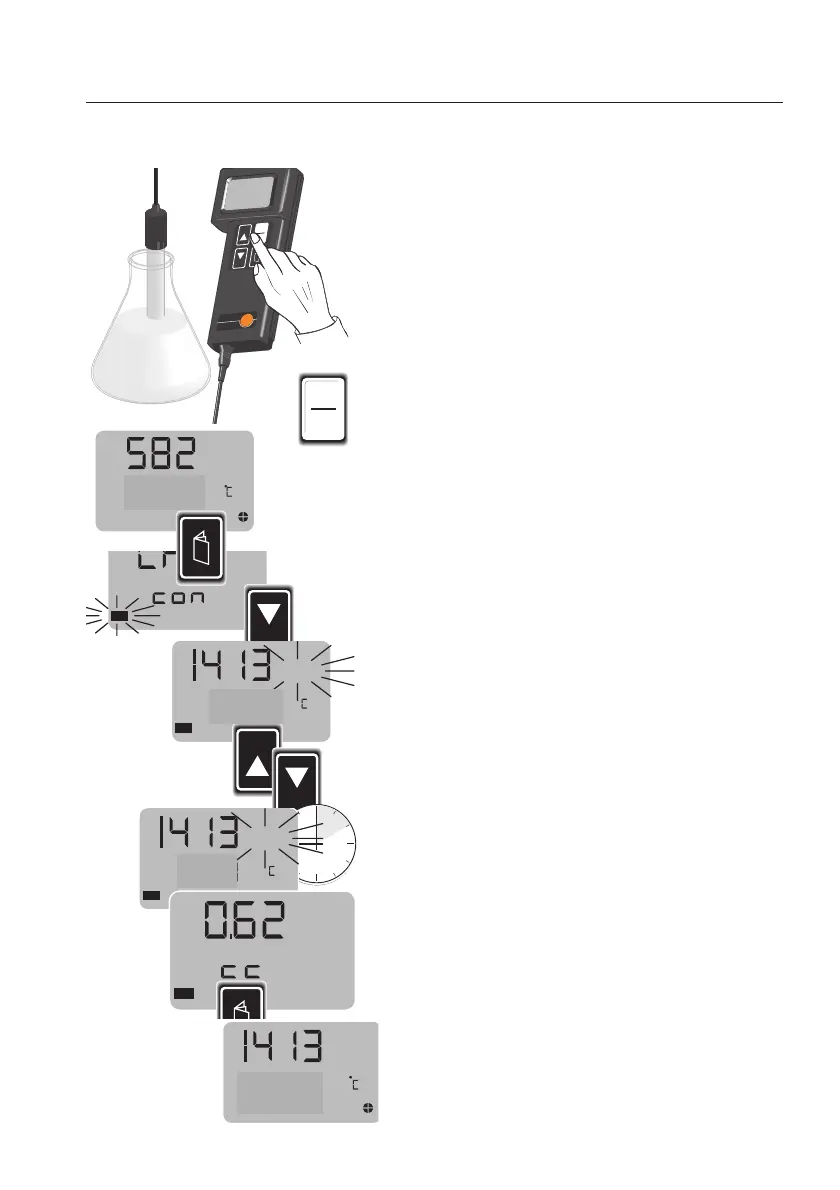
Connect the measuring cell to the instrument.
Position the measuring cell in the test solution
(conductivity standard solution or your own
solution of a known conductivity).
Make sure
- that the solution is up to the air vents ,
- that all the air escapes from the measuring cell
(move the measuring cell gently when dipping
into the solution).
Switch on the instrument.
Press the
PAGE
key to select the "tc" menu.
Set the temperature coefficient to "0".
Use the
PAGE
key to select "CAL con" and con-
firm with
SELECT
.
Enter the conductivity value of the test solution with
the ▲▼ keys (see lable on standard conductivity
solution).
Wait 5 seconds, the cell coefficient is then display-
ed. This value can differ from that set value (e.g.
with older measuring cells), it is automatically sto-
red in the instrument.
Press the
PAGE
key to enter the measuring mode.
te
s
t
o
te
r
m
mS/cm mS/cm
¡C / ¡F
te
sto
®
2
40
S
E
L
E
C
T
H
O
L
D
I
0
B
a
t
H
o
ld
¡
k
¡
W
Auto
mmS/cm
p
m
V
2
pH
Man
/
x
N
a
C
l
X
%/
D
I
N
/N
B
S
m
g/l
C
a
l
I
0
m S/cm
Cal
SELECT
m S/cm
Cal
HOLD
SELECT
m S/cm
Cal
k
Cal
2255..00
2255..00
2255..00
11
m S/cm
2255..00



 To Next Page