5 First steps
18
Mount/remove infrared protection glass
Mounting:
1. Attach the protection glass fastened to the red mounting ring
to the lens and turn the mounting ring clockwise to the stop.
2. Remove the red mounting ring from the protection glass.
Removal:
1. Attach the red mounting ring to the protection glass.
2. Turn the mounting ring anticlockwise and remove the
protection glass.
After mounting/removing the protection glass, activate or
deactivate the Protection glass option, see Configuration
page 30. If this option is set incorrectly, the stated measuring
accuracy is not guaranteed.
Mount tripod adapter
Using the included tripod adapter, the testo 880 can be
fastened to the testo tripod (accessory) or to a commercially
available standard tripod. With the tripod adapter mounted, the
battery cannot be changed!
1. Place the tripod adapter on the lower end of the handle and
screw on using the included Allen key (ISO 2936, size 4).
2. Slide thermal imager into the fastening plate of the testo
tripod and lock or fasten it to the commercially available
standard tripod (screw-type fastening).
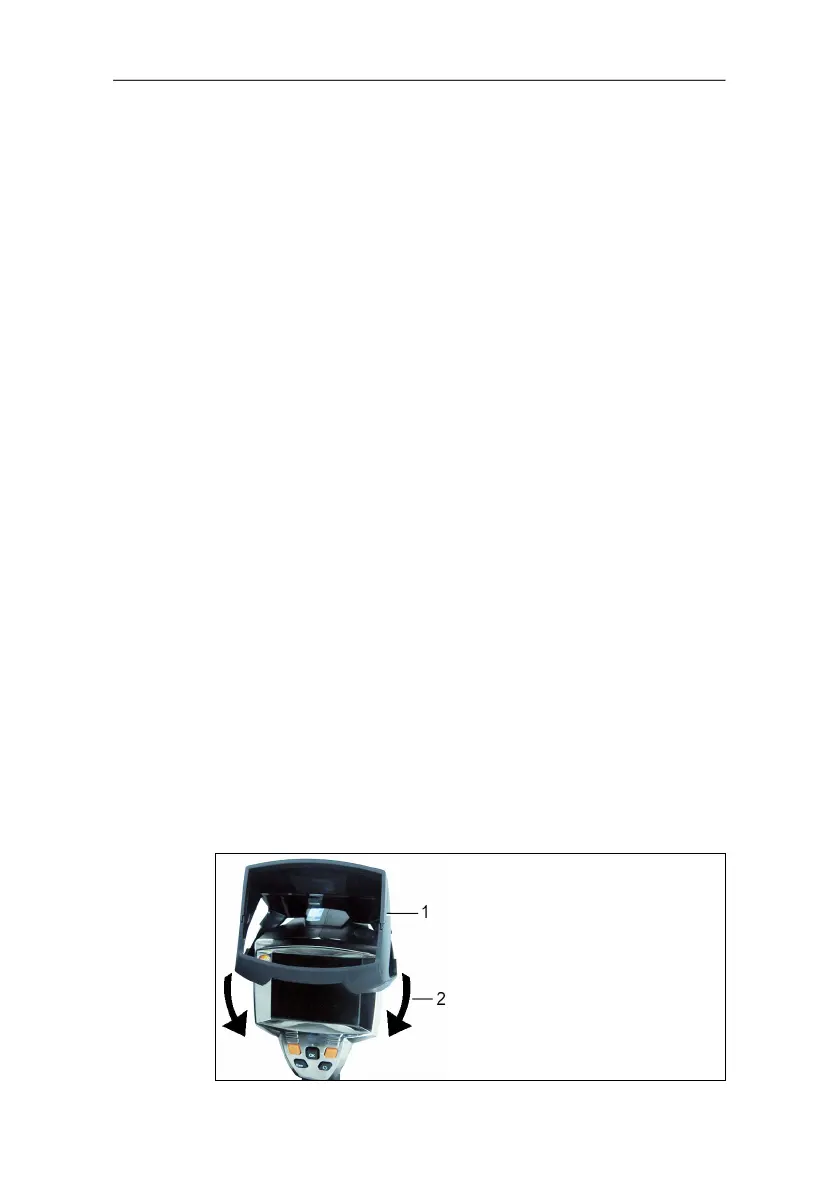
Mount sunshield
The sunshield increases the readability of the display with a
high exposure to light.
> Set the sunshield on the thermal imager from above (1) and
pull both sides of the sunshield down around the display (2).



 To Next Page