28
611 - 612
GB
INSTRUCTIONS
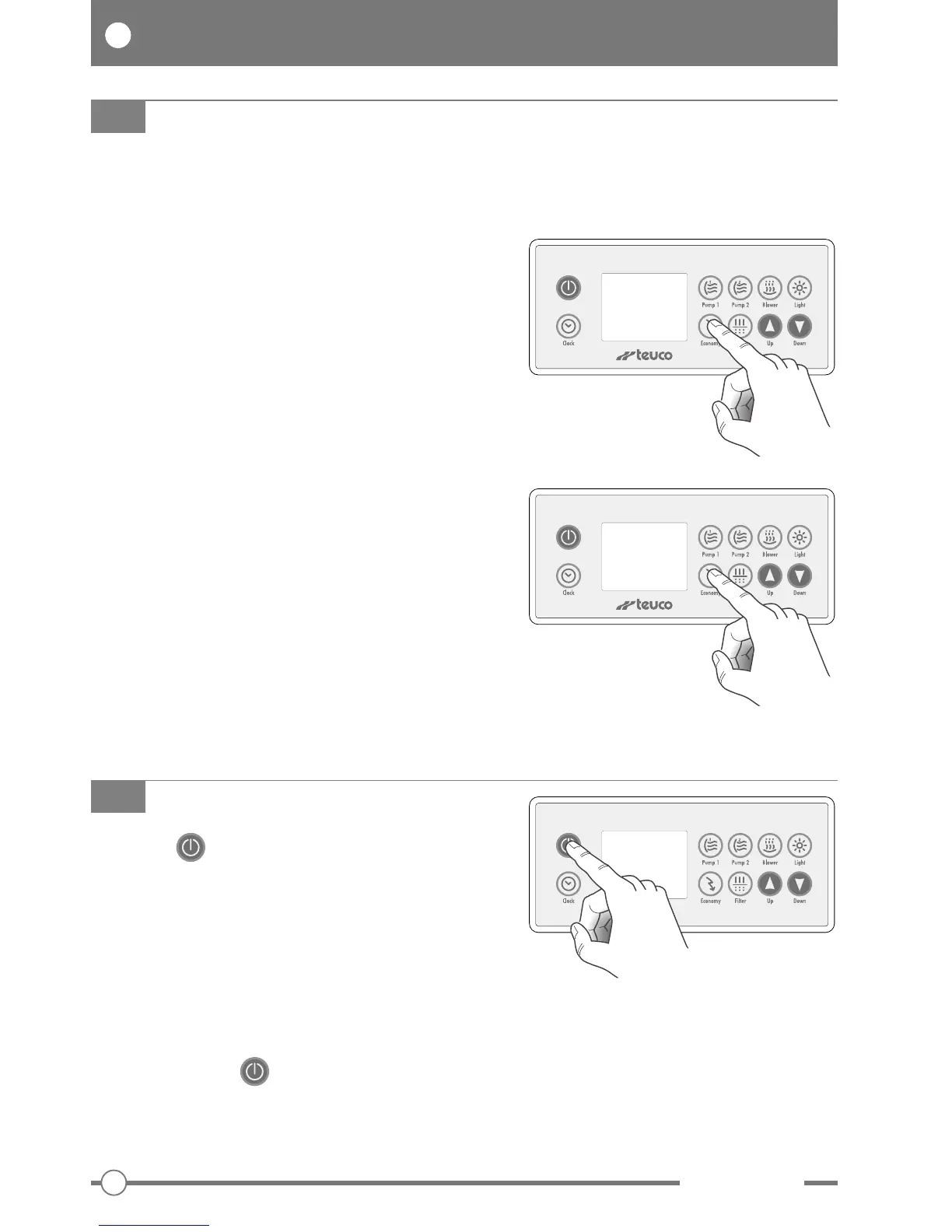
Press the “” button and hold for 5 seconds to lock
out all functions, recirculation and buttons of the
control panel (for a period of 30 minutes).
This is a safety function for use when cleaning the
filters or removing foreign matter from the bottom of the
pool, or whenever the system needs to be shut off for
technical reasons.
To
reactivate the control panel before 30 minutes have
elapsed, press the “” button a second time.
OFF MODE
This function can be used to inhibit the operation of
some or all of the control panel buttons.
PARTIAL LOCKOUT:
Press and hold the “Economy” button for 5 seconds to
inhibit all functions except Pump 1, Pump 2, Blower and
Light.
The display shows “LocP”.
In this situation, the current settings cannot be
changed.
To
re-enable the control panel, press the “Economy”
button again and hold for 5 seconds.
FULL LOCKOUT:
Press and hold the “Economy” button for 10 seconds to
inhibit all functions.
The display shows “LocF”.
In this situation, all buttons are disabled, whereas the
recirculation and all programming functions remain
active.
To
re-enable the control panel, press the “Economy”
button again and hold for 5 seconds.
CONTROL PANEL LOCKOUT
Loc P
Loc F


 To Next Page