30
611 - 612
GB
MAINTENANCE
Every two weeks the message CLE will blink in the
display, indicating that the filters need cleaning.
Clean the filters more often if need be.
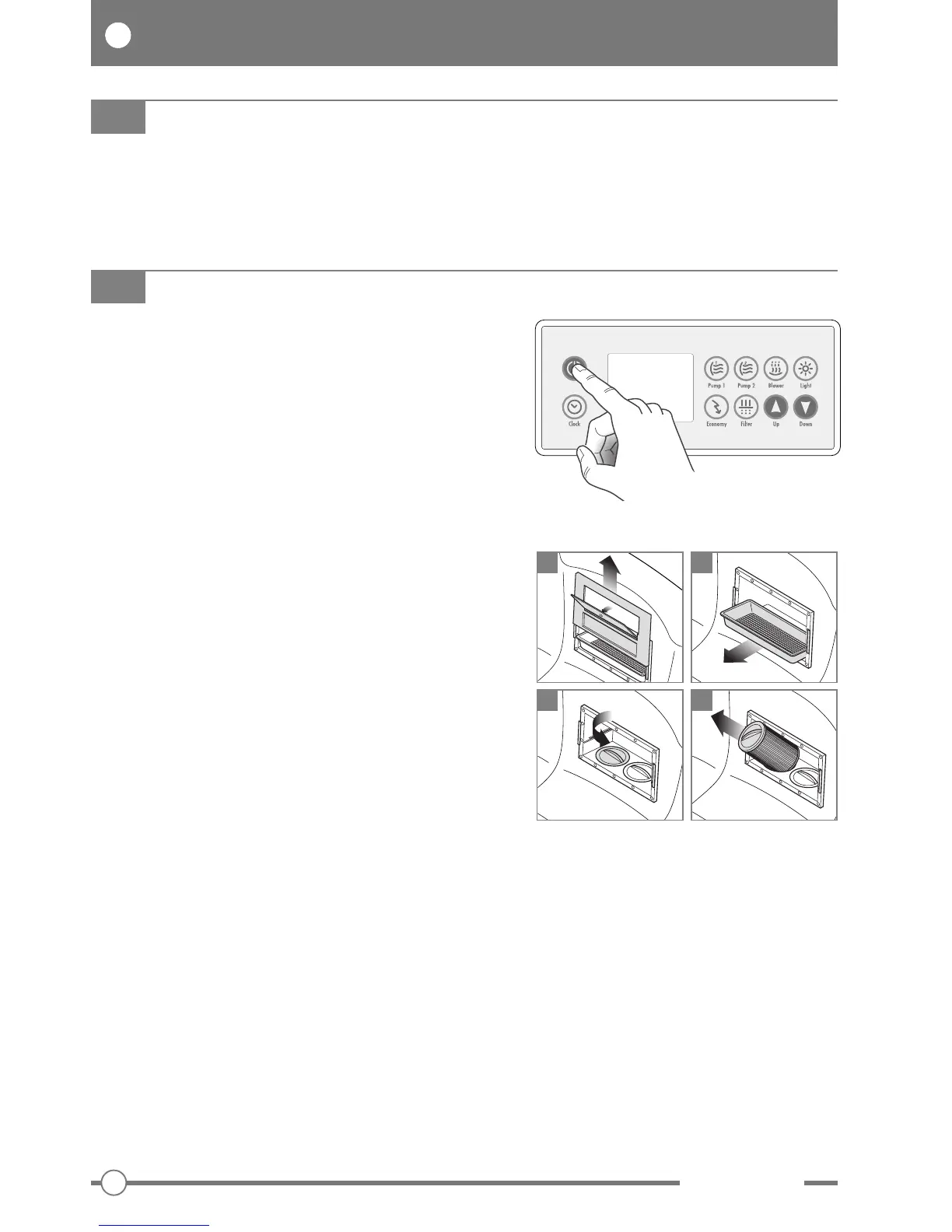
To clean the filters:
- select “OFF MODE” at the control panel,
- remove the cover and tray of the skimmer,
- unscrew the filters and remove them from their
sockets.
Clean the filters under a strong jet of water (use a high
pressure hose if necessary).
Replace the filters at the first signs of any
deterioration.
Replacement filters are available from Teuco
Authorized Dealers.
Having cleaned or replaced the filters, refit all
components before restarting the minipool.
To restart the minipool, deselect the “OFF MODE”
function at the control panel.
CLEANING THE FILTERS
1 2
3 4
Refer to the CLEANING INSTRUCTIONS manual accompanying the product.
CLEANING THE SURFACES


 To Next Page