• Concept E 450 Digital 13
Operation
Switching the device on/to standby
Activating
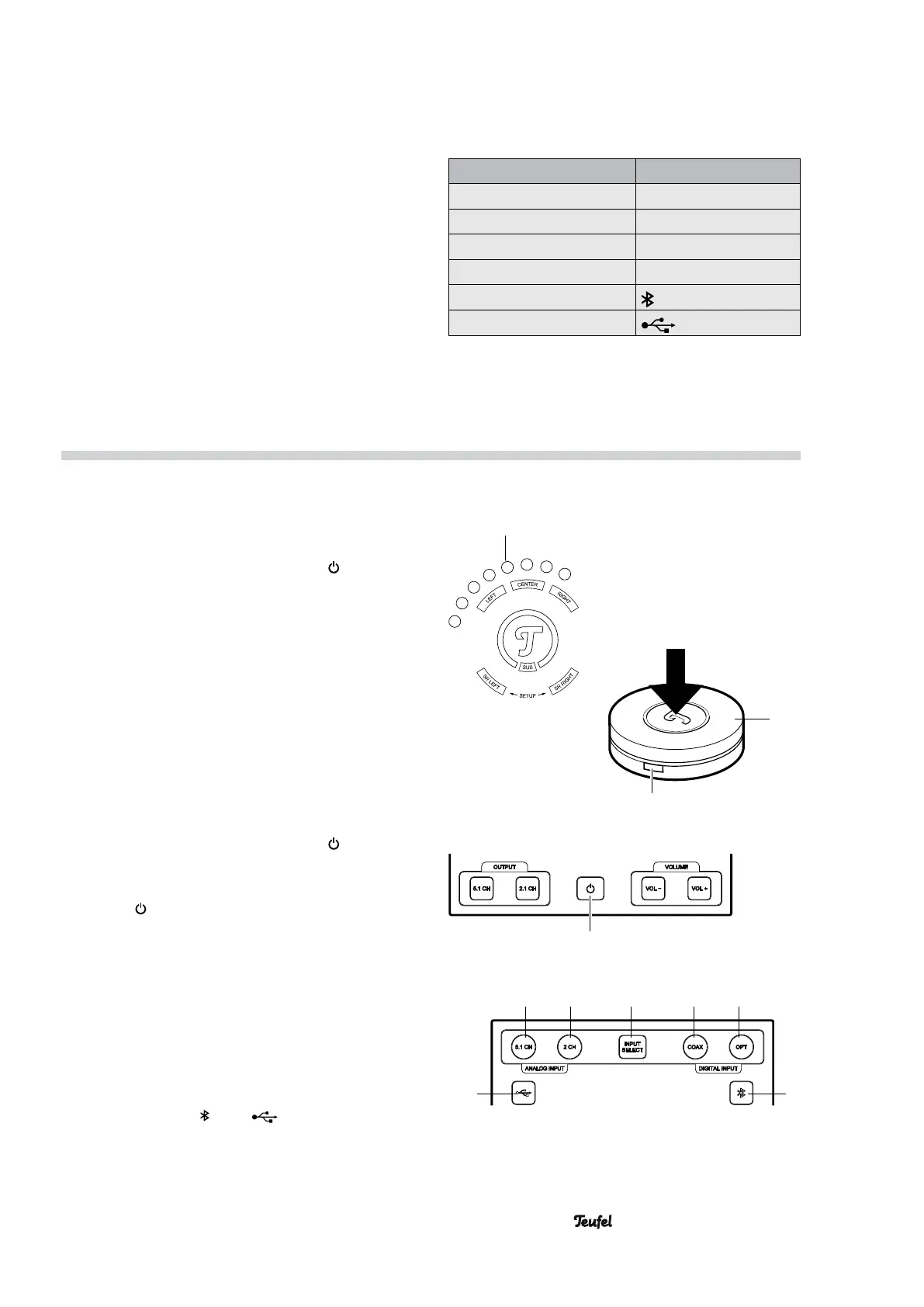
• On the device: Briefly push the button (10).
• With the remote control:
Briefly press the middle
of the control dial (20)
.
The following LEDs illuminate when the device is
activated:
– the selected input (1, 2, 4, 5, 6 or 13)
– the volume display
– the active speakers (5.1 or 2.1)
– the audio format of the input signal
The last settings that were used will still be active
even after the device has been turned on.
Switching to standby
• On the device: Briefly push the button
(10).
• With the remote control:
Push and hold the middle
of the control dial (20)
for approx. 3 seconds.
The button
(10) will illuminate in standby.
Selecting an input
• On the device: Push the button INPUT SELECT
(3) repeatedly until the LED of the desired input
illuminates.
• With the remote control: Push the side button (22)
repeatedly until the LED of the desired input illumi-
nates (1, 2, 4, 5, 6 and 13).
• You can select the Bluetooth and USB inputs by
tapping the button
(6) or (13).
Volume display
approx.
3 seconds.
20
22
10
12 3 45
6
13
Functions
• Activating the Concept E 450 Digital: Push the mid-
dle of the control dial (20).
• Switching the Concept E 450 Digital to standby:
Push and hold the control dial (20) for 3 seconds.
• Adjusting the volume: Turn the control dial (20).
• Activating/deactivating mute:
Briefly press the control dial (20).
• Selecting the input:
Push the side button (22) (repeatedly). Pushing
the button selects the next input (see table on the
right).
Selected input LED illuminates:
LINE IN (24) 5.1 CH (1)
ANALOGUE IN (27) 2.1 CH (2)
DIGITAL IN COAXIAL (26) COAX (4)
DIGITAL IN OPTICAL (25) OPT (5)
BLUETOOTH (6)
USB (23) (13)


 To Next Page