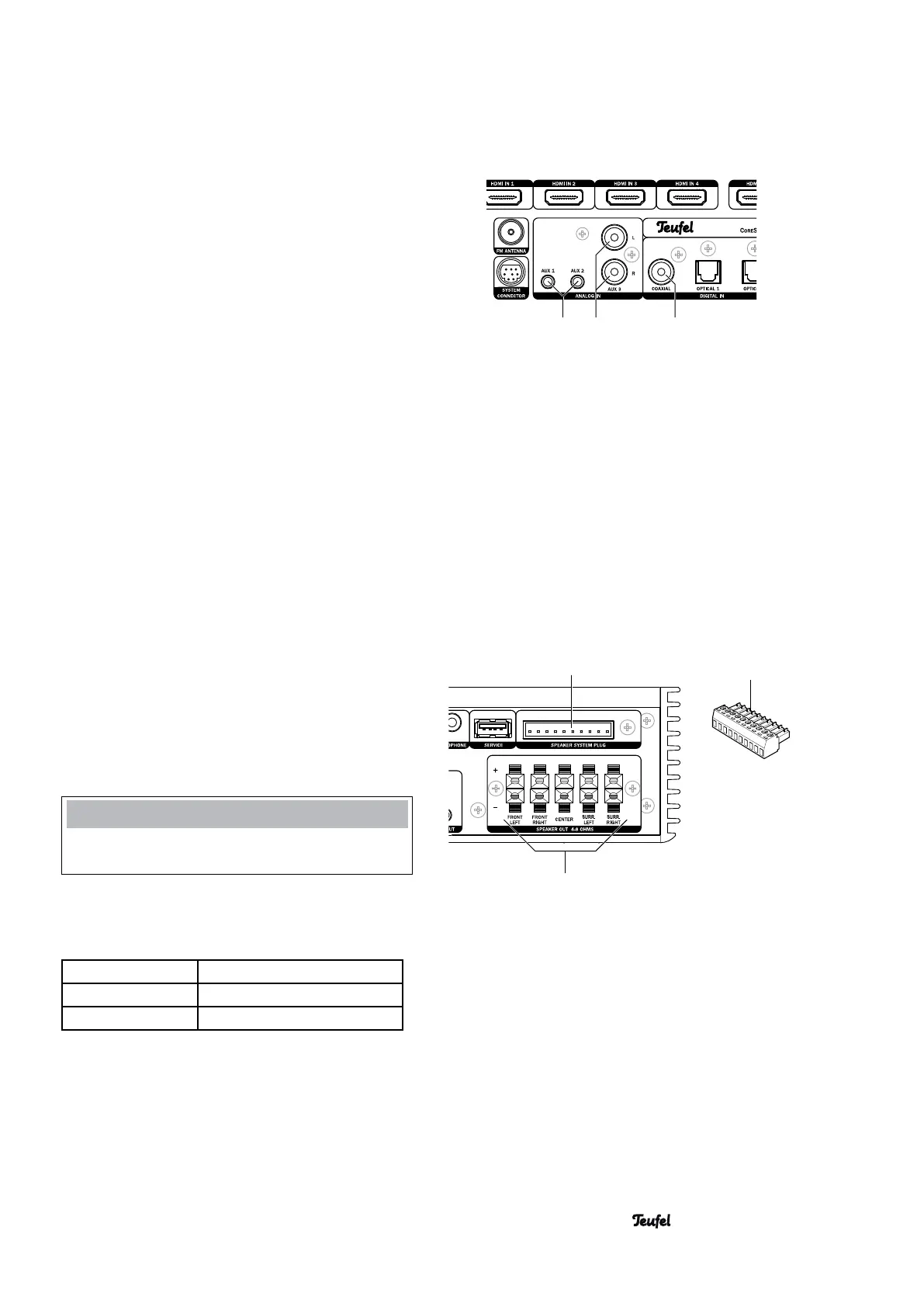
141516
9
10
13 • CoreStation
OPTICAL 1 and 2
You can connect the optical digital audio outputs of
two source devices to the OPTICAL jacks (13). You will
need an optical cable with a TOSLINK plug for this.
COAXIAL
You can connect the coaxial digital audio output of a
source device to the COAXIAL jack (14). You will need
a coaxial cable with RCA plugs to do so.
AUX 1, 2 and 3
You can connect source devices with analogue audio
to the jacks (15) and (16). The AUX 3 jacks (15) are
RCA jacks for connecting e.g. a cassette or tape
recorder. The AUX 1 and AUX 2 jacks are each 3.5 mm
jack plugs for connecting e.g. an MP3 player.
Outputs
Speaker outputs
The CoreStation has power amplifiers for 5 speak-
ers – only the active subwoofer is connected via RCA
cable or radio signal.
If possible, use high-quality, twin-core speaker single
wire with a diameter of at least 1 mm
2
to connect the
speakers. You can order such cables in our webshop
(www.teufelaudio.com) in the “Accessories” area.
Connect the speakers to the SPEAKER OUT connector
terminal (10). The system plug and the SPEAKER
SYSTEM PLUG connector (9) are only intended for
commercial applications.
NOTE
To avoid damage to the device, never use both connec-
tors (9) and (10) at the same time!
Connect the speakers as follows to the SPEAKER OUT
connector terminal (10):
FRONT LEFT/RIGHT Front left/right channels
CENTER Mid-channel
SURR. LEFT/RIGHT Rear left/right channels
The terminals are each marked red (+) and black (-).


 To Next Page