26 • CoreStation
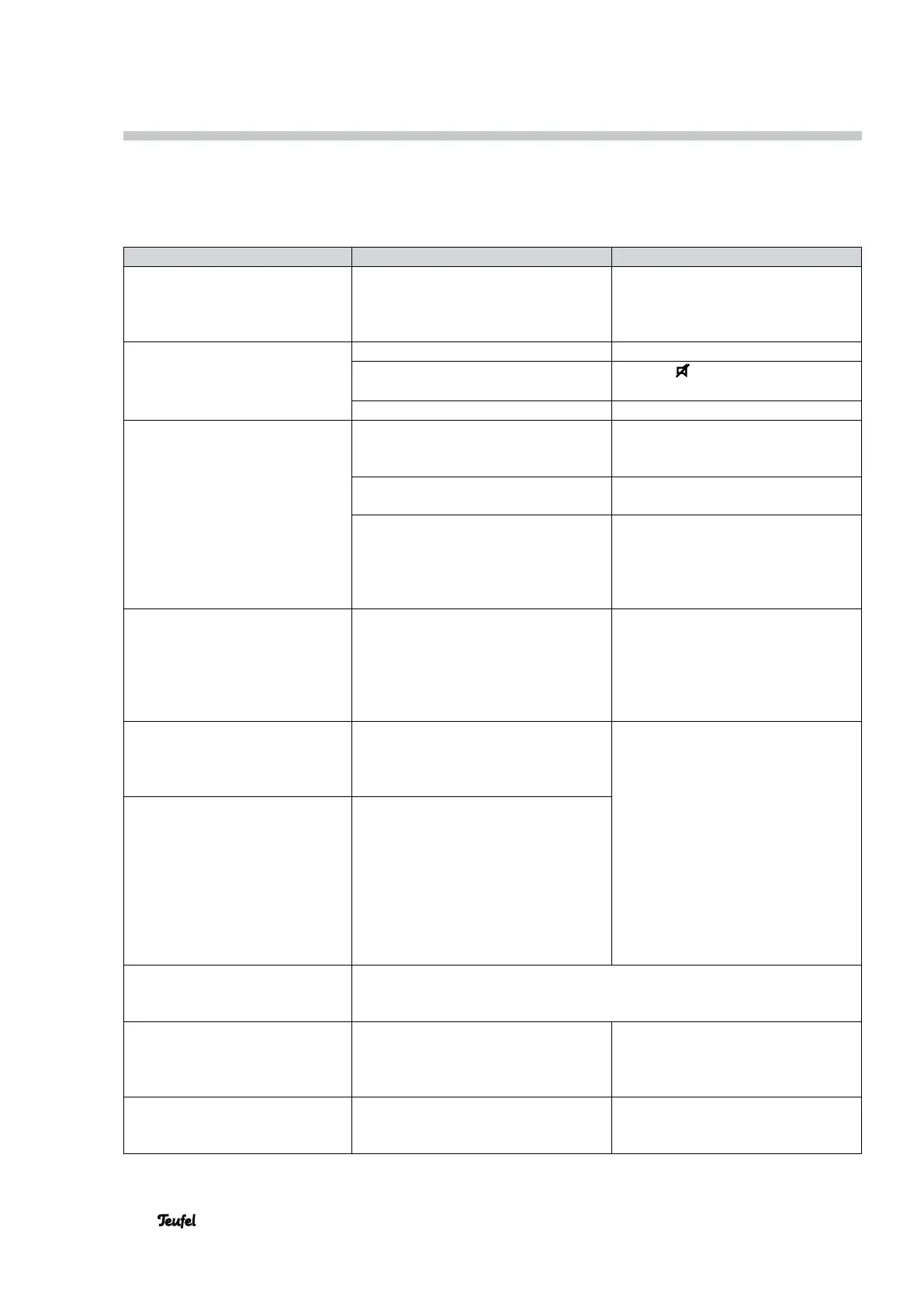
The following advice should help you to solve problems. If this does not help, you will find useful information in
the detailed FAQs on our website. Otherwise, please contact our hotline (see page 3). Take note of the warranty
instructions.
Problem Possible cause Solution
Function LED (19) blinks in red. Software error Restart the CoreStation: Pull the
mains plug, wait until the function
LED (19) goes out, insert the mains
plug back in the socket.
The CoreStation doesn’t emit
sound.
The wrong source has been selected. Select the correct source (17).
The device is set to “mute”.
Push the button or adjust the
volume.
The volume is set to “0”. Increase the volume.
The CoreStation hums. The CoreStation is connected to a
different power circuit from the rest of
the system.
Connect the CoreStation to the same
power circuit.
The humming is caused by problems
with the power supply.
Buy a line filter and connect all devic-
es to it.
The humming is caused by a multiple
socket strip.
Use a different multiple socket strip
or connect the CoreStation directly
to the wall socket. It may also help to
insert the mains plug in the socket
the other way around.
Playback is noisy. In general, the CoreStation is a very
low-noise system. In most cases, the
system with very high resolution in the
high range area can expose the poor
quality of a signal source (e.g. from
MP3 files).
Ensure that the source is sending
a clear signal to the CoreStation
system.
With stereo sources such as the
playback of radio or an MP3 play-
er, the rear satellites and/or the
center speaker do not emit sound.
MP3s, radio as well as many TV shows
only transmit stereo sound.
Switch the CoreStation to a Pro-Logic
mode or one of the DSP modes (5.1
Stereo).
No Dolby-/DTS multichannel
sound is emitted via the connect-
ed digital source.
With the playback of digital sources,
the CoreStation automatically recog-
nises the format of the signal source.
If the decoder fails to play multi-chan-
nel sound, there is presumably no
multi-channel signal. Digital signal
sources do not always have to transmit
multichannel sound, but can also emit
regular stereo sound (2.0).
You cannot toggle the surround
configuration.
You are probably using a digital input. If a Dolby or DTS signal is received at
this input, the CoreStation will automatically switch to the correct surround
configuration.
No sound is emitted from the
speakers on the CoreStation
although the TV set does not play
back the sound.
The functions CEC and ARC were not
activated on the CoreStation.
Activate the CEC and ARC functions
in the CoreStation menu (see “HDMI”
on page 21).
No sound is emitted from the
speaker system of the CoreStation,
which is connected via Pre-Out.
The PRE OUT output (11) of the
CoreStation has been switched off.
On the CoreStation, switch the mode
to 5.1 to activate the PRE OUT output
(11) (see “3.1/5.1” on page 22).
Troubleshooting


 To Next Page