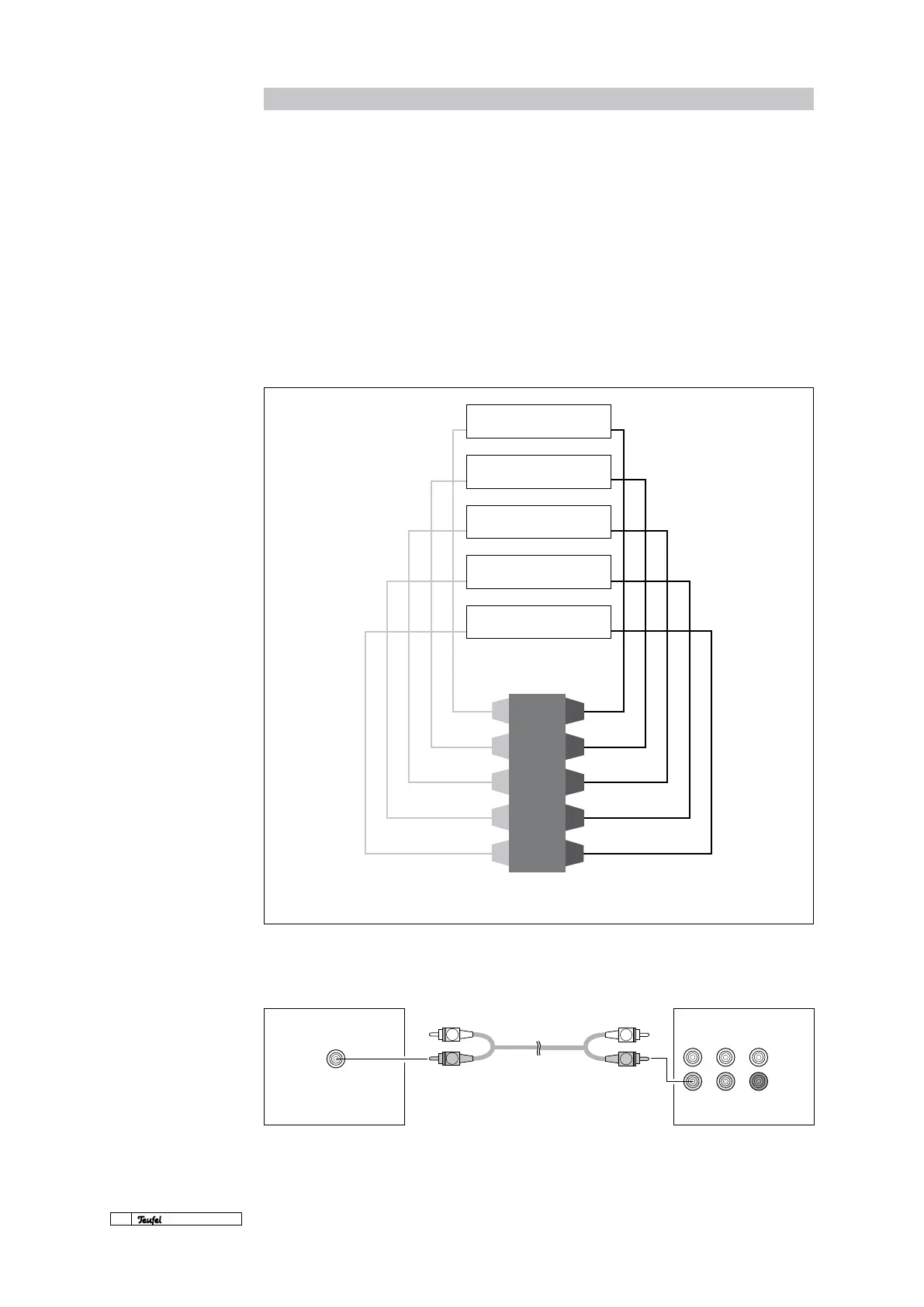
AV RECEIVER SPEAKER OUTPUT
FRONT SPEAKER
RIGHT
+ –
FRONT SPEAKER
LEFT
+ –
REAR SPEAKER
RIGHT
+ –
REAR SPEAKER
LEFT
+ –
CENTRE
+ –
FRONT
LEFT
+
FRONT
RIGHT
REAR
RIGHT
CENTRE
REAR
LEFT
+
+
+
+
–
–
–
–
–
L
R
L
R
14
· Motiv 5
The numerous possibilities for using the Mo-
tiv 5 even include connection to an AV receiver.
Although designed to be fully active, the set is
partially active in cooperation with an AV receiv-
er. You can connect the Motiv 5 like a standard
speaker system: the ve satellites via speaker ca-
ble to the corresponding speaker outputs front
R/L, rear R/L and centre of the AV receiver/ampli-
er and the subwoofer from the front R input via
a mono-cinch cable to the sub out output on the
A/V receiver/amplier.
If the AV receiver/amplier has preamplier out-
puts for all channels (front R/L, rear R/L, centre
and subwoofer), the Motiv 5 can also be connected
via three cinch cable pairs to the subwoofer and
the satellites via speaker cables to the subwoofer.
However, we recommend using the rst version.
Information
In order to guarantee that the
automatic on function
(auto on) works correctly, the
front cinch input (front right)
has to be used. The auto on/
standby switch only reacts when
the front R input is being used.
The subwoofer also receives the
full subwoofer signal via this
channel! The subwoofer input
can remain open.
AV receiver settings are de-
scribed in detail on page 15.
OUT
SUB
INPUT
L
R
FRONT
REAR
CENTRE
SUB
SUBWOOFER MOTIV 5



 To Next Page