8 • STEREO M 2
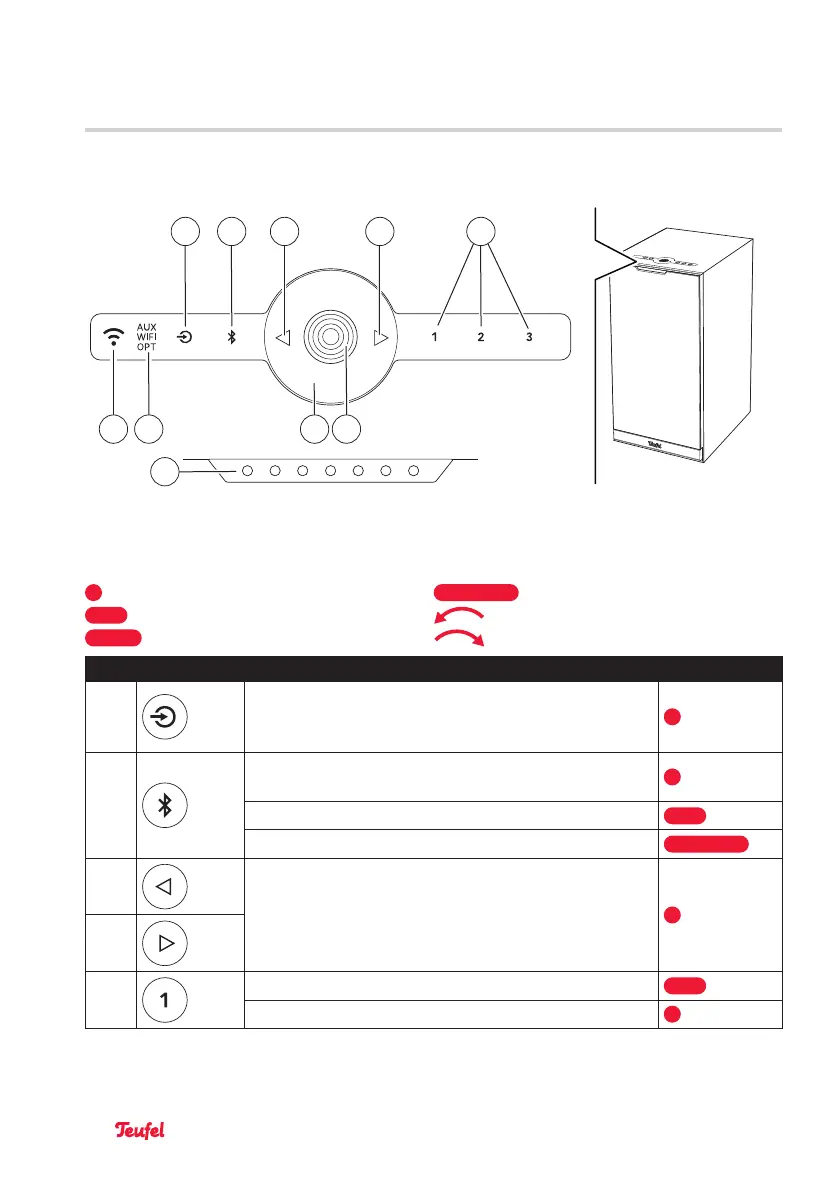
Operating panel
13
12
5 6
7
8
14
9
11 10
Operating panel and status LEDs on the primary loudspeaker
Legend (actuation):
= 1 press
= hold down (for 8 s)
= hold down (for 1.5 s) = turn counterclockwise
= hold down (for 4 s) = turn clockwise
No. Button Function Actuation
(5)
→SettingAUXIN,WiFiorOPTICALINasaplayback
source–p.20
(> AUX > WiFi > OPT >)
(6)
→SettingBluetooth®astheplaybacksource–p.20
→PairingBluetooth®devices–p.23
→DeletingtheBluetooth®list–p.23
(7)
→Playprevious / nexttrack(Bluetooth®andWiFimode)
–p.21
(8)
(9)
→Savingpresets–p.22
→Selectingpresets–p.22
Operating and display elements



 To Next Page