EasyManua.ls Logo

Texas Instruments CC35 E Series - Page 4

Texas Instruments CC35 E Series
29 pages
Print Icon
To Next Page IconTo Next Page
To Previous Page IconTo Previous Page
Loading...
2 Hardware
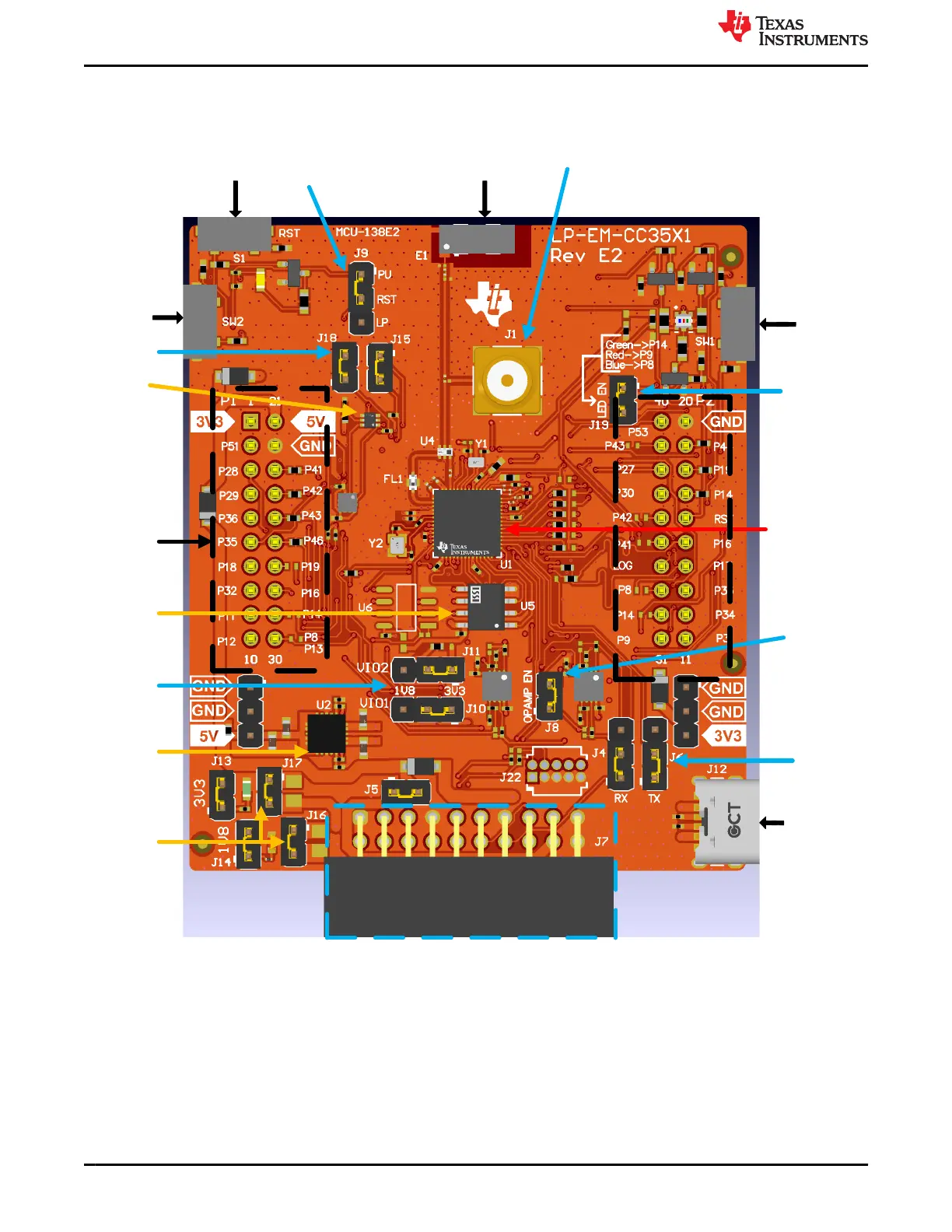
The overview of the LP-EM-CC35X1 is shown in Figure 2-1.
Reset Chip Antenna
Reset
Selection
SMA
Connector
Button/ Switch
SW2
Temp
Sensor
Sensor Bus
Connect
CC35xxE Wi-Fi 6
and Bluetooth®
Low energy
Wireless MCU
Dual
Rail
LDO
Current
measurement
USB type-C
power
supply
Button/ Switch
SW1
Enable LED
power
Enable
OPAMP
power
UART1
Selection
VIO Rings
voltage
20 pin LP-XDS110
Header
40-pin
BoosterPack
Connector
QSPI
Flash
Figure 2-1. CC35xxE LaunchPad Board Overview
Hardware www.ti.com
4 CC35xxE LaunchPad™ Development Kit for SimpleLink™ Wi-Fi 6 and
Bluetooth® Low Energy Wireless MCU
SWRU629 – SEPTEMBER 2024
Submit Document Feedback
Copyright © 2024 Texas Instruments Incorporated