EasyManua.ls Logo

Texas Microsystems, Inc. 2003 - Rev D Con£Iguration

Default Icon
44 pages
Print Icon
To Next Page IconTo Next Page
To Previous Page IconTo Previous Page
Loading...
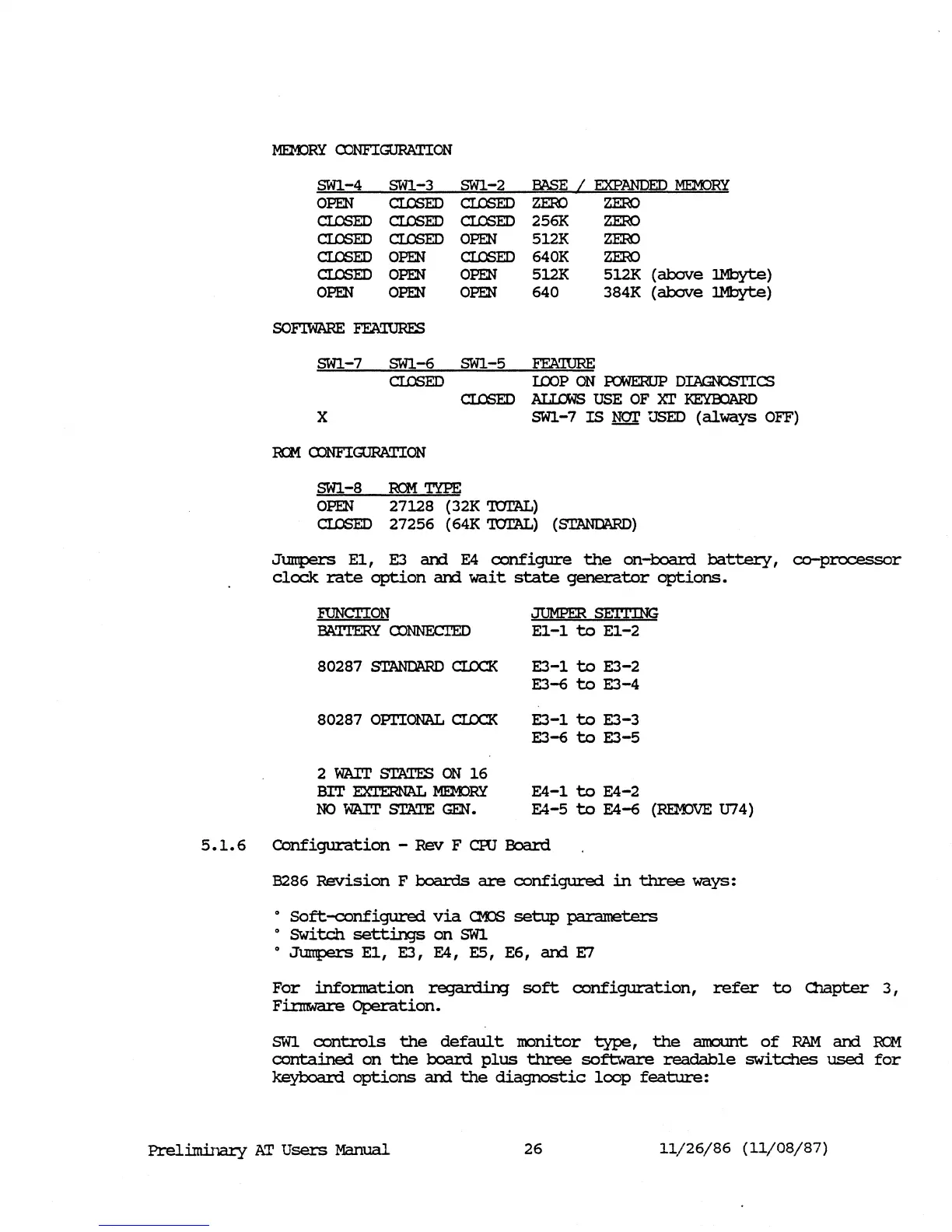
MEMJRY
CONFIGURATION
SW1-4 SW1-3 SW1-2
EASE
/
EXPANDED
MEMJRY
cr..a;ED
cr..a;ED
OPEN
cr..a;ED
ZERO
ZERO
2561<
ZERO
512K
ZERO
640K
ZERO
OPEN
cr..a;ED
cr..a;ED
cr..a;ED
cr..a;ED
OPEN
cr..a;ED
cr..a;ED
cr..a;ED
OPEN
OPEN
OPEN
OPEN
OPEN
5l2K 5l2K
(above
1Mbyte)
640
384K
(above
1Mbyte)
SW1-7 SW1-6 SW1-5
FFA'IURE
cr..a;ED
ImP
ON
~
DIAGNOSTICS
cr..a;ED
AI..l:.CWS
USE OF
n'
I<E:YOOARD
X SW1-7
IS
gzr
USED
(always
OFF)
RCM
CDNFIGURATION
SW1-8
RCM
TYPE
OPEN
27128
(32K '!OrAL)
cr..a;ED
27256
(64K '!OrAL)
(STANDARD)
Jumpers
El,
E3
arxi
E4
configure
the
on-board
battery,
co-processor
clock
rate
option
arxi
wait
state
generator
options.
FUNCl'ION
JUMPER
@ITlNG
BATI'ERY
CDNNEC1'ED
El-l
to
El-2
80287
STANDARD
cr.cx:::K
E3-l
to
E3-2
E3-6
to
E3-4
80287
OPl'IONAL
cr.cx:::K
E3-l
to
E3-3
E3-6
to
E3-5
2 WAIT STATES
ON
16
BIT
EXTERNAL
MEMJRY
E4-l
to
E4-2
NO
WAIT
STME
GEN.
E4-5
to
E4-6
(REM:>VE
074)
5.1.6
Configuration
- Rev F cro
Board
B286
Revision
F
boards
are
configured
in
three
ways:
o
Soft-configured
via
CM:>S
setup
parameters
o SWitch
settings
on
SW1
o
Jumpers
El,
E3,
E4,
E5, E6,
arxi
E7
For
infonnation
regarding
soft
configuration,
refer
to
Olapter
3,
FiJ:nWcn'e
Operation.
SW1
controls
the
default
monitor
type,
the
aIOOllIlt
of
RAM
arxi
RCM
contained
on
the
board
plus
three
software
readable
switches
used
for
keyboard
options
arxi
the
diagnostic
loop
feature:
PrelimiJary
AT
Users
Manual
26
11/26/86
(11/08/87)