EasyManua.ls Logo

Texas Microsystems, Inc. 2003 - Changing Processor Clock Speed; Continuous Loop Diagnostics

Default Icon
44 pages
Print Icon
To Next Page IconTo Next Page
To Previous Page IconTo Previous Page
Loading...
continue.
However~
operating
inconsistencies
can
result
that
may
cause
the
computer
to
abort.
(Re£er
to
the
BIOS
Startup
Routine
and
Error
Messages
discussed
previously
in
this
section.)
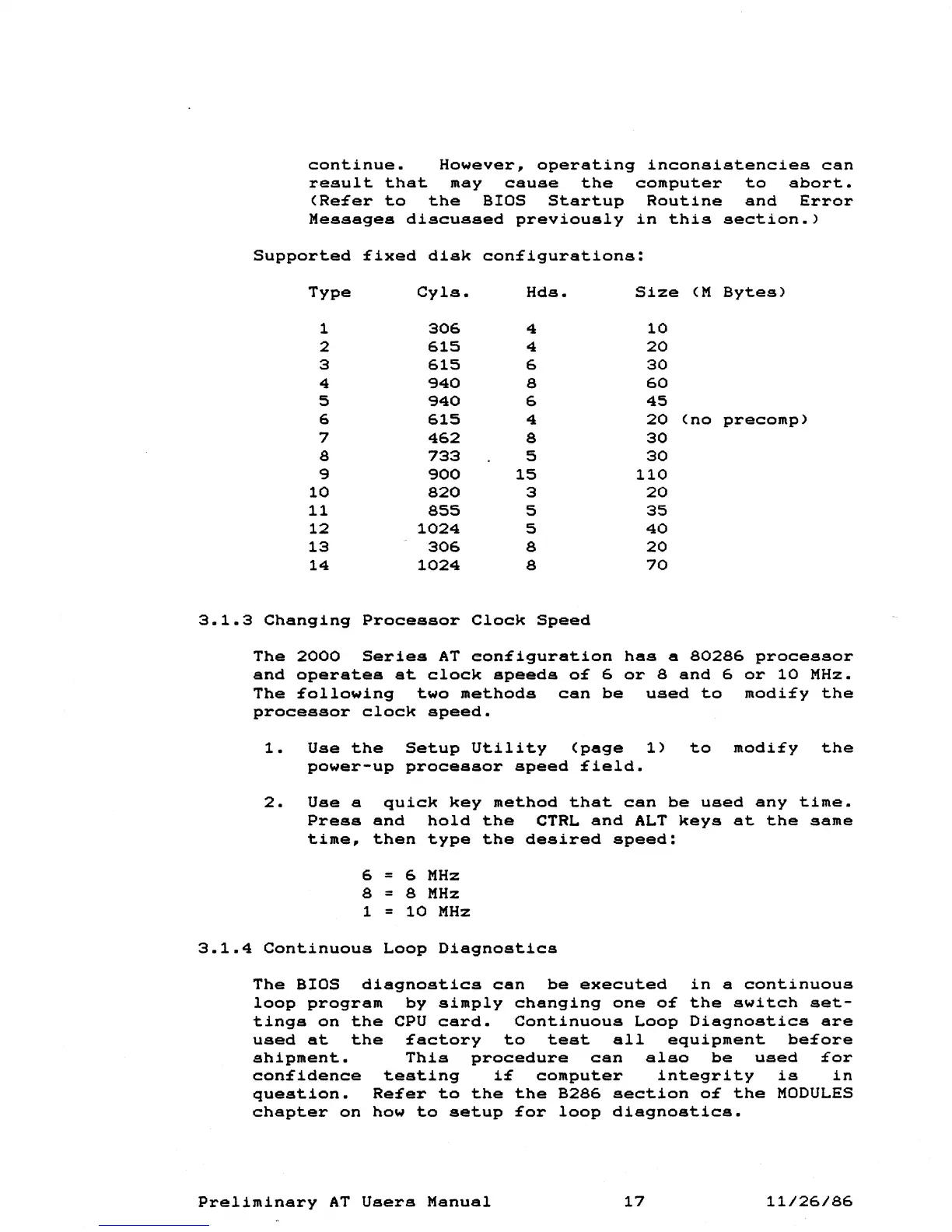
Supported
£ixed
disk
con£igurations:
Type
Cyls.
Hds.
Size
(M
Bytes)
1
306
4
10
2
615
4
20
3
615
6
30
4
940
8
60
5
940
6
45
6
615
4
20
(no
precomp)
7
462
8
30
8
733
5
30
9
900
15
110
10
820
3
20
11
855
5
35
12
1024
5
40
13
306
8
20
14
1024
8
70
3.1.3
Changing
Processor
Clock
Speed
The
2000
Series
AT
eon£iguration
has
a
80286
processor
and
operates
at
clock
speeds
6
or
8
and
6
or
10
MHz.
The
£ollowing
two
methods
can
be
used
to
modi£y
the
processor
clock
speed.
1.
Use
the
Setup
Utility
(page
1)
to
modi£y
the
power-up
processor
speed
£ield.
2.
Use
a
quick
key
method
that
can
be
used
any
time.
Press
and
hold
the
CTRL
and
ALT
keys
at
the
same
time,
then
type
the
desired
speed:
6 = 6
MHz
8 = 8
MHz
1 =
10
MHz
3.1.4
Continuous
Loop
Diagnostics
The
BIOS
diagnostics
can
be
executed
in
a
continuous
loop
program
by
simply
changing
one
the
switch
set-
tings
on
the
CPU
card.
Continuous
Loop
Diagnostics
are
used
at
the
£actory
to
test
all
equipment
be£ore
shipment.
This
procedure
can
also
be
used
£or
con£idence
testing
computer
integrity
is
in
question.
Re£er
to
the
the
B286
section
the
MODULES
chapter
on
how
to
setup
£or
loop
diagnostics.
Preliminary
AT
Users
Manual
17
11/26/86