— E12 —
Operation
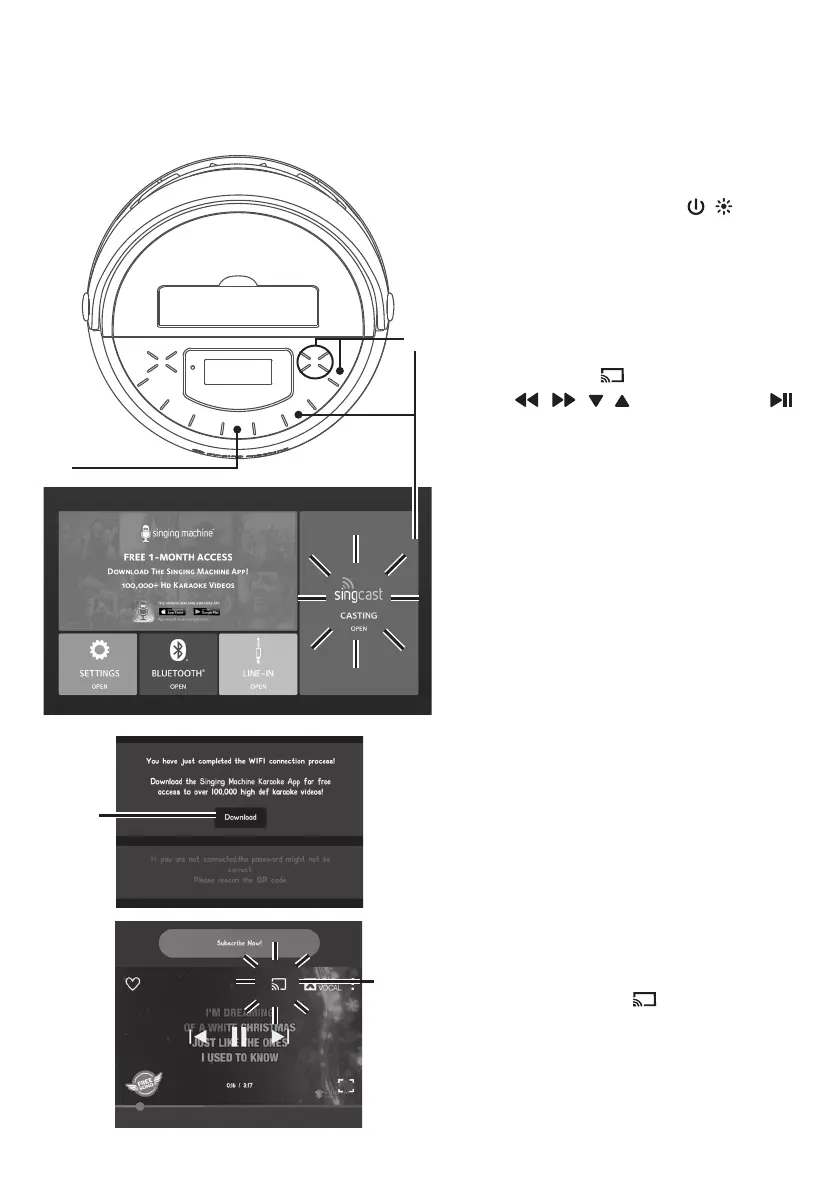
Using SingCast Casting
1
Connect the unit as described
previously and ensure to connect
it to a TV. Press the / button
to power on the unit. The power
indicator will light solid.
2
Press the button or using the
, , , Navigation and
button to select the SINGCAST
OPEN in the main menu (the unit
should be connected to a TV).
“CAS” appears on the display.
3
Download the Singing Machine
Karaoke App to choose from
thousands of HD karaoke videos,
project your favorite karaoke
videos from your mobile device to
your TV (make sure your mobile
device and the unit are connected
to the same WiFi network).
4
After registering your account,
choose your favorite song. Press
the icon “ “ and select
“SingCast_One” to cast to your
TV.
w
x
v
u











 To Next Page