EasyManua.ls Logo

The Singing Machine STVG-519 - Making the Connections; Connecting Power; Selecting Your Singing Machine as Your Source;Input

The Singing Machine STVG-519
14 pages
Print Icon
To Next Page IconTo Next Page
To Previous Page IconTo Previous Page
Loading...
MAKING
THE
CONNECTIONS
CONNECTING
POWER
Insert
the
DC
plug
of
the
power
adapter
into
the
DC
12V
jack
of
the
unit.
You
can
power
the
system
from
a
standard
AC
ouUet
by
using
the
supplied
Power
Adapter
(The
adapter
operates
on
AC
100V-
240V/50HZ-60HZ
©-(S-@).
CAUTION:
~
The
included
AC
adaptor
is
for
use
with
this
unit
only.
Do
not
use
them
with
other
equipment.
-
When
the
unit
is
not
going
to
be
used
for
a
long
time,
disconnect
the
adaptor
from
the
AC
outlet.
•
When
the
adaptor
is
plugged
in.
the
apparatus
Is
not
completely
disconnected
from
the
main,
even
when
the
power
is
turned
off.
CONNECTING
TO
YOUR
TV
OR
VCR/DVD
PLAYER
Your
Singing
Machine
is
designed
to
connect
to
your
TV
the
same
way
you
would
connect
most
video
cameras,
VCR/OVO
players
or
video
game
consoles.
We
have
provided
RCA
cables
to
connect
your
unit
to
a
TV.
VCR/DVD
player,
video
device
or
an
external
audio/sound
system.
The
RCA
cables
have
three
connections
at
each
end
(white
and
red
are
for
left
and
right
audio
connections
and
the
yellow
is
for
video
connection).
Please
follow
the
steps
below
to
display
CD+G
lyrics
on
the
TV
screen;
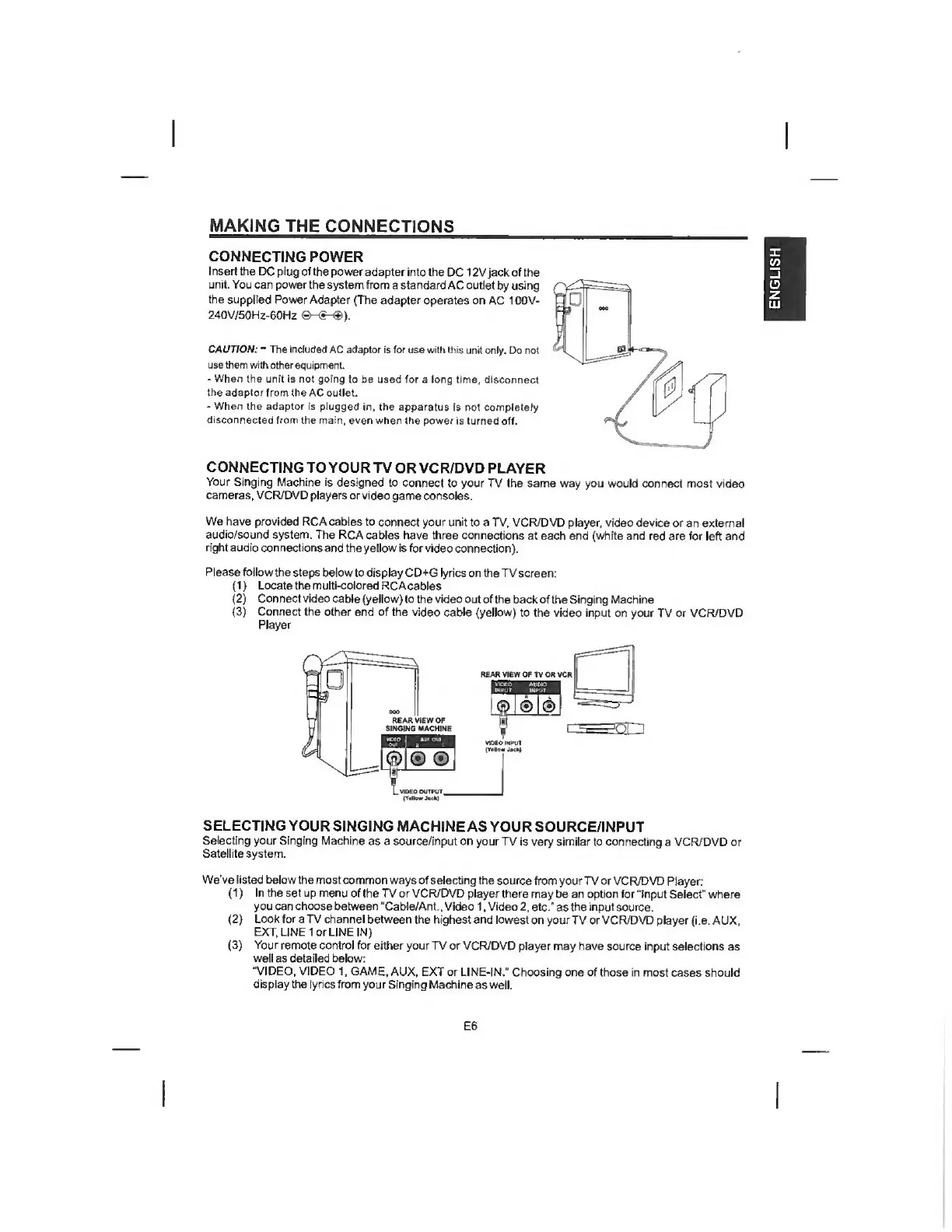
(1)
Locate
the
multi-colored
RCAcables
(2)
Connect
video
cable
(yellow)
to
the
video
out
of
the
back
of
the
Singing
Machine
(3)
Connect
the
other
end
of
the
video
cable
(yellow)
to
the
video
input
on
your
TV
or
VCR/DVD
Player
mi-
I
VMOMPVt
SELECTING
YOUR
SINGING
MACHINE
AS
YOUR
SOURCE/INPUT
Selecting
your
Singing
Machine
as
a
source/input
on
your
TV
is
very
similar
to
connecting
a
VCR/DVD
or
Satellite
system.
We’ve
listed
below
the
most
common
ways
of
selecting
the
source
from
your
TV
or
VCR/DVD
Player:
(1)
In
the
set
up
menu
of
the
TV
or
VCR/DVD
player
there
may
be
an
option
for
“Input
Select"
where
you
can
choose
between
‘Cable/Ant.,
Video
1,
Video
2,
etc."
as
the
input
source.
(2)
Look
for
a
TV
channel
between
the
highest
and
lowest
on
your
TV
or
VCR/DVD
player
(i.e.
AUX,
EXT.
LINE
lor
LINE
IN)
(3)
Your
remote
control
for
either
your
TV
or
VCR/DVD
player
may
have
source
input
selections
as
well
as
detailed
below:
“VIDEO,
VIDEO
1,
GAME.
AUX.
EXT
or
LINE-IN.“
Choosing
one
of
those
in
most
cases
should
display
the
lyrics
from
your
Singing
Machine
as
well.
E6
ENGLISH