58
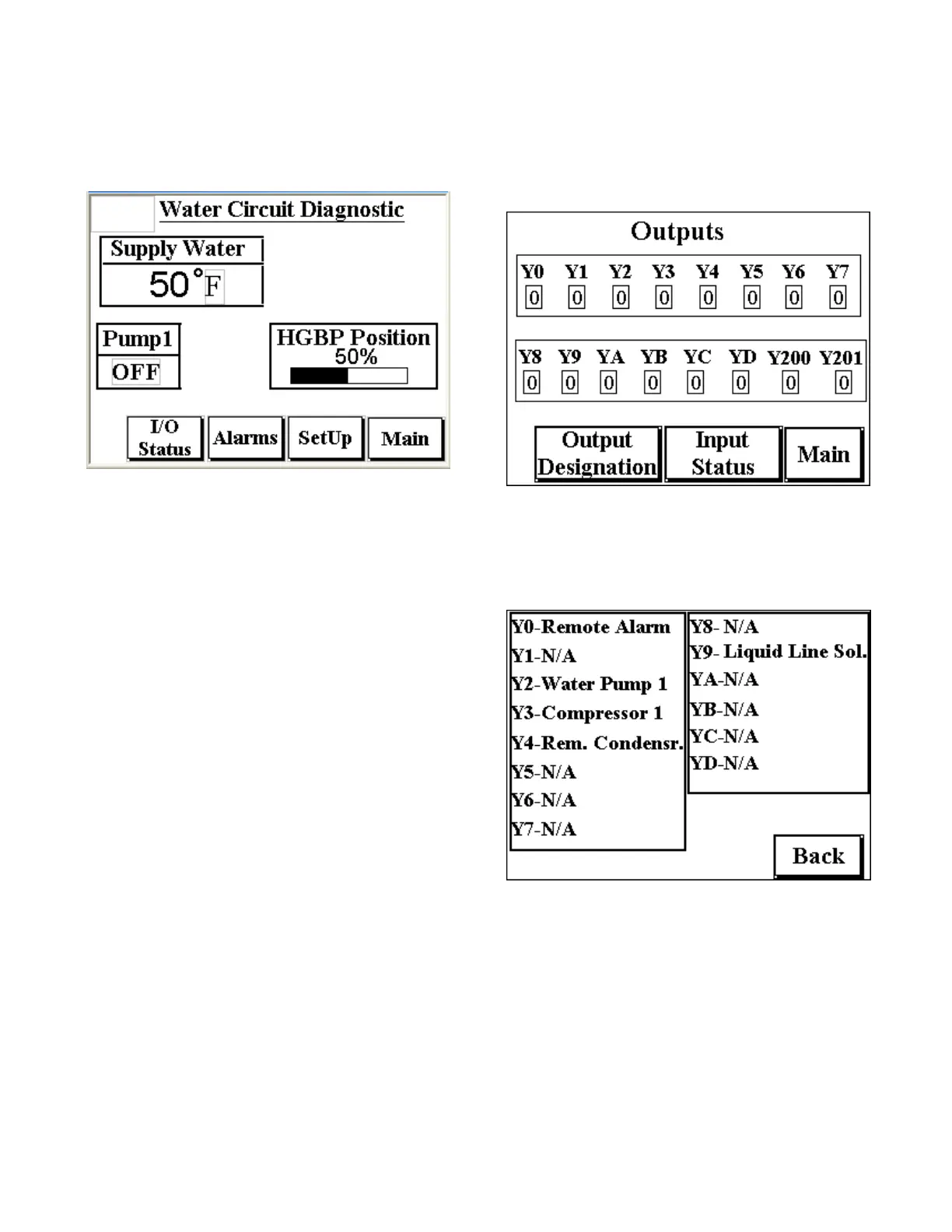
Process Diagnostic Screen
This screen displays the operating status of the
coolant temperature, pump status, and the hot gas
bypass valve position as a percentage of full open.
I/O Status Button
Touching this button navigates to the I/O Status
screen.
Alarms Button
Touching this button navigates to the Alarms screen.
Setup Button
Touching this screen navigates to the Compressor
Setup screen. The Compressor Setup screen is
password protected so navigating to this screen
shows a prompt for a password. The Password is
“9999”.
Main
Touching this button navigates to the Main screen.
I/O Status Screen
This screen shows the digital inputs and outputs
from the chiller PLC. A “0” represents OFF while “1”
represents ON. Each symbol (Y0, Y1, etc.) represents
a physical input or output.
Output Designation Button
Touching this button navigates to the Output
Designation screen. A sample of an output
designation screen is below.
Input Status Button
Touching this button toggles the display from Input
to Output status and back again.



 To Next Page