23
9. TROUBLE SHOOTING
9. TROUBLE SHOOTING
Serial
#
ERROR CONDITION TROUBLESHOOTING
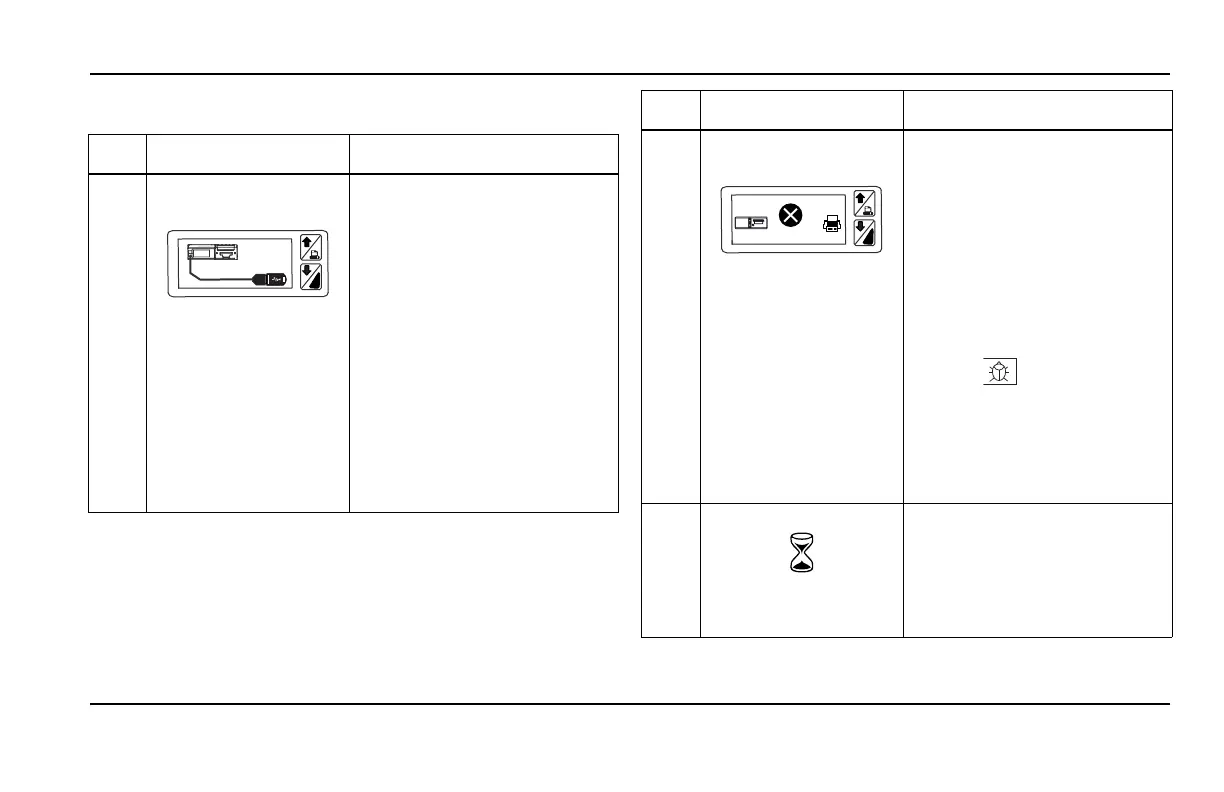
1 Language Glossary Error
with the following symbol
i
• Copy the .glo files (of all
languages to be supported) in
a USB flash drive.
• Connect the USB port using short
Mini USB cable.
• Restart the device if
the download not happened
au
tomatically by connecting
the FLASH drive.
• ABC symbol are the glossaries of
the T
ouchPrint. Glossaries must
not be deleted unless you are
planning to replace them with
new glossaries. If glossaries are
deleted, put the .GLO files
(available to TK Dealers) in
a USB memory stick and connect
to the TouchPrint mini USB port.
2 Error while printing
(Delivery Ticket)
i
TK
ERROR
6
• Check if the Baud rate is
matching with the connected
DATALOGGER (Cargowatch)
• Check for Electrical connection -
TX and R
X.
• If the HMI is engaged in ‘Engine
sta
rt’, ‘Alarm’,…the Printer
cannot establish communication
with CargoWatch. Wait and try
again when HMI is in normal
mode.
• Increase T1 in the parameter
setting ( in service menu) to
60s to allow for more time to
communicate between Printer
and Unit.
NOTE: See section "10.3.1 Error
Display in Touch Print" on
page 28
3 Device Busy
• If the User try to print the trip
ticket before the T3 time (refer
6.7) after printing a trip ticket
then the device will show this
BUSY, Try again symbol. User
has to wait approximately 150 sec
to generate another trip ticket.
Serial
#
ERROR CONDITION TROUBLESHOOTING


 To Next Page