B
·
R
·
A
·
H
·
M
·
S GmbH
B
·
R
·
A
·
H
·
M
·
S KRYPTOR compact PLUS User Manual (Version R08en) Page 21 of 28
The assay of an analyte with a pre-incubation is com-
posed of two phases:
Pre-incubation or Phase I: the system aspirates one
of the 2 conjugates and the antigen (sample). The
system dispenses the mixture into the reaction well
and the pre-incubation starts.
Phase II: the system aspirates the second conjugate
and dispenses it into the reaction well. At this moment
the Out of Range detection starts.
This leads to a specific operation of the interface
to avoid losing tests in Phase I distributed into the
reaction area.
The final test result will be achieved through Phase I
and Phase II using the same reagent kit.
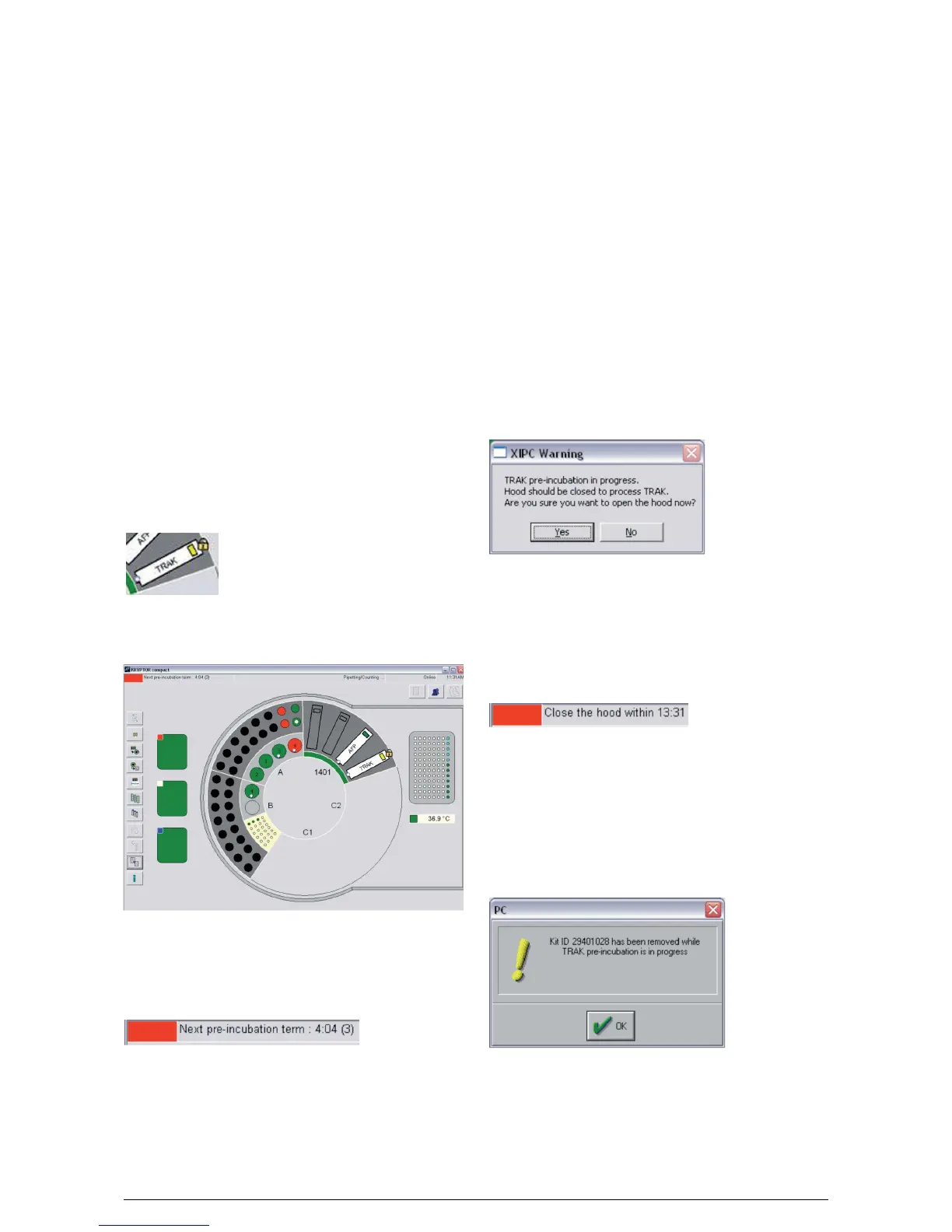
To alert the user that a kit is in use for Phase I and is
required for Phase II, a padlock will appear on the user
interface at the edge of the reagent kit as shown
below. The kit should not be removed while the
padlock is displayed.
At the same time, a flashing red square will appear in
the top left corner of the screen.
The message behind the red square indicates the
estimated time in minutes and seconds remaining of
Phase I. There is also a number in parentheses to show
the number of tests in Phase I.
By reading this message the user can estimate the
time available to open and close the hood.
The padlock is removed when the reagent kit has no
tests remaining in Phase I, however the RED square
can remain active if other tests in Phase I are under-
way.
If the buffer bottle, water bottle, one of the solution
bottles or the waste bottle is detected in red status
during Phase I or Phase II, pipetting will stop and a
popup window on interface informs to replace the
solution. In Phase II the carousel hood will be opened
by the system software and a beeping sound will alert
the user.
A user request to open the carousel hood during Phase
I is subject to confirmation by the user via a message
appearing on the screen.
Clicking on the “Yes” button allows the hood to be
opened with a beeping sound to alert the user and a
new text message next to the red flashing square indi-
cating the time available for the user to close the hood.
Clicking on “No” led to the abandonment of the appli-
cation to open the carousel hood.
When closing the carousel hood, the text indicates
the estimated time in minutes and seconds before the
distribution of Phase II.
When closing the hood, a carousel scan is performed.
If a reagent kit containing a pre-incubation test was not
found on board of the instrument, the user is notified
via a message displayed on the interface:
If the kit is not returned before the start of Phase II, any
tests in progress with this kit will be declared failed. At
the results list, the user can view the status of a test.
Analytes with Pre-incubation
B
·
R
·
A
·
H
·
M
·
S GmbH
B
·
R
·
A
·
H
·
M
·
S KRYPTOR compact PLUS User Manual (Version R08en) Page 21 of 30





 To Next Page