B
·
R
·
A
·
H
·
M
·
S GmbH
B
·
R
·
A
·
H
·
M
·
S KRYPTOR compact PLUS User Manual (Version R08en) Page 25 of 30
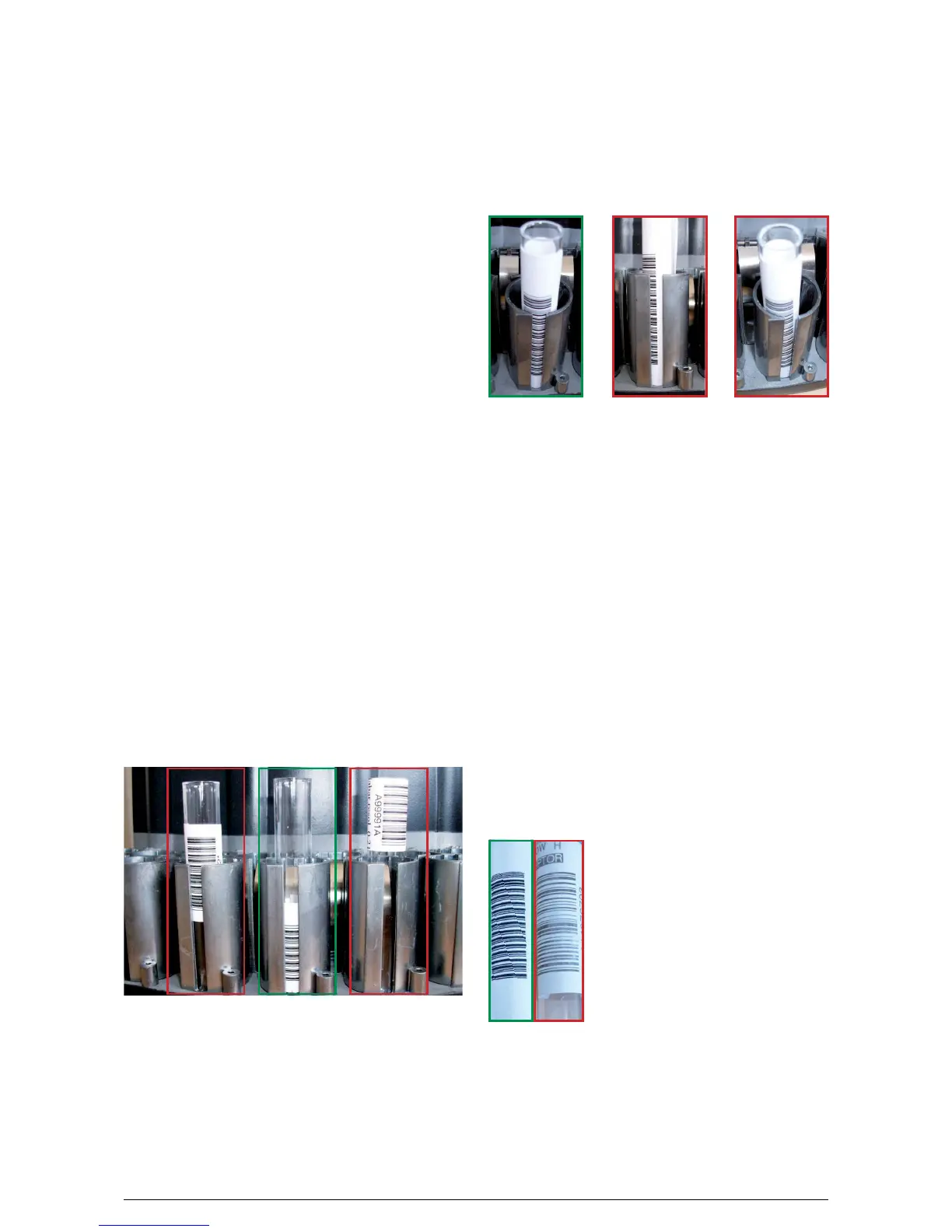
Tube positioning: The tube must be straight and the
bars must visible throughout the window width.
A: Good position
B-C: Bad position, the barcode reader may not be able
to scan the code
Paper quality: A paper having a too high ink absorp-
tion will give a blurred result and will decrease the
amount of good readings (this problem will have a
higher impact on barcodes having a low resolution).
Paper brightness: The barcode readers are very sens -
itive to the light reflection. Even though the barcode
reader is mechanically adjusted in order to limit the
light reflection a too glossy paper may affect the
reading performances of the codes.
Printing quality: The printer quality has an influence
on the reading performances. The best printers for
bar
c
odes are thermal printers (recommended for low
resolution barcodes) but most of the time a laser
printer is sufficient.
C
A: Printing quality is good.
Good contrast. Good resolution (accu-
rate printing).
B: Printing quality is low.
The printer resolution is not good
enough. The contrast is not sufficient.
BA
B
Available symbologies on KRYPTOR instruments:
• Code 128
• Code 39
• Codabar
• Code 2/5 interleaved
• Code UPC/EAN
Other specifications:
• Minimum resolution: 0.21 mm
(size of narrowest bar (black or white bar))
• Minimum ratio = 2.5
(ratio of narrow bars to wide bars)
• Maximum ratio = 3.0
Silence section (blank section before and after the
code): at least 10 times the resolution (a silent section
before and after the code is mandatory for a good rea-
ding otherwise the code cannot be recognized).
Barcode positioning: We recommend to stick the
label 5 mm above the bottom of the tube (if the code
is long and the label is stuck too high the barcode rea-
der may have some difficulties to read the bars located
at the top, specially if the resolution is low (thin bars)).
At least a few bars from the barcode must be in the
window formed by the tube holder: the window will
determine the barcode position within the cassette.
The code must not be stuck entirely above the tube
holder because there is a risk of misidentification in
this case (a tube in position 2 may be seen in position
3 for example).
A B
C
A: Barcode position is acceptable but it’s not the best
position.
B: Best barcode position.
C: This barcode position is forbidden. At least a few bars
must be in the tube holder window.
Barcodes Specifications
A





 To Next Page