33
Sensitivity
Path: Sensitivity
This menu sets the sensitivity number which the detector is using. Increasing the number results in higher sensitivity detecting
smaller particles of metal. Manually adjust the sensitivity using the + and - keys, then press Accept to enter the new value.
Range: 0-1000.
Note: Coarse adjustment can be achieved by moving the cursor to the desired digit and adjusting that digit.
WARNING: Any adjustment made to the sensitivity setting should be followed by a thorough test of the detector’s
operation using the required test samples.
Peak Signal
The peak signal is always displayed with the sensitivity number and it shows the relative value of any signal which the detector
receives. When the peak signal exceeds 100, the detection threshold is tripped and will result in a reject signal.
(if the detection mode is narrow zone, a higher peak - 120-140 - may be required before a rejection will occur - see - detect mode
below).
The peak number should be used as a guide to assist in determining the sensitivity setting. Assuming any product effect has
been compensated, the peak number will display the current background signal. This should be kept below 50-60 for reliable
operation. Adjusting the sensitivity will scale the peak number also.
Example: If peak = 100
Sensitivity = 200 Changing sensitivity to ‘100’ will scale the peak to ‘50’
Ideally the sensitivity should be set so that the background signal peak is 50 or below and the signal from the test sample(s) is
150 or greater.
Sensitivity - Special
Detect Mode
Narrow Zone
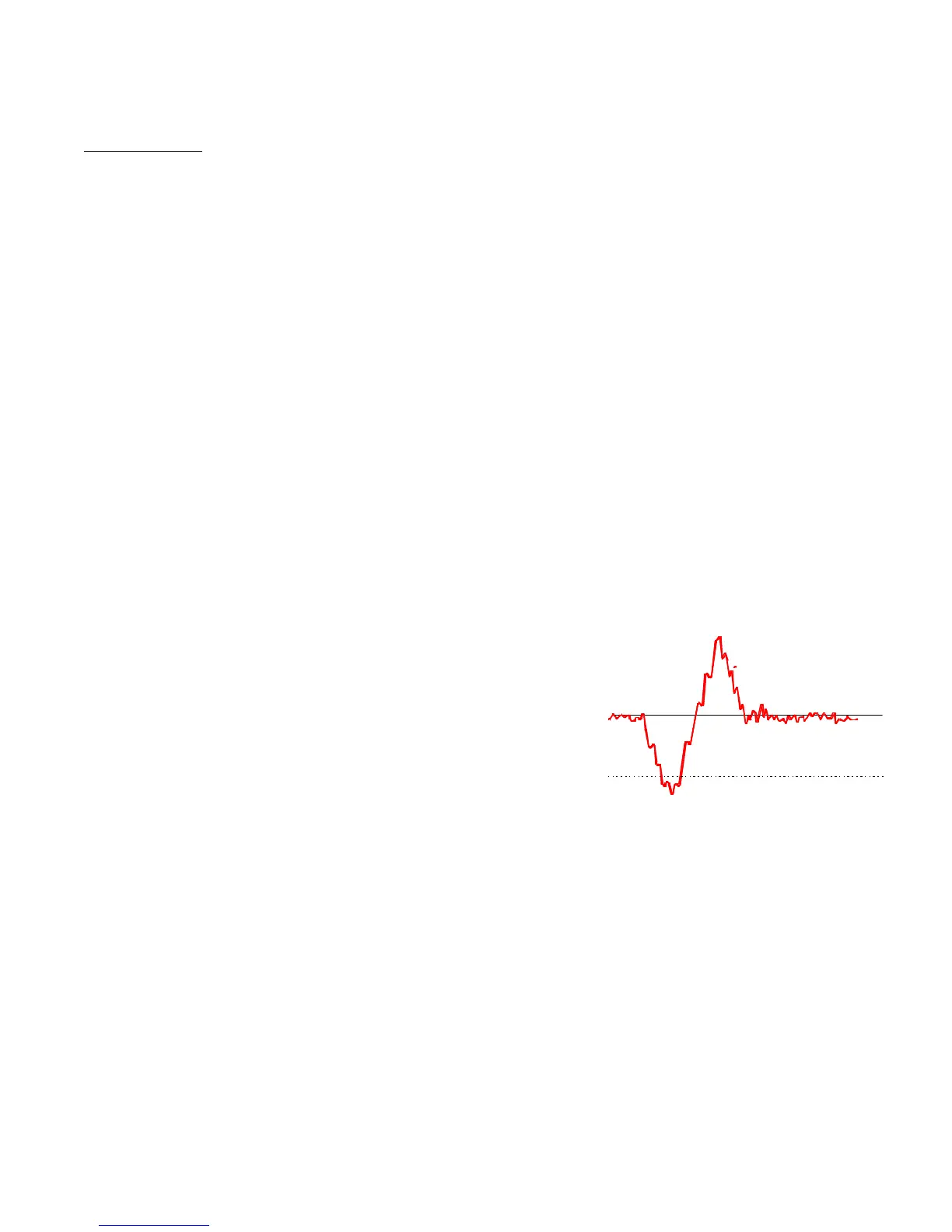
Under this mode, a detection will occur only if the signal from the
entrance coil and exit coil (positive & negative) both exceed the threshold
set by the sensitivity number. Figure 32
Amplitude
Under Amplitude, if either polarity (positive or negative) cross a threshold a detection will occur. Amplitude is usually more
sensitive than narrow zone and should be used if in doubt. Narrow zone can improve immunity to external interference in some
circumstances.
Fixed
Selecting fixed will include sensitivity and the Product Learn path.
Hold
Hold will remove sensitivity from the Product Learn path. Hold is the default setting for gravity applications.
Learn
Learn initiates an Automatic Sensitivity Learn. If the system has a photo eye the learn will take four product passes to be
complete. If there is no photo eye, a learn will take approximately 15 to 20 seconds. During this period the detector will calculate
an optimum safe sensitivity. This can then be manually adjusted if required.
Signal
Positive
Threshold
Negative
Threshold



 To Next Page