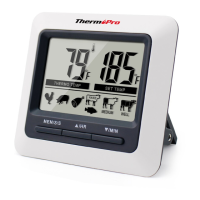
6. START STOP– In timer mode, press to start or stop
the timer.
7. TASTE – In thermometer mode, select the meat
taste level, RARE, MED RARE, MEDIUM, MED WELL
and WELL DONE.
Note: The temperature displayed to the right of the
actual meat temperature PROBE TEMP will show
the preset temperature TEMP SET according to
USDA doneness levels. Example: Beef will be Well
Done at 165 ºF.
Measure meat temperature to USDA
doneness temperature range
1. Press MODE to select thermometer mode. The upper
display will show a small MEAT and a meat type such
as BEEF.
2. Press MEAT to select meat type. PROG
GBEEF(ground beef), GPOUL (ground poultry), BEEF,
VEAL, CHCKE(chicken), PORK, POULT(poultry) ,
LAMB & FISH.
(program),
3. Press TASTE to select the level of doneness for the
meat type selected. RARE, MED RARE, MEDIUM,
MED WELL and WELL DONE.
Installing Batteries
Open the battery compartment and insert two AAA
batteries with correct polarity.
Turn On/Off The Unit
Press and hold “ C/ F/ ” for 2 seconds to turn on/off
the unit.
º º
4. Once the temperature of meat reaches the preset
doneness level the unit will beep and the LCD
backlight will turn red.
Measure meat temperature set to your
specific taste
1. Press MODE to select thermometer mode. The
upper display will show a small MEAT and a meat
type such as BEEF.
2. Press HR or MIN to raise or lower the set
ture. As you press HR or Min the display changes to
PROG (program). Holding the button will raise or
lower the temperature setting rapidly. Pressing
MEAT will return you to the preset USDA ranges.
tempera-
3. Once the temperature of meat reaches the preset
ENEN
-4-
-5-



 To Next Page