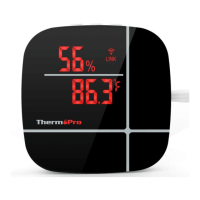
Congratulations on your purchase of a smart, wireless Alexa-
enabled indoor Thermometer/Hygrometer. This Alexa-enabled
ThermoPro device not only quickly and accurately broadcasts the
temperature and humidity of each room, it allows you to be able
to conveniently look up historic temperature and humidity
readings from any location via an APP installed on your cellphone.
When you ask Alexa the temperature and humidity of a room,
Alexa will respond you by announcing the current temperature
and humidity retrieved from the device.
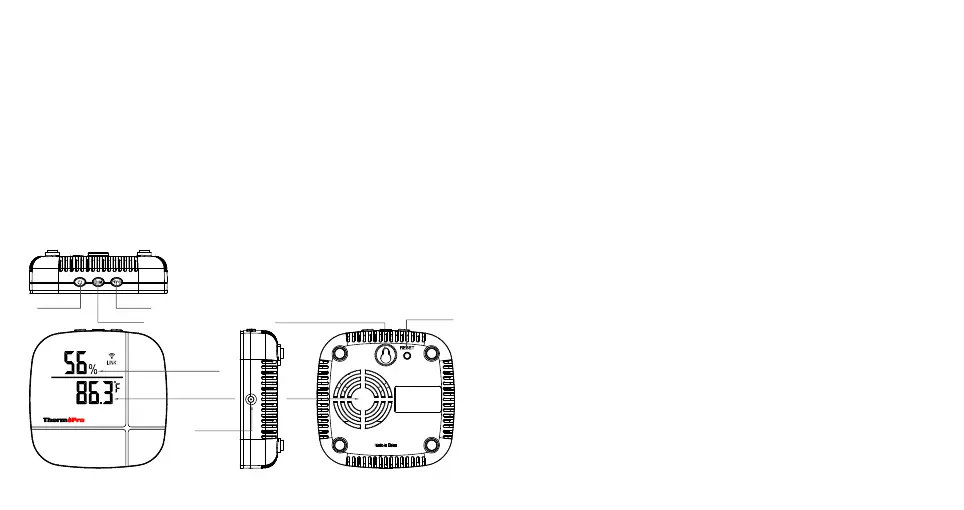
Buttons:
Power: Press to turn on/off device.
DIM: Press to adjust the brightness of the LED display.
°F/°C
and Celsius.
: Press to switch the temperature unit between Fahrenheit
RESET: Press and hold for 5 seconds to enter EZ or AP pairing modes.
°F/°C
DIMMER
ON/OFF
HUMIDITY
TEMPERATURE
DC JACK
WALL HANGING HOLE
WI-FI RESET
FAN
-2- -3-
Step 3: Once your account is setup, power on the ThermoPro
thermometer/hygrometer device and follow the instructions in
the APP to add the sensors.
Follow the simple steps below to set up your smart Alexa-Enabled
Thermometer/Hygrometer.
You need to install and setup both the ThermoPro Home APP and
Amazon Alexa APP.
Step 1: Search for “ThermoPro Home“ on the Apple Store for IOS
devices or on the Google Play Store for Android devices.
Download the App and install it on your smartphone.
Step 2: Open the ThermoPro Home App, and you will be asked to
register a ThermoPro account.


 To Next Page