Applied Instructions
Function & Action
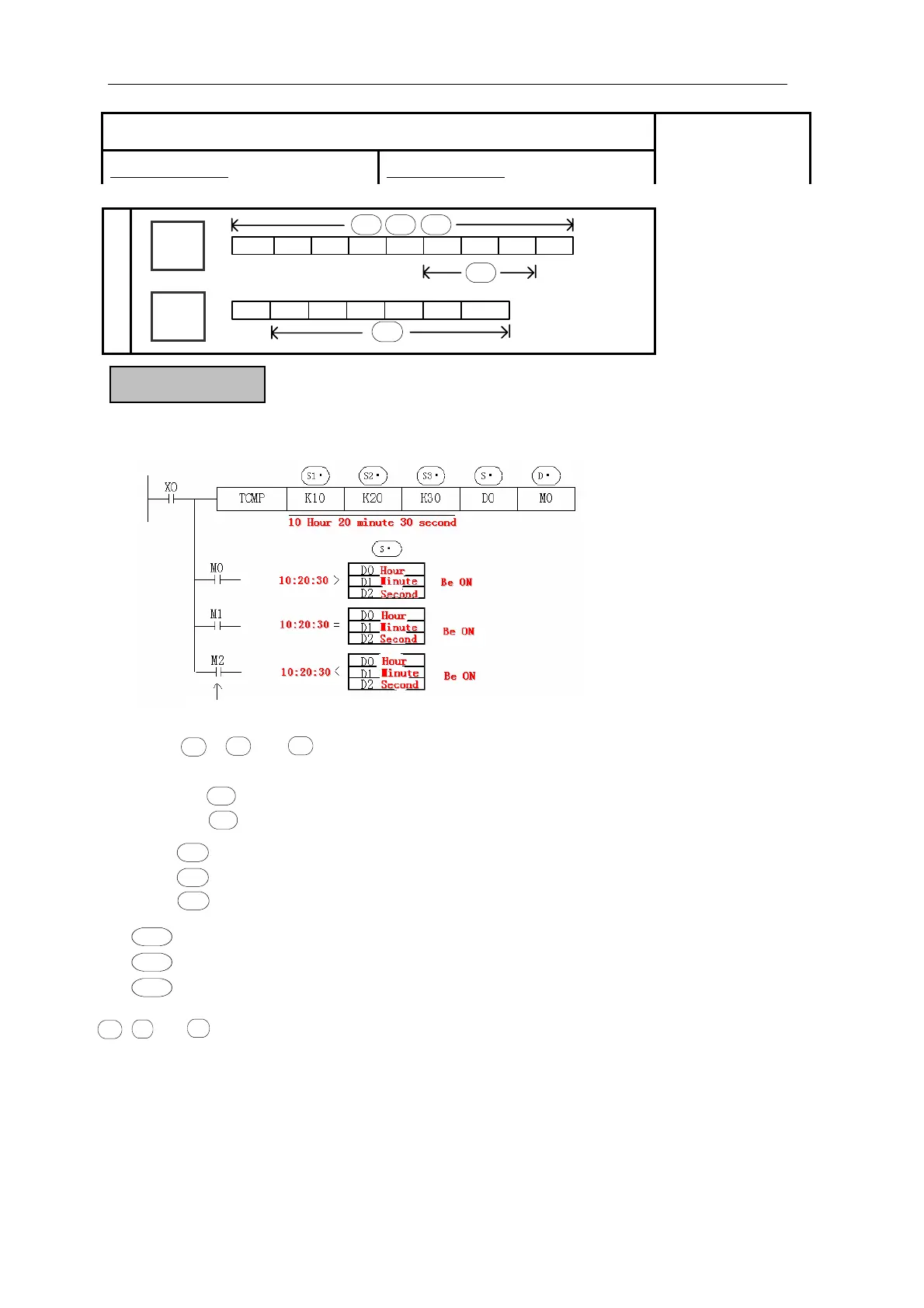
Compare the assigned time with time data.
The status of the destination devices is ke
t
even if the TCMP instruction is deactivated.
:Assign the compare standard “Hour”
:Assign the compare standard “Minute”
:Assign the compare standard “Second”
S1·
S2·
S3·
z 「 , , 」represent hours, minutes and seconds respectively. This
time is compared to the time value in the 3 data devices specified by the head
address , The result is indicated in the 3 bit devices specified by the head
address
S1·
S2·
S3·
S·
D·
:Assign the “Hour” of clock data
+1 :Assign the “Minute” of clock data
+2 :Assign the “Second” of clock data
S·
S·
S·
, + 2 :According to the compare result, the 3 devices output ON/OFF.
The valid range of “Hour” is「0~23」.
The valid range of “Minute” is「0~59」.
The valid range of “Second” is「0~59」.
1, +
D·
D·
D·
Time Compare [TCMP]
16 bits instruction:DIV 32 bits instruction:DDIV
Suitable Models:
XC3、XC5
Word
Device
Bit
Device
D FDDMDX DY DS TD CDK/H
S1·
S2· S3·
S·
X Y M S T C Dn.m
D·
129



 To Next Page