Applied Instructions
TWR D10
X0
S·
Function & Action
The 7 data devices specified with the
head address S are sed to set a ne
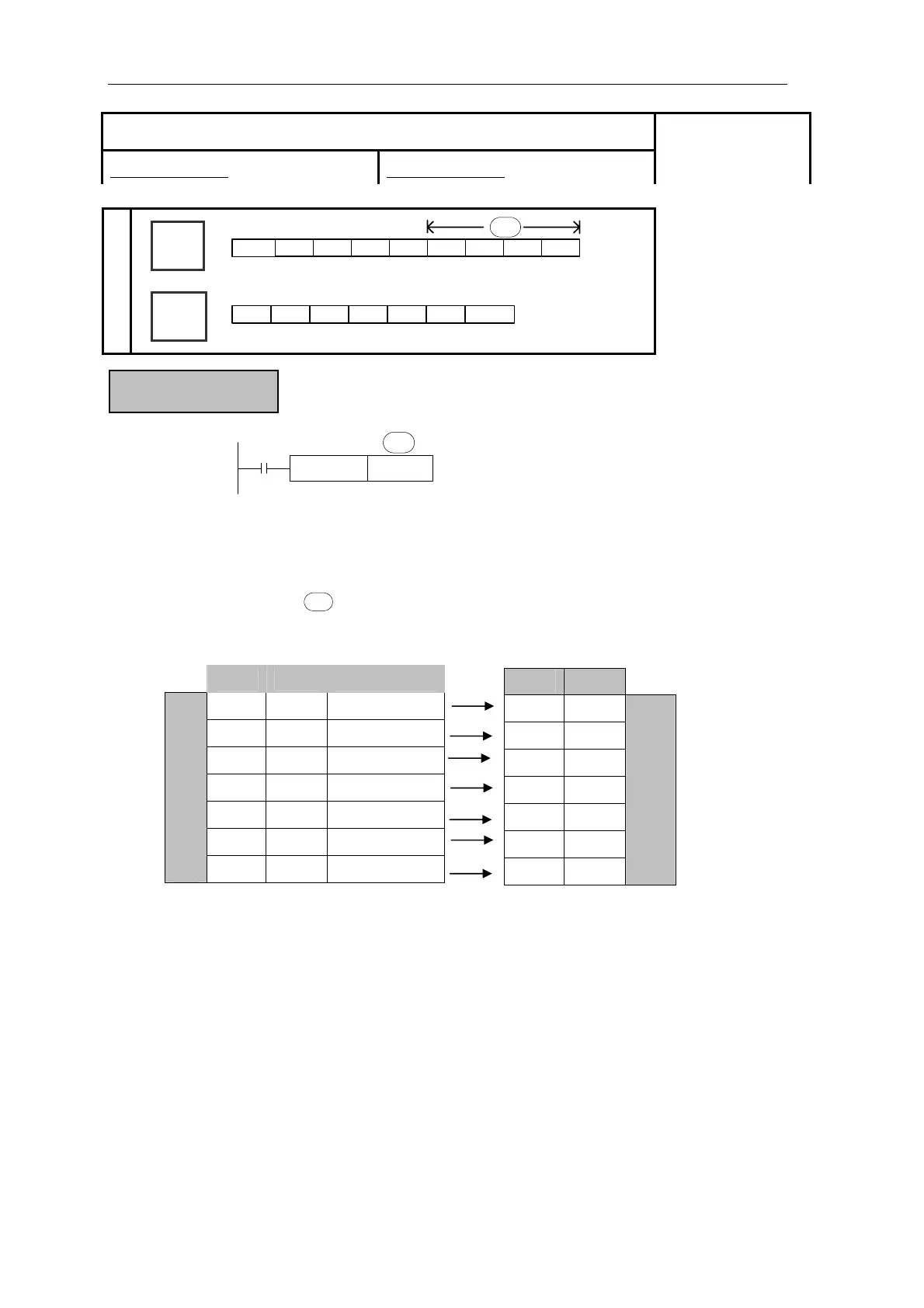
z Write the set clock data into PLC’s real time clock.
In order to write real time clock, the 7 data devices specified with the head
address should be pre-set.
S·
After executing TWR instruction, the time in real time clock will
ly change to be the new set time. So, when setting the time it is a
then drive the instruction when the real time reaches this value.
[TWR]
16 bits instruction:DIV 32 bits instruction:DDIV
Suitable Models:
XC3、XC5
Word
Device
Bit
Device
X Y M S T C Dn.m
D
FD
DM
DX
DY
DS
TD
CD
K/H
S·
Unit Item Clock data
D0 Year 0-99
D1 Month 1-12
D2 Date 1-31
D3 Hour 0-23
D4 Minute 0-59
D5 Second 0-59
Data for clock setting
D6 Week 0 (Sun.)-6 (Sat.)
Unit Item
D8018 Year
D8017 Month
D8016 Date
D8015 Hour
D8014 Minute
D8013 Second
D8019 Week
Special data register for real
time clock t
immediate
good idea to set the source data to a time a number of minutes ahead and
205



 To Next Page