Battery Capacity and Battery Level Indicator
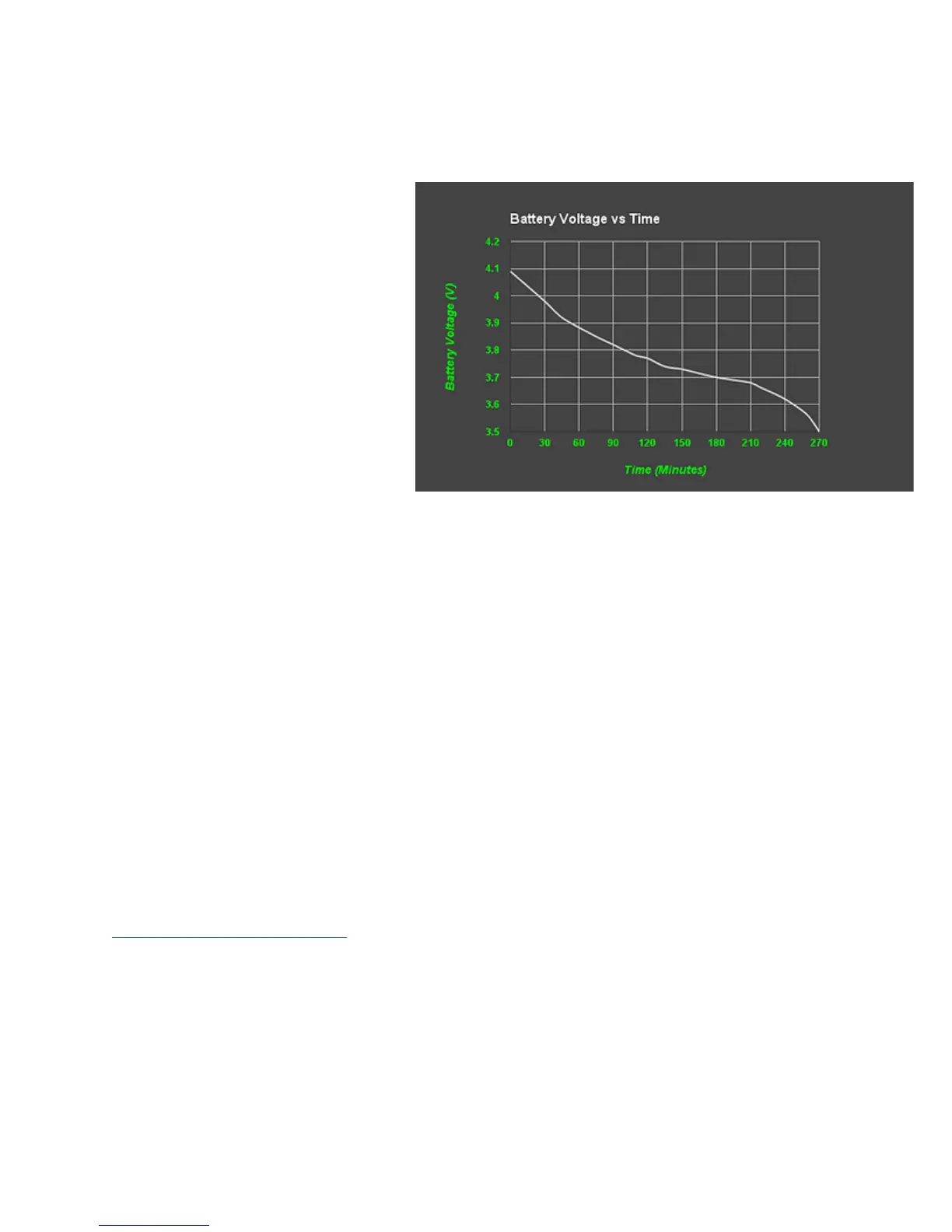
The battery discharge profile is
shown at right, and indicates
that you should get over 4
hours of listening (over 100
patients typically).
The battery level is shown on
the 0-10 scale when the One
powers off, either through
manually or auto shutoff. The
diagrams show the various
levels.
Power On - Off
Push ANY key to turn on your One stethoscope
Manual Shutoff
To manually turn off your stethoscope, simultaneously push and hold the "-" key
AND the "Alt" key. After 2 seconds, the battery level indication will flash across
the 0-10 scale display and you can release the keys.
Automatic shutoff
Your One is programmed to automatically shut off after a preset time. The factory
default is 2 minutes, and you can change this to a range of 1-10 minutes. See
Auto Shutoff Programming.
Constant On (no auto shutoff)
You can also DISABLE the automatic shutoff. This is not advisable for normal
clinical use, but is useful for longer term recordings. Constant On mode will keep
the stethoscope on until the battery is discharged, at which time, it will shut off.
10


 To Next Page