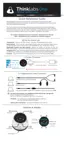
Volume Control
Click the "-" Key (Minus Key) to reduce volume.
Click the "+" Key (Plus Key) to increase volume.
Volume Level is indicated on the 0-10 Scale.
NOTE:
Set the Volume at a level that is comfortable.
Protect your hearing - Do not listen at excessive volume.
If you have normal hearing, you should seldom need to use a volume level in
excess of 5.
See the Psychoacoustics (pg. 17) discussion for more on hearing and perception.
11


 To Next Page