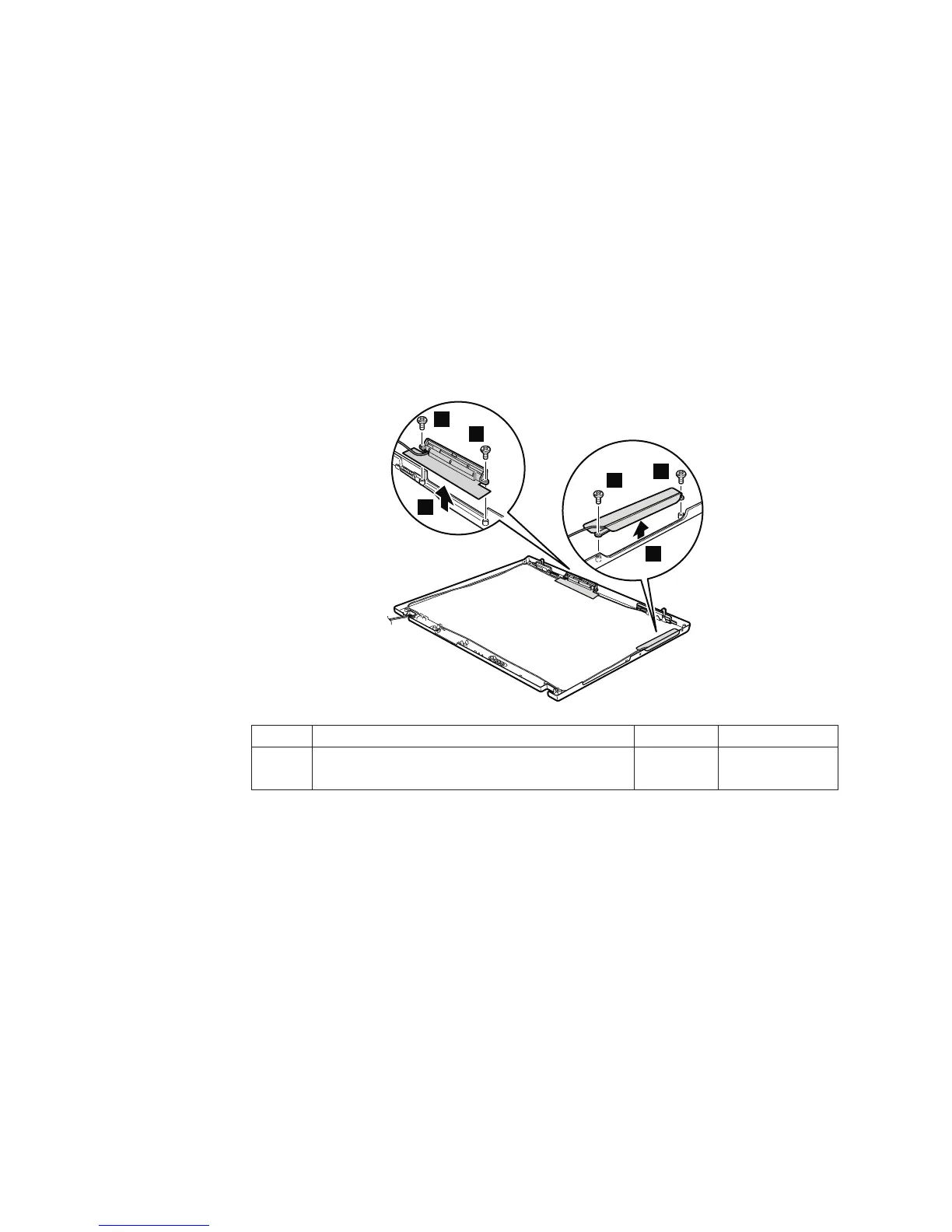
2060 LCD rear cover and wireless LAN antenna cables
For access, remove these FRUs in order:
v “1010 Battery pack” on page 59
v “1040 Palm rest or palm rest with fingerprint reader” on page 63
v “1060 Keyboard” on page 71
v “1100 PCI Express Mini Card for wireless WAN” on page 79
v “1120 Keyboard bezel and wireless WAN antenna cable (AUX)” on page 82
v “1150 LCD assembly” on page 90
v “2010 LCD front bezel” on page 113
v “2020 Inverter card” on page 115
v “2030 Bluetooth daughter card (BDC-2)” on page 116
v “2040 Wireless WAN antenna cable (MAIN) or wireless WAN blank cover” on
page 117
Note:
Step 1 is only for the models with 14.1-in. LCD models.
1
1
2
1
1
2
Step Screw (quantity) Color Torque
1 M2 × 2.8 mm, flat-head, nylon-coated (4) Silver 0.118 Nm
(1.2 kgfcm)
Removing and replacing a FRU
122 MT 1951, 1952, 1953, 1954, 1955, 1956, 2007, 2008, 2009, 2613, 2623, and 2637



 To Next Page