Locations
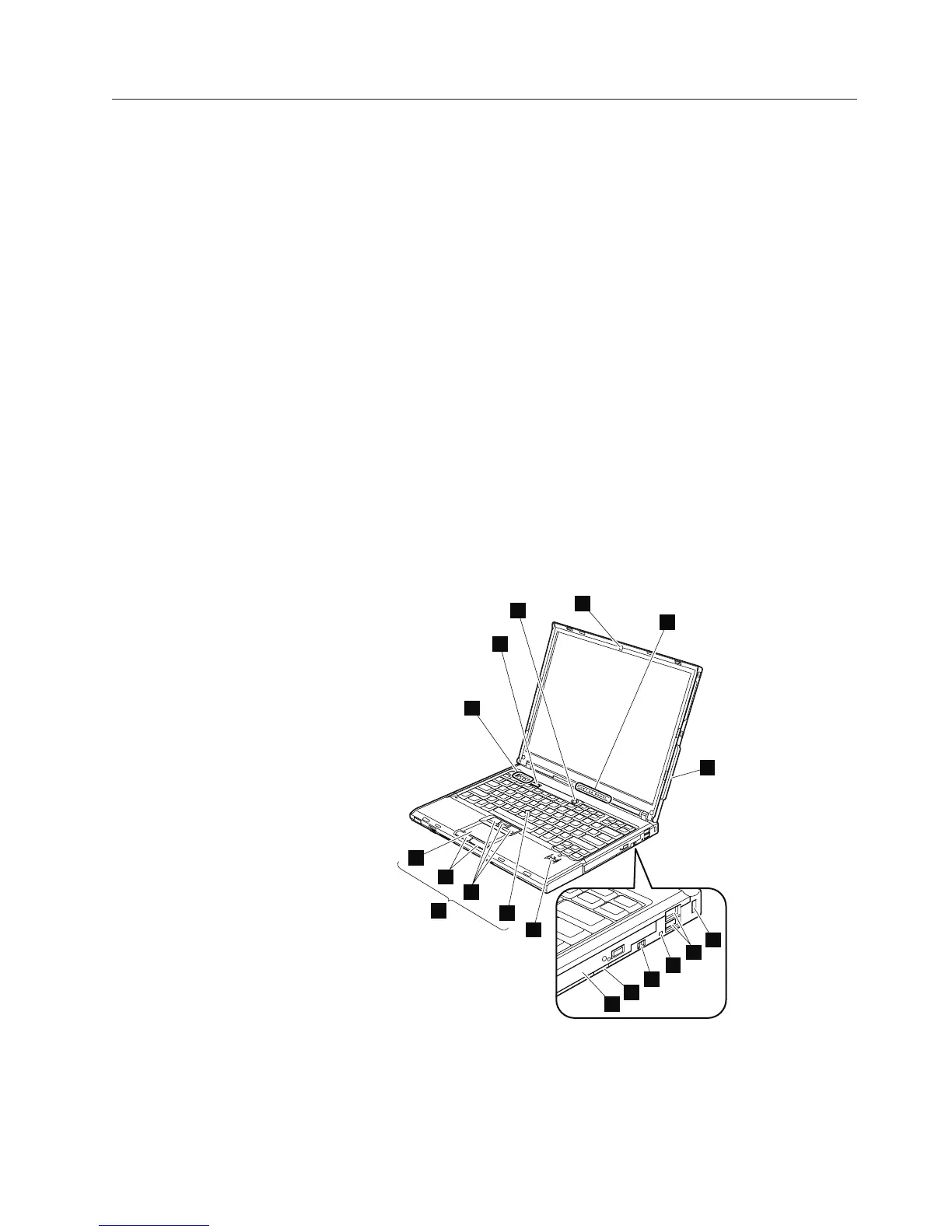
Front view
1 ThinkLight
2 Status indicators
Note:
For the description of each indicator, see “Status indicators” on page
37.
3 Wireless WAN antenna
4 Security key hole
5 Universal serial bus (USB) connectors
6 Ultrabay Slim status indicator
7 Ultrabay Slim latch
8 Ultrabay Slim device eject lever
9 Ultrabay Slim
10 Fingerprint reader (for some models)
11 TrackPoint pointing stick
12 TrackPoint buttons
13 Touch pad buttons
14 Touch pad
15 UltraNav
16 ThinkVantage button
17 Volume control buttons
18 Power switch
2
3
14
10
12
13
17
18
1
11
4
6
5
8
9
7
15
16
Locations
ThinkPad T60 and T60p 123



 To Next Page