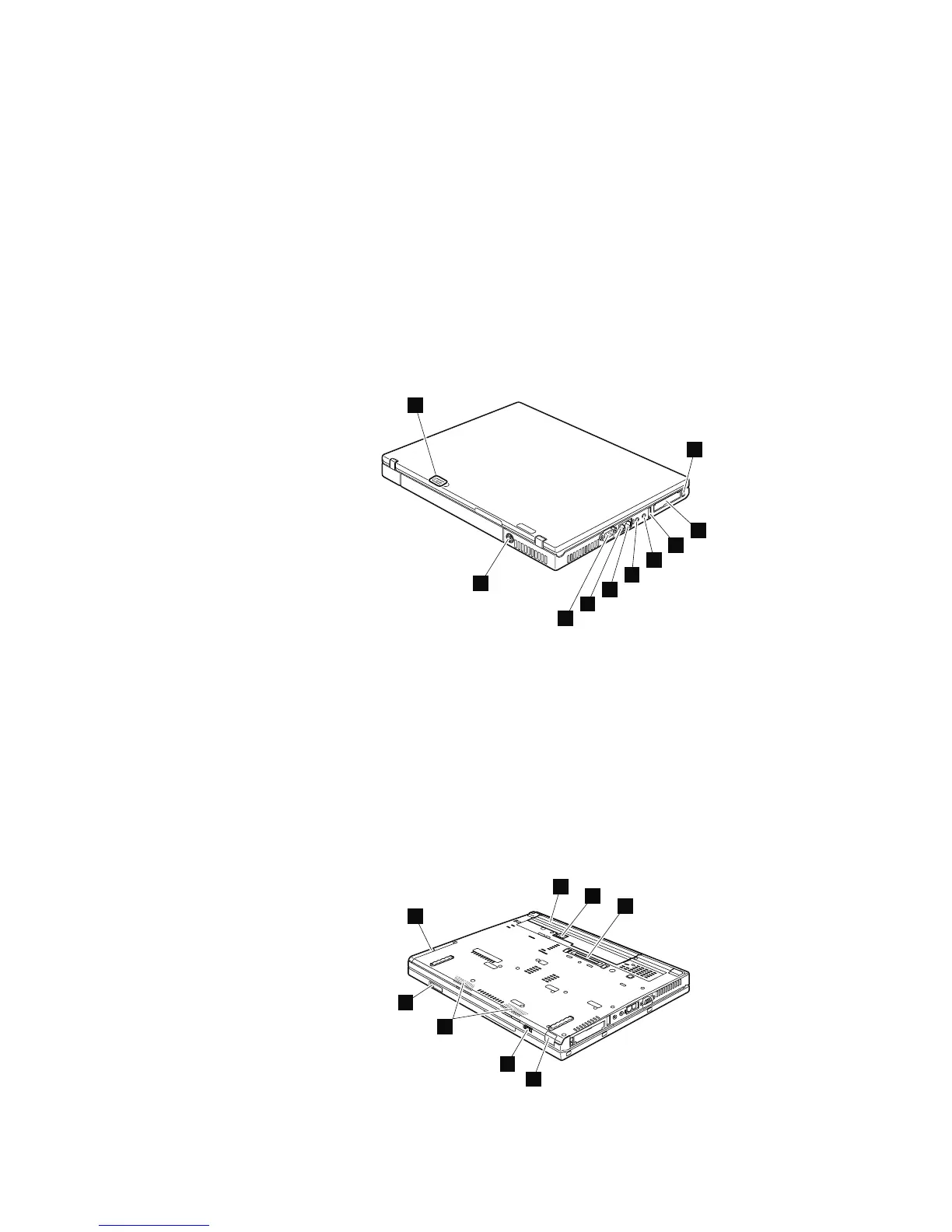
Rear view
1 Status indicators
Note: For the description of each indicator, see “Status indicators” on page
37.
2 PC Card/ExpressCard slots eject buttons
3 PC Card/ExpressCard slots
4 USB connector
5 Stereo headphone jack
6 Microphone jack
7 RJ-45 (Ethernet) connector
8 RJ-11 (modem) connector
9 External monitor connector
10 AC power connector
1
2
3
4
5
6
7
8
9
10
Bottom view
1 Battery pack
2 Battery pack latch
3 Docking connector
4 Infrared port
5 Wireless radio switch
6 Stereo speakers
7 LCD cover latch
8 Hard disk drive
8
1
2
3
4
5
7
6
Locations
124 MT 1951, 1952, 1953, 1954, 1955, 1956, 2007, 2008, 2009, 2613, 2623, and 2637



 To Next Page