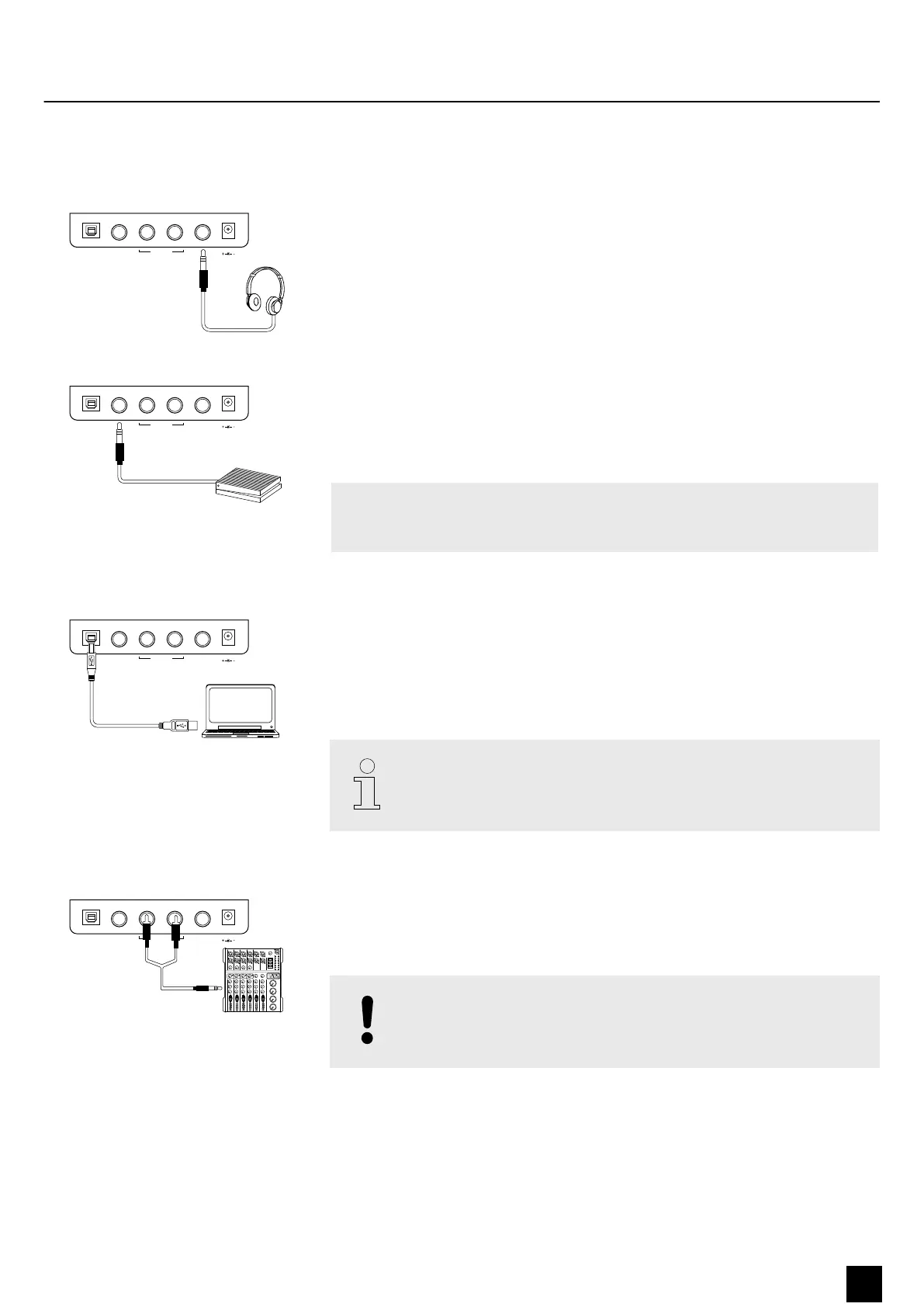
5 Connection options
The headphones output is located on the rear side of the device.
Connecting headphones (not supplied) to the headphones output mutes the
speakers.
Connect the supplied Sustain pedal to the provided connector on the rear side of the
device.
Pedal functions:
Sustain pedal
With the sustain pedal all played notes sound longer. This eect simulates the
lifting of the damper in an analogue keyboard instrument.
Via this output, the MIDI data generated by the digital piano are transferred to a PC
(MIDI stands for ‘Musical Instrument Digital Interface’ and enables the electronic
interaction of various instruments and sound modules as a worldwide standard).
At the same time, the audio signal from the digital piano is transmitted to a con‐
nected PC via this output and can be recorded and reproduced using appropriate
software.
Use a current operating system still supported by the provider to avoid tech‐
nical diculties.
Use the [LINE OUT] sockets to connect the digital piano to an amplier, stereo device,
mixing console or recording device. Plug one end of the audio cable into the
[LINE OUT] sockets in the connection box of the digital piano and the other end into
the input of the respective audio device.
NOTICE!
To prevent damage to the speakers, turn the volume down to ‘Mini‐
mum’ before you connect other devices to the digital piano.
Headphones
U
S
B TO HOST
S
US
T
AIN
LINE OUT
PHONES
R
DC1
2
V
1
A
POW
ER
L
(MONO
)
Pedal
U
S
B TO HOST
S
US
T
AIN
LINE OUT
PHONES
R
DC1
2
V
1
A
POW
ER
L
(MONO
)
USB to host
U
S
B TO HOST
S
US
T
AIN
LINE OUT
PHONES
R
DC1
2
V
1
A
POW
ER
L
(MONO
)
External audio devices Line Out (L / R)
U
S
B TO HOST
S
US
T
AIN
LINE OUT
PHONES
R
DC1
2
V
1
A
POW
ER
L
(MONO
)
6
CLIP
10
5
2
0
2
5
20
MAX
-∞
Connection options
SP-320
13
Digital Piano



 To Next Page