WIRELESS COLOUR VIDEO INTERCOM WITH OP-
TIONAL VIDEO SURVEILLANCE
17
ENEN
E - OPERATION
1 - HOW IT WORKS
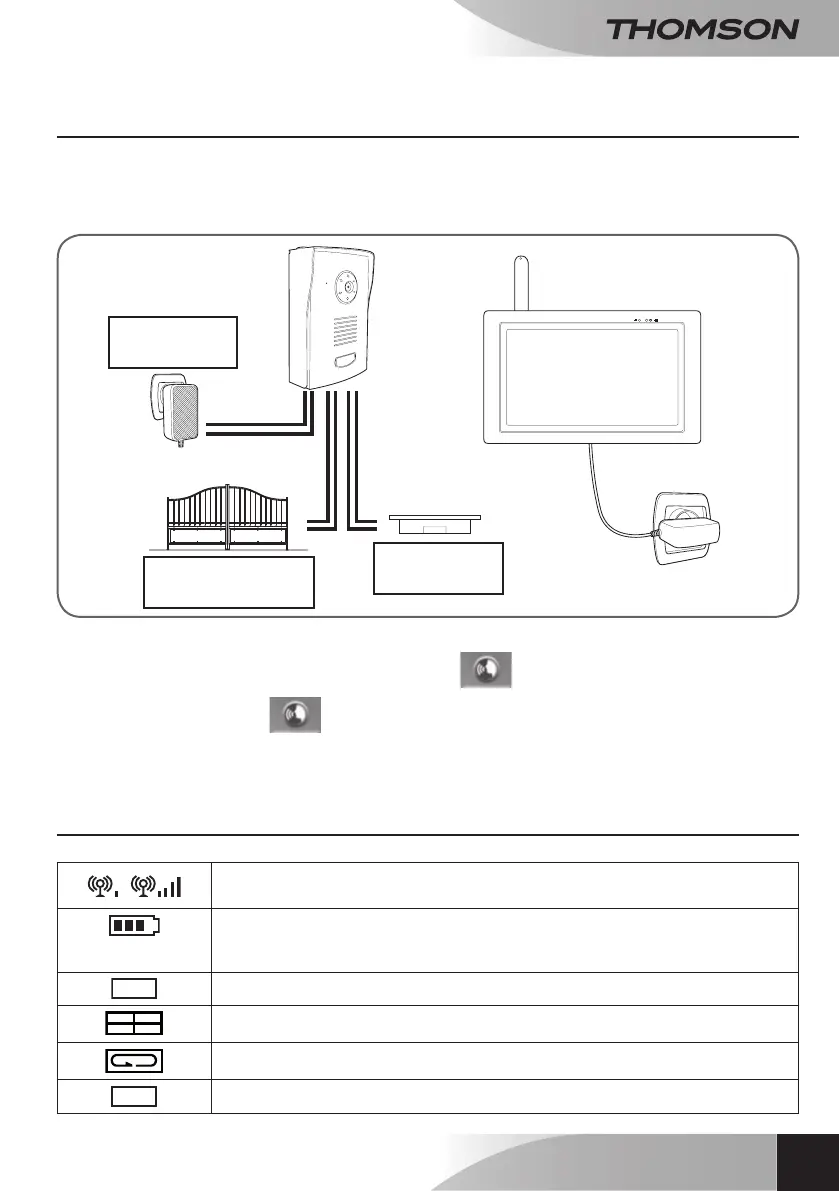
The exterior panel can either be powered by 6 LR06 batteries or by a 12V mains adapter, included, which
will allow you to:
• Open an electric strike plate (not included).
• Use surveillance mode so that video can be viewed without someone ringing the doorbell.
• Pressing the name plate on the exterior panel makes the monitor ring 3 times.
• After the 3 rings, you can talk to your visitor using the
button.
Note:
You must keep pressing the button for the visitor to hear you. You must let go of
the button to hear your visitor’s response.
• Let go of this button to hear your visitor’s response.
• The conversation will automatically cut off after 60 seconds if the exterior panel is battery powered.
2 - SCREEN SYMBOLS
/
12V adapter
(optional)
Electric strike
plate (optional)
Gate motor (optional)
5V DC
Signal quality indicator: according to distance between the exterior panel and the
monitor.
Battery indicator
Bottom of the screen for the monitor
Top of the screen for the exterior panel
1
Full-screen mode.
Quad mode: All active channels are visible.
Scan mode: The monitor performs a scan of all active channels.
2 X
Zoom x2


 To Next Page