GB
GB
3
Set-up
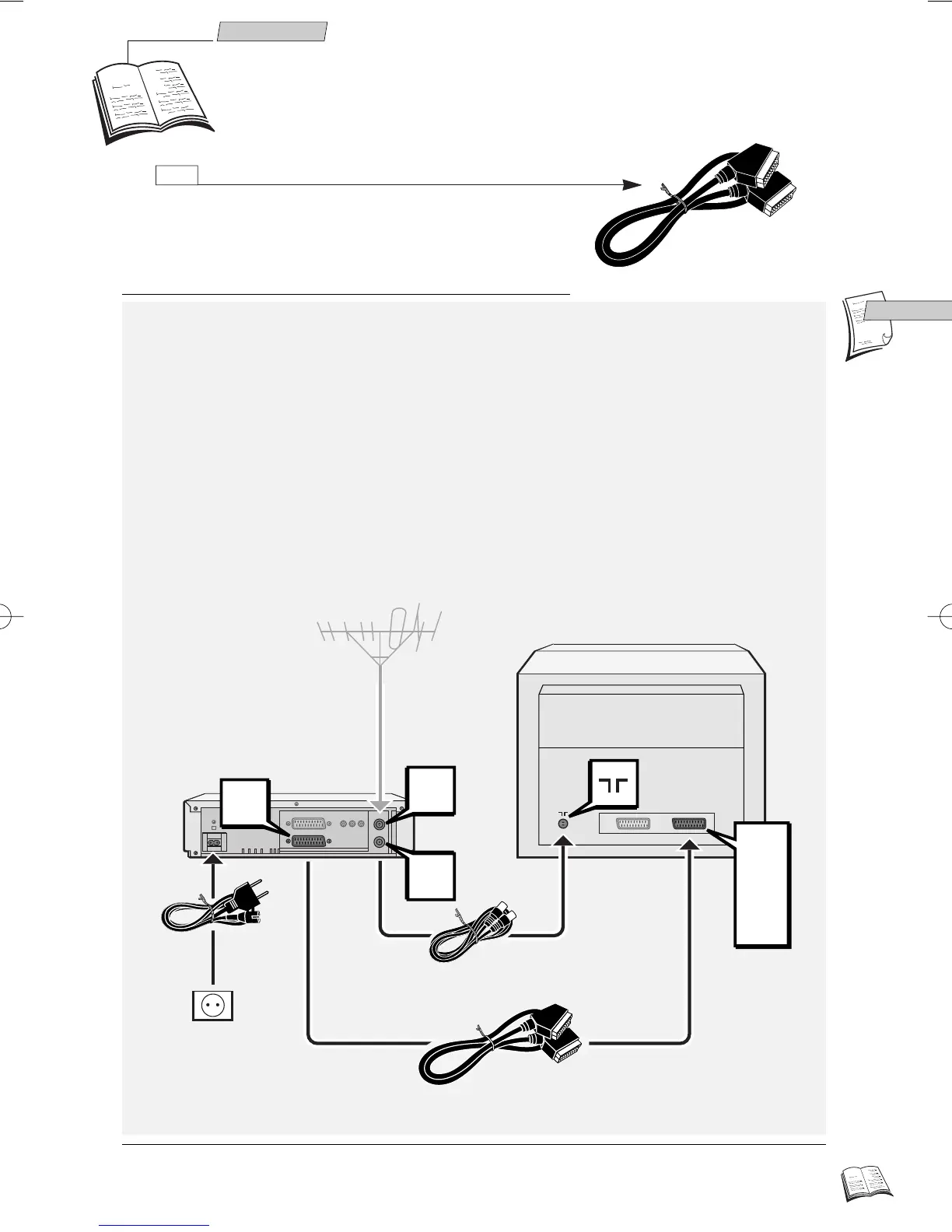
Making the connections
Other possible connection schemes are shown on page 7 and 9
J
1 Disconnect the aerial cable from your TV set and reconnect it to the IN socket of your
video recorder.
2 By means of the coaxial cable supplied, connect the video recorder's OUT socket to the
television's aerial socket
gg
.
3 With the SCART cable supplied, connect the video recorder's AV 1 socket
(audio/video 1) to the television's SCART socket (AV 1, EXT 1, AUX 1
depending on the make).
4 Connect the video recorder to the mains with the power cord supplied by first plugging
in the connector at the video recorder rear.
AV1
EXT1
AUX1
AV1
IN
OUT
220V/240V - 50Hz
1
2
3
4
J
Connecting the video recorder and television set with this
cable simplifies set-up and subsequent use, and considerably
improves the picture and sound reproduction quality. If your
television set has no SCART socket, you'll have to adjust the
modulator of the video recorder and assign a channel
number to the video recorder on the television set (refer to
page 6).
r9_2EN01 25/01/00 10:35 Page 3



 To Next Page