EasyManua.ls Logo

THORLABS GVS011 - User Manual

THORLABS GVS011
40 pages
Print Icon
To Next Page IconTo Next Page
Loading...
HA0220T
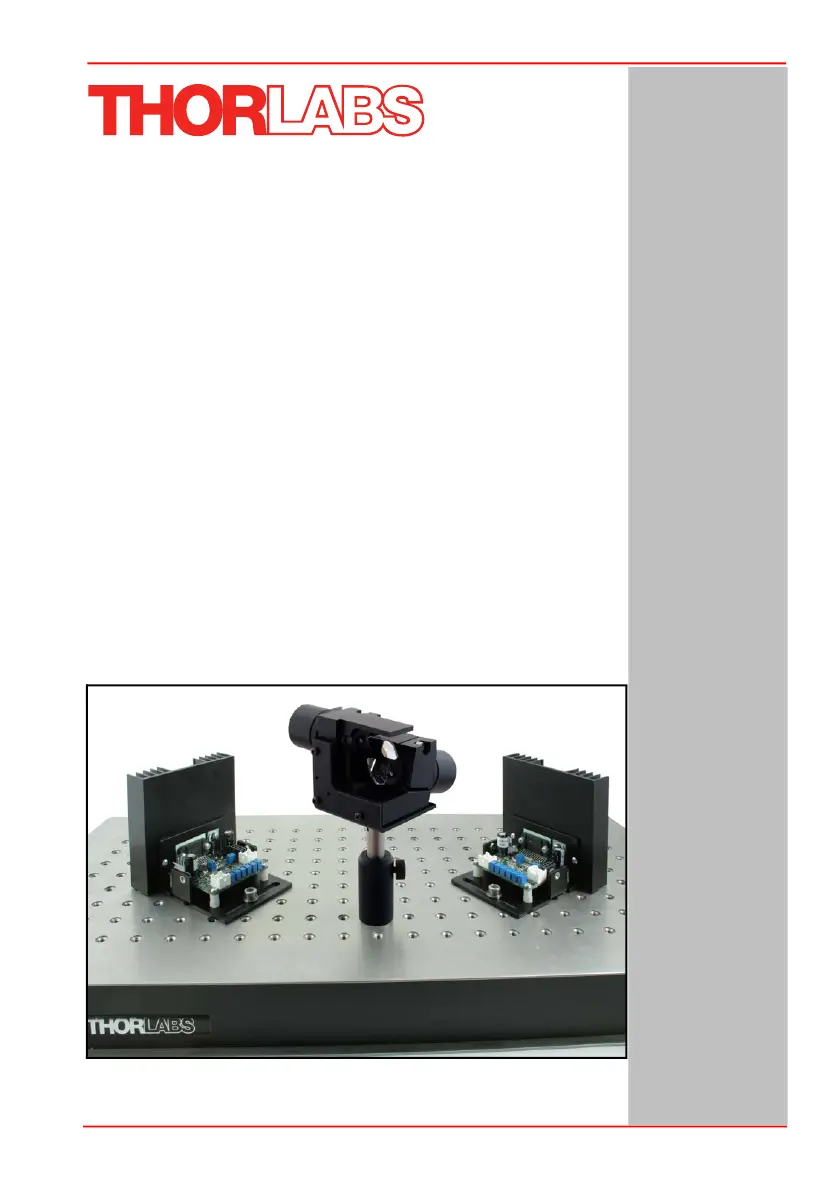
GVS011 and GVS012
GVS111 and GVS112
GVS211 and GVS212
GVS311 and GVS312
GVS411 and GVS412
Large Beam Diameter
Scanning Galvo Systems
User Guide
Original Instructions

Questions and Answers

  • M
    mlynchAug 1, 2025
    How to fix THORLABS GVS011 Scanner motor not responding?
    • K
      Kevin SullivanAug 2, 2025
      If the THORLABS Scanner motor isn't responding, ensure power is correctly applied to the board. Also, check for faulty or improperly connected cables. Try resetting the device to clear any faults. Finally, verify the device is not disabled by checking the jumper settings.
  • S
    Shawn ZimmermanAug 5, 2025
    Why is my THORLABS GVS011 unstable?
    • C
      Catherine DavisAug 6, 2025
      Scanner instability can occur if the driver board is incorrectly tuned to the motor, so re-tune it. Ensure the driver board is connected to the correct motor. Check and reset any tampered potentiometers. Avoid driving the motor with excessive amplitude and frequency.
  • C
    Crystal StephensAug 10, 2025
    What to do if THORLABS GVS011 galvo periodically becomes unstable?
    • A
      Allison SmallAug 10, 2025
      If the THORLABS Scanner galvo periodically becomes unstable, it may be due to an incorrectly tuned galvo driver card. In this case, re-tune the galvo driver card. Also, ensure the error signal remains within acceptable limits, as exceeding the maximum error signal value can cause instability.
  • C
    clarkdavidAug 15, 2025
    Why does THORLABS GVS011 Scanner position signal overshoot and grow over time?
    • Z
      zweaverAug 15, 2025
      An overshoot in the position signal that grows over time in your THORLABS Scanner may be due to a power supply that cannot deliver enough current for the intended application. Choose a power supply that can deliver adequate current.
  • L
    Leah HarperAug 19, 2025
    What causes THORLABS GVS011 mirror to shoot off to one side?
    • S
      Steven WelchAug 19, 2025
      If the THORLABS Scanner mirror periodically shoots off to one side and then stops, it could be due to the position sensing circuitry not functioning correctly. Check and repair the position sensing circuitry. Alternatively, the motor cable may be incorrectly wired; inspect and rewire it properly.
  • M
    Maria CastroAug 23, 2025
    How to stop oscillation in THORLABS GVS011 Scanner galvo motor current?
    • J
      Justin CarlsonAug 23, 2025
      Oscillation in the THORLABS Scanner galvo motor current can be caused by crosstalk between the position sensing circuitry and the motor drive current. Reposition the motor drive cable. Also, use separate shielded cables for the position sensing and motor drive signals.
  • K
    Kathleen ConleyAug 27, 2025
    Why is there cross talk between axes in my THORLABS Scanner?
    • M
      Mary WheelerAug 27, 2025
      Cross talk between axes can occur if both motors run off the same power supply, which cannot deliver peak currents. Choose a different power supply with sufficient peak drive current capability to test.

Summary

Chapter 1 Overview

1.1 Introduction

Introduces GVS series scanning galvo systems for laser beam steering applications.

1.2 System Description

Describes galvo scanners, their components, and typical applications.

1.2.2 The Galvanometer

Details the galvanometer's components: motor and position detector.

1.2.3 The Mirror

Explains mirror assembly, its effect on performance, and lists mirror coatings.

1.2.4 Servo Driver Board

Describes the servo driver board's function and schematic diagram.

Chapter 2 Safety

2.1 Safety Information

Explains safety symbols used in the handbook and on the product.

2.2 General Warnings

Provides general warnings regarding product usage and fluid spillage.

Caution: Cables and Adjustments

Warns about using supplied cables and not making unauthorized adjustments.

Chapter 3 Installation & Initial Set Up

3.1 Mechanical Installation

Details factory settings, serial number matching, and heatsink requirements.

3.1.2 Fitting The Heatsinks

Explains how to fit heatsinks for the driver board and motor/mirror mount.

3.1.3 Typical System Set Up

Guides on setting up a typical beam steering system with the galvo.

3.2 Electrical Installation

Introduces electrical installation and power supply considerations.

3.2.1 Choosing A Power Supply

Recommends GPS011 PSU and details power requirements for driver electronics.

Caution: Voltage;Fuse Selection and Cable Routing

Warns about voltage/fuse selection and advises on cable routing for noise minimization.

Caution: PCB Revisions

Notes section applicability for PCB rev 11 or later and how to identify revisions.

Power Cable Connection to PSU

Details how to connect the power cable to the PSU unit.

PSU Steps for Power Connection

Refers to PSU steps (1) to (3) for power connection.

J10 Power Connector Pin Identification

Identifies pins for connector J10 on the driver board for power connections.

J9 Motor Connector Pin Identification

Details pin assignments for connecting motors to driver boards.

Galvo Assembly Motor Connector Pin Identification

Shows pinout for galvo assembly motor connector.

J7 Command Input Connector Pin Identification

Explains how to connect command input signals to the driver board.

J6 Diagnostics Connector Pin Identification

Identifies pins for the diagnostic terminal J6.

3.2.4 Diagnostic Signal Descriptions

Describes diagnostic signals like Scanner Position and Motor Drive Current.

3.2.5 Setting the Volts;Degree Scaling Factor

Explains how to set the Volts/Degree scaling factor using a jumper.

Chapter 4 Operation

4.1 General Operation

Outlines basic steps for operating the system, including powering and command signals.

4.2 External Enabling of the driver board

Describes how to enable/disable drive electronics using a jumper and CMOS signal.

4.3 Using a DAQ Card

Provides recommended specifications for DAQ card analogue outputs.

4.4 Recommended Scanning Angles

Lists recommended scanning angles based on input beam diameter.

Chapter 5 Troubleshooting

5.1 Common Problems

Discusses common issues like motor failure to respond and scanner instability.

Mirror Shoots Off and Stops

Explains causes for mirrors shooting off and stopping.

Periodic Scanner Instability

Addresses periodic instability due to tuning or exceeding error signal limits.

Oscillation in Galvo Motor Current

Describes oscillation in motor current and its causes like crosstalk.

Cross Talk Between Axes

Explains cross-talk issues between axes due to power supply limitations.

Overshoot in Position Signal

Discusses overshoot in position signal caused by inadequate power supply.

5.2 Galvanometer Faults

Lists potential faults, their causes, and the actions taken by the fault control circuit.

Appendix A Specifications and Associated Parts

A.1 Specifications (Mirror)

Lists detailed specifications for mirrors, including damage threshold and wavelength range.

Motor & Position Sensor Specifications

Details specifications for motor linearity, scale drift, repeatability, and resolution.

Drive Electronics Specifications

Lists specifications for drive electronics, including bandwidth, power supply, and operating temperature.

Appendix B Connecting Legacy Driver Units

B.1 Electrical Connections

Details electrical connections for driver card units with PCB earlier than rev 11.

Fig. B.1 Connector Identification

Identifies connectors on the driver board for legacy units.

Fig. B.2 J10 Power Connector Pin Identification

Shows J10 power connector pinout for legacy driver boards.

Fig. B.3 J9 Motor Connector Pin Identification

Details J9 motor connector pinout for legacy driver boards.

Fig. B.4 J7 Command Input Connector Pin Identification

Shows J7 command input connector pinout for legacy driver boards.

2.1.1 Diagnostic Signal Descriptions

Describes diagnostic signals from J6 connector for legacy units.

2.1.2 Setting the Volts;Degree Scaling Factor

Explains setting the Volts/Degree scaling factor for legacy units.

Appendix C Calculating the Power Dissipation

3.1 Motor Heatsink

Provides equations to estimate power dissipated in the motor and driver boards.

3.1.1 Calculating the Required Thermal Conductivity

Explains how to calculate required thermal conductivity for heatsinks.

Appendix D Reasons For Image Distortion

Fig. D.1 Field Distortion in a Two-way Mirror Deflection System

Illustrates field distortion in a two-way mirror deflection system.

Fig. D.2 Pillow-shaped Field Distortion Caused by the Arrangement of Mirrors

Shows pillow-shaped field distortion caused by mirror arrangement.

Appendix E Regulatory

E.1 Declarations Of Conformity

States compliance with FCC rules for Class A digital devices in the USA.

E.2 CE Certificates

Provides EU Declaration of Conformity for GVS X1X Series.

Appendix F Thorlabs Worldwide Contacts

For technical support or sales inquiries

Lists Thorlabs contact information for various regions globally.

THORLABS GVS011 Specifications

General IconGeneral
BrandTHORLABS
ModelGVS011
CategoryScanner
LanguageEnglish

Related product manuals