13 ST PLUS ENGLISH
ENGLISH ST PLUS 13
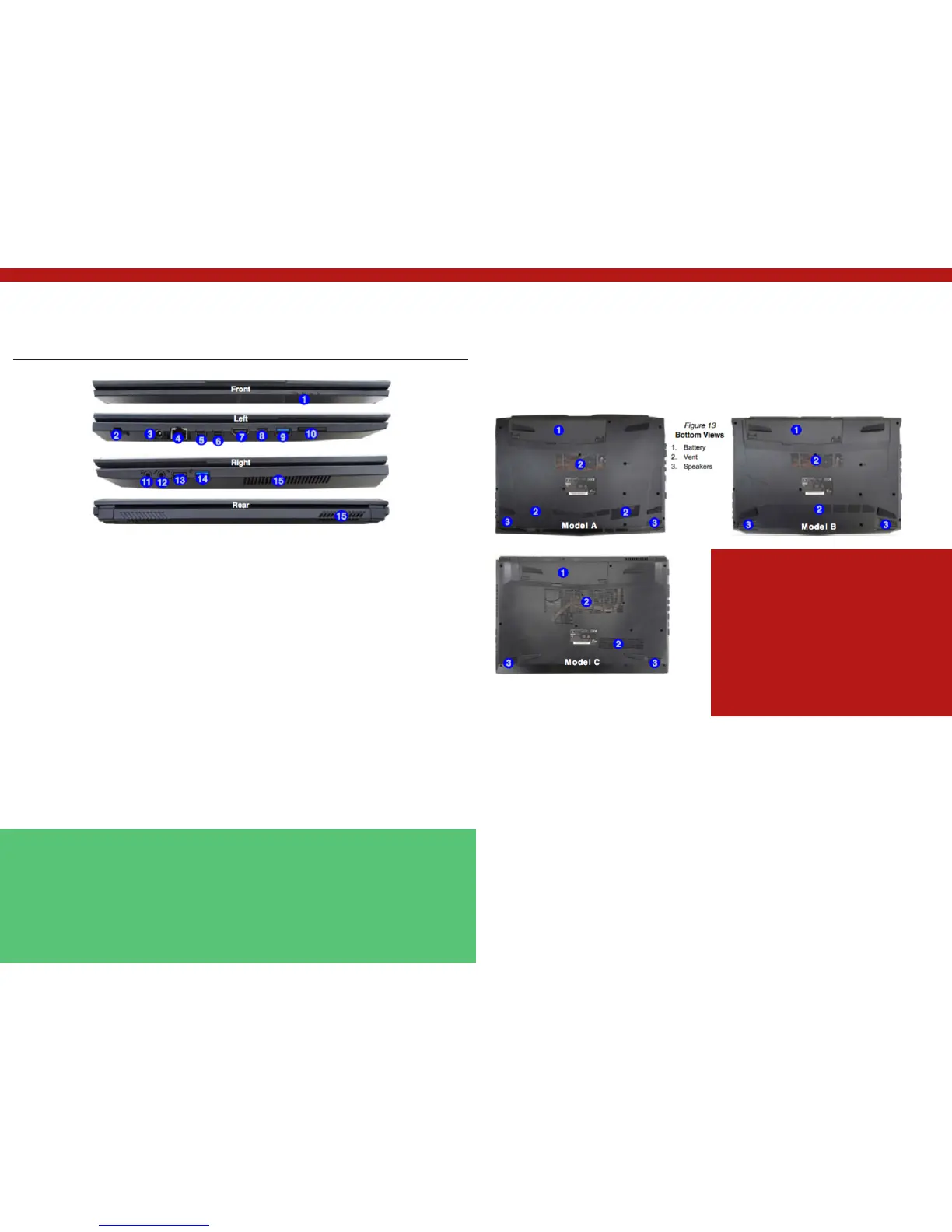
System Map: Front, Left, Right & Rear Views
(Model C)
1. LED Indicators
2. Security Lock Slot
3. DC-In Jack
4. RJ-45 LAN Jack
5. Mini DisplayPort 1
6. Mini DisplayPort 2
7. HDMI-Out Port
Mini DisplayPorts
External displays can be config- ured either using
the Intel HD Graphics Control Panel or by the Pro-
ject menu (press + P or Fn + F7).
If you wish to configure an external display connec-
ted to Mini DisplayPort 2 5 you must use Project
menu to control the dis- play configuration.
USB 3.1 Gen 2
Note that when a single USB device is plugged in to
a USB 3.1 Gen 2 port the data transfer speed will be
10Gbps, however when two devices are plugged in
8. USB 3.0 (USB 3.1 Gen 1) Type C Port Or
(Factory Option) USB 3.1 Gen 2 Type C Port
9. USB 3.0 (USB 3.1 Gen 1) Type A Port Or
(Factory Option) USB 3.1 Gen 2 Type A Port
10. Multi-in-1 Card Reader 11. Headphone-Out
Jack 12. Microphone-In Jack 13. USB 2.0
Port
14. USB 3.0 (USB 3.1 Gen 1) Type A Port
15. Vent
Figure 12 Front, Left, Right & Rear Views (Model A) Overheating
To prevent your computer from overheating make
sure nothing blocks any vent while the computer is
in use.
Bottom Cover Removal Warning
Do not remove any cover(s) and/or screw(s) for the
purposes of device upgrade as this may violate the
terms of your warranty.
If you need to replace/remove the hard disk/RAM
etc., for any reason, please contact your distributor/
supplier for further information.
Figure 13 Bottom Views
1. Battery
2. Vent
3. Speakers
System Map: Bottom Views


 To Next Page