12 ST PLUS ENGLISH
ENGLISH ST PLUS 12
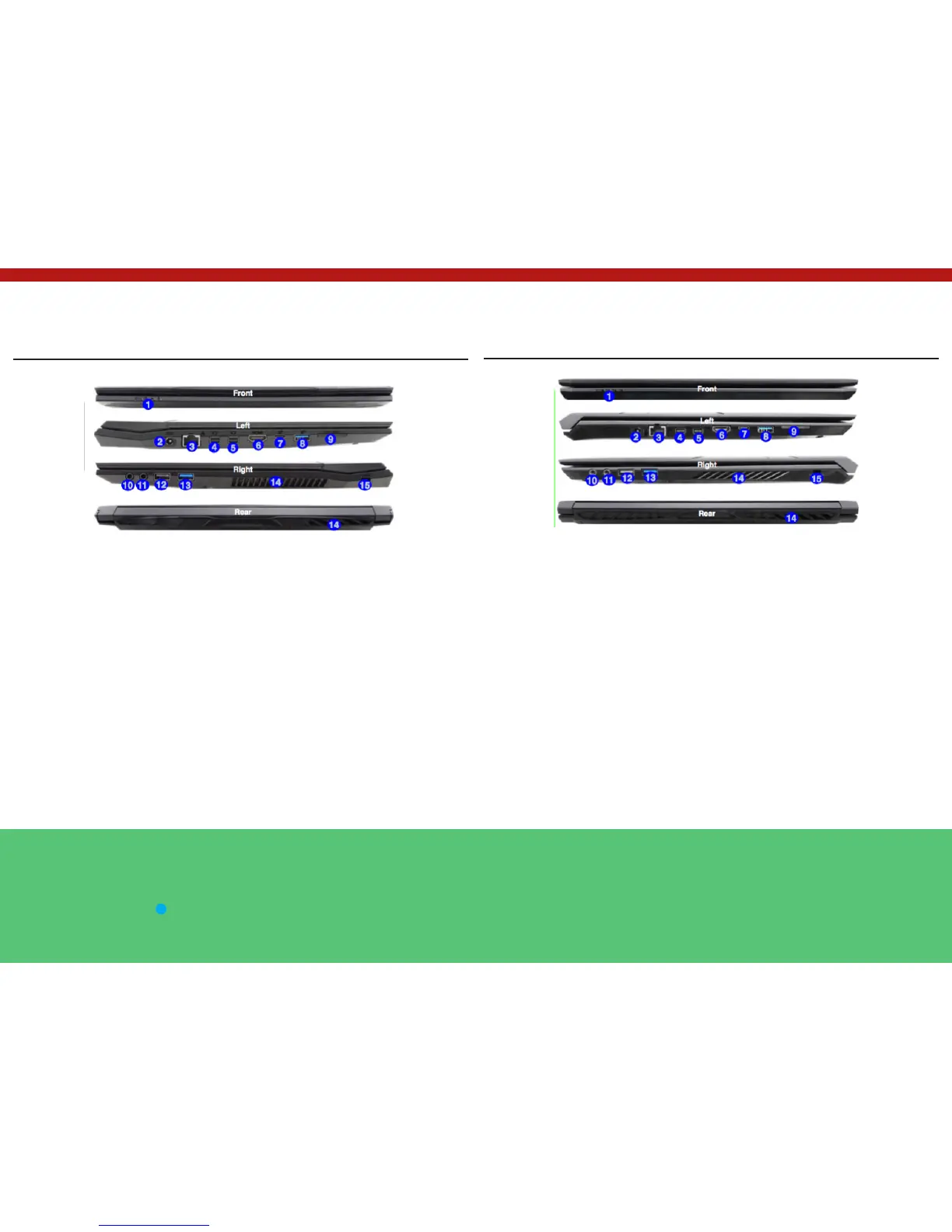
System Map: Front, Left, Right & Rear Views
(Model A)
1. LED Indicators
2. DC-In Jack
3. RJ-45 LAN Jack
4. Mini DisplayPort 1
5. Mini DisplayPort 2
6. HDMI-Out Port
7. USB 3.0 (USB 3.1 Gen 1) Type C Port Or
(Factory Option) USB 3.1 Gen 2 Type C Port
Mini DisplayPorts
External displays can be config- ured either using
the Intel HD Graphics Control Panel or by the Pro-
ject menu (press + P or Fn + F7).
If you wish to configure an external display connec-
ted to Mini DisplayPort 2 5 you must use Project
menu to control the dis- play configuration.
USB 3.1 Gen 2
Note that when a single USB device is plugged in to
a USB 3.1 Gen 2 port the data transfer speed will be
10Gbps, however when two devices are plugged in
8. USB 3.0 (USB 3.1 Gen 1) Type A Port Or
(Factory Option) USB 3.1 Gen 2 Type A Port
9. Multi-in-1 Card Reader
10. Headphone-Out Jack
11. Microphone-In Jack
12. USB 2.0 Port
13. USB 3.0 (USB 3.1 Gen 1) Type A Port
14. Vent
15. Security Lock Slot
Figure 10 Front, Left, Right & Rear Views (Model A)
System Map: Front, Left, Right & Rear Views
(Model B)
1. LED Indicators
2. DC-In Jack
3. RJ-45 LAN Jack
4. Mini DisplayPort 1
5. Mini DisplayPort 2
6. HDMI-Out Port
7. USB 3.0 (USB 3.1 Gen 1) Type C Port Or
(Factory Option) USB 3.1 Gen 2 Type C Port
Mini DisplayPorts
External displays can be config- ured either using
the Intel HD Graphics Control Panel or by the Pro-
ject menu (press + P or Fn + F7).
If you wish to configure an external display connec-
ted to Mini DisplayPort 2 5 you must use Project
menu to control the dis- play configuration.
USB 3.1 Gen 2
Note that when a single USB device is plugged in to
a USB 3.1 Gen 2 port the data transfer speed will be
10Gbps, however when two devices are plugged in
8. USB 3.0 (USB 3.1 Gen 1) Type A Port Or
(Factory Option) USB 3.1 Gen 2 Type A Port
9. Multi-in-1 Card Reader
10. Headphone-Out Jack
11. Microphone-In Jack
12. USB 2.0 Port
13. USB 3.0 (USB 3.1 Gen 1) Type A Port
14. Vent
15. Security Lock Slot
Figure 11 Front, Left, Right & Rear Views (Model B)


 To Next Page