8 ST PLUS ENGLISH
ENGLISH ST PLUS 8
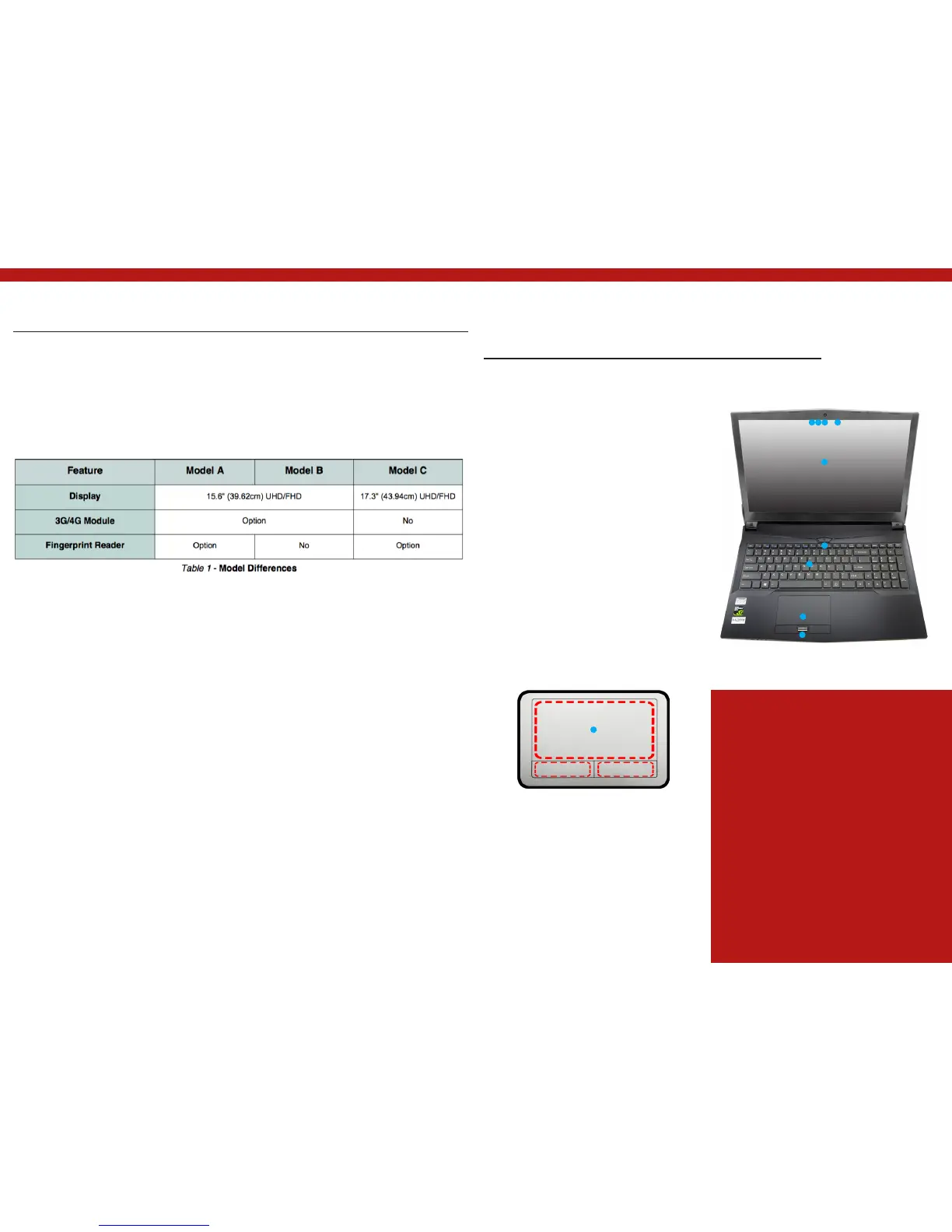
Model Differences
This notebook series includes three different
models that vary slightly in design style, color
and general appearance. Not all the model
variants, colors, configurations, buttons etc.,
are pictured in this manual. Note that though
your com- puter may look slightly different
System Map: Front View with LCD
Panel Open (Model A)
Figure 2
Front View with LCD Panel Open (Model A)
1. PC Camera
2. *PC Camera LED
*When the PC camera is in use,
the LED will be illuminated.
3. Built-In Array Microphone
4. LCD
5. Power Button
6. Keyboard
7. Touchpad & Buttons
8. Fingerprint Reader
(Optional)
Wireless Device Operation Aboard
Aircraft
The use of any portable electronic transmission devi-
ces aboard aircraft is usually prohibited.
Make sure the WLAN, Bluetooth & 3G/4G module(s) are
OFF if you are using the computer aboard aircraft by pu-
tting the system in to Airplane Mode.
Note that the Touchpad and Buttons valid
operational area is that indicated within the red
dotted lines.
from that pictured throughout this manual, all
ports, jacks (other than those indicated below
and in specification) and general functions
are the same for all the design styles (see
Specifications for further details).
123 3
4
5
6
7
8
7


 To Next Page